Image classification projects often begin as folders of photos sorted by category, and that layout already holds the labels a model needs. image_dataset_from_directory() in Keras turns such a directory into labelled batches that fit() can train on directly, with a repeatable split between training and validation files.
Each subdirectory directly below the dataset directory becomes one class unless its name starts with a dot, and labels follow the sorted folder names. Images sitting beside those subdirectories belong to no class and are skipped, as are formats outside JPEG, PNG, BMP, and GIF, so a folder of WebP files loads nothing. Every image is resized as it is read, which can change its aspect ratio unless cropping or padding is requested.
The split comes from a seeded shuffle of the current file list, so a seed repeats the same validation files only while that list stays the same. Adding one photo to a 3,670-image set put 433 former training files into the 734-file validation set, which matters when comparing models across dataset updates. The shuffle also ignores class balance, so each class share of the validation set only approximates the requested fraction.
Steps to load an image dataset from a directory in Keras:
- Install Keras and TensorFlow in an active Python 3.11 to 3.13 virtual environment.
$ python -m pip install keras tensorflow
##### snipped #####
Successfully installed absl-py-2.5.1 astunparse-1.6.3 certifi-2026.10.23 charset_normalizer-3.5.2 flatbuffers-25.12.19 gast-0.7.0 google_pasta-0.2.0 grpcio-1.85.1 h5py-3.14.0 idna-3.20 keras-3.15.1 libclang-18.1.1 markdown-it-py-4.2.0 mdurl-0.1.2 ml-dtypes-0.6.0 namex-0.1.0 numpy-2.5.4 opt_einsum-3.4.0 optree-0.20.0 packaging-26.3 protobuf-7.36.2 pygments-2.21.0 requests-2.34.2 rich-15.0.0 setuptools-84.2.1 six-1.17.0 tensorflow-2.21.0 termcolor-3.3.0 typing_extensions-4.16.0 urllib3-2.8.0 wheel-0.48.0 wrapt-2.5.2
TensorFlow 2.21.0 publishes wheels for Python 3.10 to 3.13, and Keras 3.15.1 requires Python 3.11 or newer. The default dataset format is tf.data.Dataset, so the loader needs TensorFlow installed alongside Keras. Tested on Linux with Python 3.12, Keras 3.15.1, and TensorFlow 2.21.0.
Related: How to install Keras with pip - Download the TensorFlow flower photo archive to the working directory.
$ curl -LO https://storage.googleapis.com/download.tensorflow.org/example_images/flower_photos.tgz
The archive is about 229 MB.
- Extract the archive.
$ tar -xzf flower_photos.tgz
To load your own images instead, give them the same shape, with one subdirectory per class directly below the dataset directory, and pass that directory to the loader in place of flower_photos.
- Count the photos in each class subdirectory.
$ find flower_photos -type f -name '*.jpg' \
    | cut -d/ -f2 | sort | uniq -c
    633 daisy
    898 dandelion
    641 roses
    699 sunflowers
    799 tulips
The five rows add up to 3,670 files. flower_photos/LICENSE.txt sits beside the class folders, so the loader skips it.
- Create a file named load_flowers.py in the working directory using your text editor.
- Enter the following imports and backend selection.
- load_flowers.py
import hashlib
import os
from collections import Counter
from pathlib import Path

os.environ["KERAS_BACKEND"] = "tensorflow"

import keras
KERAS_BACKEND has to be set before the first import keras statement.
- Add the following loader call at the end of load_flowers.py.
train_ds, val_ds = keras.utils.image_dataset_from_directory(
    "flower_photos",
    validation_split=0.2,
    subset="both",
    seed=123,
    image_size=(180, 180),
    batch_size=32,
)
subset="both" returns the training and validation datasets from one call. seed fixes the file shuffle, and the loader raises a ValueError for a shuffled split without one. Labels come from the folder names as integers by default. Pass crop_to_aspect_ratio=True when stretching to the square image_size would mislead the model.
- Add the following split checks at the end of load_flowers.py.
val_paths = val_ds.file_paths
val_folders = [Path(path).parent.name for path in val_paths]
class_counts = sorted(Counter(val_folders).items())
path_bytes = "\n".join(val_paths).encode()
fingerprint = hashlib.sha256(path_bytes).hexdigest()

print("class names:", train_ds.class_names)
print("training files:", len(train_ds.file_paths))
print("validation files:", len(val_paths))
print("validation per class:", dict(class_counts))
print("validation fingerprint:", fingerprint[:12])
file_paths lists the images in each subset. The fingerprint is a short hash of the validation list, which makes two runs easy to compare.
- Add the following batch checks at the end of load_flowers.py.
images, labels = next(iter(train_ds))
val_images, val_labels = next(iter(val_ds))

class_names = train_ds.class_names
label_names = [class_names[label] for label in val_labels]
folder_names = val_folders[:32]

print("image batch:", images.shape, images.dtype.name)
print("label batch:", labels.shape, labels.dtype.name)
print("largest pixel value:", float(keras.ops.max(images)))
print("labels match folders:", label_names == folder_names)
The label check reads the validation dataset because the loader keeps that subset in file_paths order. The training subset reshuffles as it is read, so its batches cannot be paired with file_paths this way.
- Save load_flowers.py.
- Run load_flowers.py to print the class names, file counts, and batch shapes.
$ python load_flowers.py
Found 3670 files belonging to 5 classes.
Using 2936 files for training.
Using 734 files for validation.
class names: ['daisy', 'dandelion', 'roses', 'sunflowers', 'tulips']
training files: 2936
validation files: 734
validation per class: {'daisy': 129, 'dandelion': 176, 'roses': 120, 'sunflowers': 152, 'tulips': 157}
validation fingerprint: ba9fb98f126c
image batch: (32, 180, 180, 3) float32
label batch: (32,) int32
largest pixel value: 255.0
labels match folders: True
A label is a position in the class list, so daisy is 0 and tulips is 4. Sorting compares text, which puts class10 before class2 and uppercase names before lowercase ones. Pass an explicit class_names list to the loader when a different order matters.
- Run load_flowers.py a second time to compare the validation fingerprint.
$ python load_flowers.py | grep fingerprint
validation fingerprint: ba9fb98f126c
The value matches the first run while the seed and image files stay the same. Changing seed, or adding or removing an image, produces a different fingerprint.
- Open load_flowers.py in your text editor.
- Add the following small classifier at the end of load_flowers.py.
num_classes = len(train_ds.class_names)
model = keras.Sequential(
    [
        keras.Input(shape=(180, 180, 3)),
        keras.layers.Rescaling(1.0 / 255),
        keras.layers.Conv2D(16, 3, activation="relu"),
        keras.layers.MaxPooling2D(),
        keras.layers.Conv2D(32, 3, activation="relu"),
        keras.layers.MaxPooling2D(),
        keras.layers.GlobalAveragePooling2D(),
        keras.layers.Dense(num_classes, activation="softmax"),
    ]
)
model.compile(
    optimizer="adam",
    loss="sparse_categorical_crossentropy",
    metrics=["accuracy"],
)
The loader leaves pixels in the 0 to 255 range, so Rescaling moves them to 0 to 1 inside the model. The sparse loss matches the integer labels, and the output layer takes its size from the class list.
- Add the following one-epoch training call at the end of load_flowers.py.
model.fit(
    train_ds,
    validation_data=val_ds,
    epochs=1,
    shuffle=False,
    verbose=2,
)
The training dataset already shuffles itself, and shuffle=False stops fit() warning that its own default has no effect on a dataset. verbose=2 prints one summary line per epoch in place of a progress bar.
- Save load_flowers.py.
- Run load_flowers.py to train the classifier for one epoch.
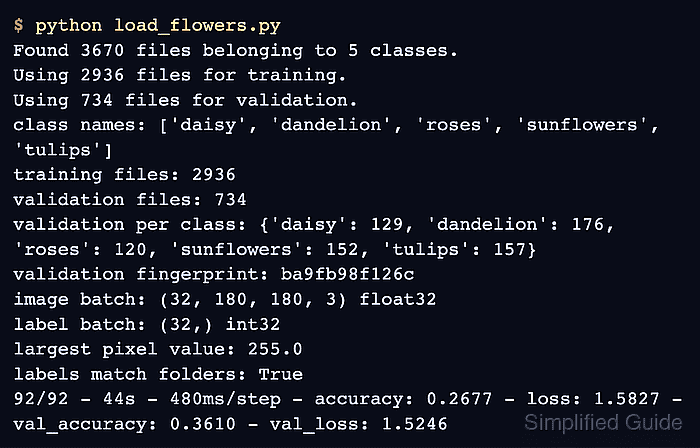
$ python load_flowers.py
Found 3670 files belonging to 5 classes.
Using 2936 files for training.
Using 734 files for validation.
class names: ['daisy', 'dandelion', 'roses', 'sunflowers', 'tulips']
training files: 2936
validation files: 734
validation per class: {'daisy': 129, 'dandelion': 176, 'roses': 120, 'sunflowers': 152, 'tulips': 157}
validation fingerprint: ba9fb98f126c
image batch: (32, 180, 180, 3) float32
label batch: (32,) int32
largest pixel value: 255.0
labels match folders: True
92/92 - 44s - 480ms/step - accuracy: 0.2677 - loss: 1.5827 - val_accuracy: 0.3610 - val_loss: 1.5246
The 92/92 count is 2,936 training files in batches of 32, rounded up. The val_accuracy and val_loss values show that the validation dataset also ran. Low accuracy is expected after one epoch of a small model.