Business actions in a JMeter test often span more than one sampler. A Transaction Controller groups those nested requests under one named transaction so the result file can show timing for a login, checkout, search, or other multi-request action.
The controller can write an additional independent transaction sample after the child samples, or generate a parent sample that contains the children. Leaving Generate Parent Sample cleared keeps both the child sampler rows and the overall transaction row in the .jtl file while validating a new branch.
Timer and pre/post-processor time is excluded from the generated sample unless Include duration of timer and pre-post processors in generated sample is selected. Keep that option cleared when comparing only sampler timings, and enable it only when the transaction definition should include the full controller scope.
Steps to add a JMeter Transaction Controller:
- Open the test plan in the JMeter GUI.
- Select the thread group or parent controller that should contain the business action.
- Add the controller from Add → Logic Controller → Transaction Controller.
- Name the controller for the action it measures.
Name: Checkout transaction
- Leave Generate Parent Sample cleared when the result file should keep child sampler rows.
Generate Parent Sample: cleared
When Generate Parent Sample is selected, child samples can still be inspected in View Results Tree, but they do not appear as separate rows in CSV .jtl files.
- Leave Include duration of timer and pre-post processors in generated sample cleared for sampler-only timing.
Include duration of timer and pre-post processors in generated sample: cleared
Select this option only when timers, pre-processors, and post-processors are part of the transaction timing definition.
- Move the related child samplers under the Transaction Controller in the order the user action runs.
GET /cart
POST /checkout
- Save a validation copy of the test plan.
transaction-controller-add.jmx
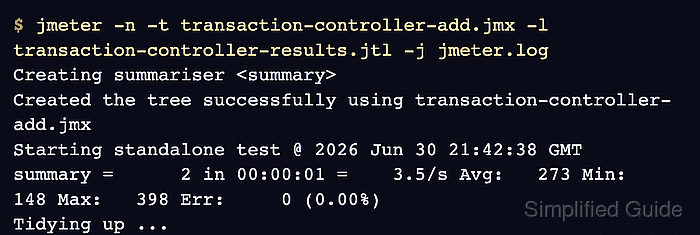
- Run the saved plan in non-GUI mode with a fresh result file.
$ jmeter -n -t transaction-controller-add.jmx -l transaction-controller-results.jtl -j jmeter.log
Creating summariser <summary>
Created the tree successfully using transaction-controller-add.jmx
Starting standalone test @ 2026 Jun 30 21:42:38 GMT
Waiting for possible Shutdown/StopTestNow/HeapDump/ThreadDump message on port 4445
summary =      2 in 00:00:01 =    3.5/s Avg:   273 Min:   148 Max:   398 Err:     0 (0.00%)
Tidying up ...
... end of run
-n runs JMeter without the GUI, -t selects the saved plan, -l writes sampler results, and -j writes the run log.
Related: How to run a JMeter test from the command line - Check the process exit status.
$ echo $?
0
- Count the result-file rows.
$ wc -l transaction-controller-results.jtl
4 transaction-controller-results.jtl
The first row is the CSV header, so four lines means two child sampler rows plus one transaction row.
- Inspect the result file for the generated transaction row.
$ cat transaction-controller-results.jtl
timeStamp,elapsed,label,responseCode,responseMessage,threadName,dataType,success,failureMessage,bytes,sentBytes,grpThreads,allThreads,URL,Latency,IdleTime,Connect
1782855759031,398,GET /cart,200,OK,Checkout smoke users 1-1,text,true,,12,0,1,1,null,0,0,0
1782855759430,148,POST /checkout,200,OK,Checkout smoke users 1-1,text,true,,16,0,1,1,null,0,0,0
1782855759031,546,Checkout transaction,200,"Number of samples in transaction : 2, number of failing samples : 0",Checkout smoke users 1-1,,true,,28,0,1,1,null,0,1,0
The Checkout transaction row is the sample generated by the Transaction Controller. Its message confirms that both child samples were included and no child sample failed.

Mohd Shakir Zakaria is a cloud architect with deep roots in software development and open-source advocacy. Certified in AWS, Red Hat, VMware, ITIL, and Linux, he specializes in designing and managing robust cloud and on-premises infrastructures.


