Short browser flows often need to remember a choice after a reload without keeping it after the tab is gone. sessionStorage gives JavaScript a same-origin, per-tab storage area for small string values such as a checkout step, temporary filter, or form draft marker.
The Storage methods stay intentionally small. setItem() writes a string under a key, getItem() returns the saved string or null, and removeItem() deletes one key without clearing unrelated values from the same tab.
Use sessionStorage for non-sensitive state that the page can recreate. Browser privacy settings, blocked storage policies, direct file: URLs, and third-party iframe restrictions can change whether storage is available, and any script running on the same origin can read the stored value.
Steps to save a sessionStorage value with JavaScript:
- Add a flow-step control and a status element to the page.
<label for="flow-step">Checkout step</label>
<select id="flow-step">
  <option value="cart">Cart</option>
  <option value="shipping">Shipping</option>
  <option value="review">Review</option>
</select>
<button id="restart-flow" type="button">Restart flow</button>
<p id="flow-status"></p>
- Define the session key, default step, and UI update function.
const sessionKey = "sg:checkout-step";
const defaultStep = "cart";
const flowStep = document.querySelector("#flow-step");
const status = document.querySelector("#flow-status");

function showStep(step) {
  flowStep.value = step;
  document.documentElement.dataset.checkoutStep = step;
  status.textContent = `sessionStorage ${sessionKey}=${step}`;
}
sessionStorage is scoped by origin and by top-level browser tab. A page at https://example.com and a page at http://example.com use different storage areas.
- Restore the saved flow step during page startup.
const savedStep = sessionStorage.getItem(sessionKey) ?? defaultStep;

showStep(savedStep);
getItem() returns null when the key is missing. The nullish coalescing operator keeps the default step only for missing values.
- Save the selected step when the control changes.
flowStep.addEventListener("change", (event) => {
  const selectedStep = event.target.value;
  sessionStorage.setItem(sessionKey, selectedStep);
  showStep(selectedStep);
});
Do not store passwords, access tokens, personal records, or authorization decisions in sessionStorage. Cross-site scripting on the same origin can read the value before the tab closes.
- Clear the saved step when the user restarts the flow.
const restartButton = document.querySelector("#restart-flow");

restartButton.addEventListener("click", () => {
  sessionStorage.removeItem(sessionKey);
  showStep(defaultStep);
});
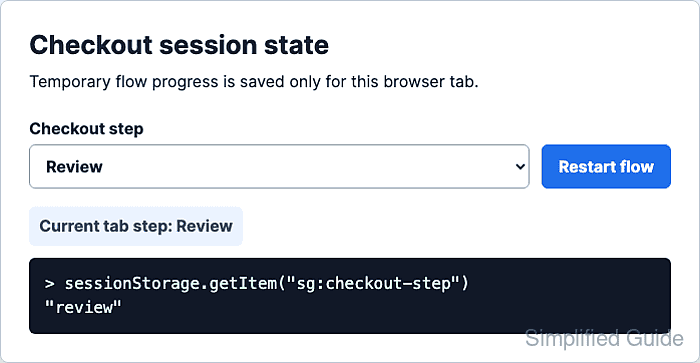
- Select Review in the page and confirm the key exists in the browser console.
> sessionStorage.getItem("sg:checkout-step") "review" - Reload the same tab and confirm the value remains available.
> sessionStorage.getItem("sg:checkout-step") "review" - Open the same URL in a fresh tab from the address bar.
If a script opens a page and keeps window.opener, the new page may start with a copy of the opener's sessionStorage. Later changes remain separate.
- Confirm the fresh tab starts without the original tab's key.
> sessionStorage.getItem("sg:checkout-step") null - Return to the original tab and click Restart flow.
- Confirm the original tab's key is gone.
> sessionStorage.getItem("sg:checkout-step")
null

Mohd Shakir Zakaria is a cloud architect with deep roots in software development and open-source advocacy. Certified in AWS, Red Hat, VMware, ITIL, and Linux, he specializes in designing and managing robust cloud and on-premises infrastructures.


