Long pages often contain panels that are not needed during the first paint. IntersectionObserver gives the browser a native way to notice when a placeholder nears the viewport, so the page can request that content at the point it is likely to be seen.
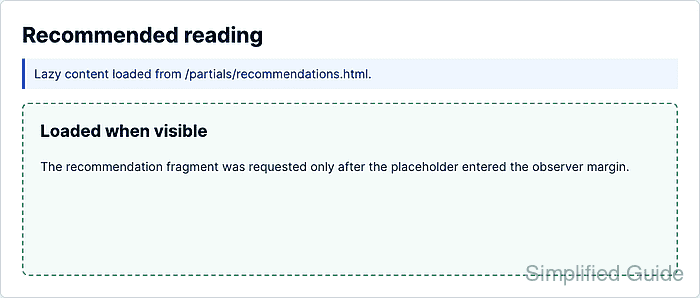
A lazy content panel needs a placeholder, a source URL or fragment, and observer code that runs once for each target. The observer callback should check entry.isIntersecting, load the content, and stop observing that element so repeat scroll movement does not create duplicate requests.
A viewport-based implementation uses root: null, expands the trigger area with rootMargin, and uses a small threshold so loading starts shortly before the panel is fully visible. Browsers without IntersectionObserver should load the same content immediately, which keeps the page functional instead of leaving an empty placeholder.
Steps to lazy-load content with IntersectionObserver:
- Add a lazy content placeholder to the page.
<section
  data-lazy-content
  data-src="/partials/recommendations.html"
  aria-busy="true"
>
  <p>Loading recommendations...</p>
</section>
data-src points to the same-origin fragment or endpoint that will be requested when the placeholder enters the observer margin. Keep critical content in normal HTML or provide a non-JavaScript fallback when the content must always be available.
Related: How to add a noscript fallback for JavaScript-disabled browsers - Create the fragment or endpoint returned by data-src.
<article class="recommendation-card">
  <h2>Recommended reading</h2>
  <p>Loaded when the recommendation panel reached the viewport.</p>
</article>
An HTML fragment keeps the network response ready for direct insertion. A JSON endpoint can use the same observer flow, but the loader should render the JSON into safe DOM nodes instead of assigning raw untrusted text to innerHTML.
- Add a loaded state for the placeholder.
[data-lazy-content] {
  min-height: 12rem;
  border: 2px dashed #94a3b8;
  padding: 1.5rem;
}

[data-lazy-content].is-loaded {
  border-color: #16a34a;
  background: #f0fdf4;
}
- Create the content loader.
async function loadLazyContent(panel) {
  if (panel.dataset.loaded === "true" || panel.dataset.loading === "true") {
    return;
  }

  panel.dataset.loading = "true";

  try {
    const response = await fetch(panel.dataset.src);

    if (!response.ok) {
      throw new Error(`Request failed with ${response.status}`);
    }

    panel.innerHTML = await response.text();
    panel.dataset.loaded = "true";
    panel.classList.add("is-loaded");
    panel.setAttribute("aria-busy", "false");
  } catch (error) {
    panel.textContent = "Content could not be loaded.";
    panel.dataset.error = "true";
    console.error(error);
  } finally {
    delete panel.dataset.loading;
  }
}
Only insert trusted same-origin HTML with innerHTML. Sanitize user-generated or third-party content before rendering it into the page.
- Observe the lazy content placeholders.
const lazyPanels = document.querySelectorAll("[data-lazy-content]");

if ("IntersectionObserver" in window) {
  const observer = new IntersectionObserver((entries, observer) => {
    for (const entry of entries) {
      if (!entry.isIntersecting) {
        continue;
      }

      observer.unobserve(entry.target);
      loadLazyContent(entry.target);
    }
  }, {
    root: null,
    rootMargin: "200px 0px",
    threshold: 0.1
  });

  lazyPanels.forEach((panel) => observer.observe(panel));
} else {
  lazyPanels.forEach(loadLazyContent);
}
Place the observer script after the placeholder markup or load it with defer so document.querySelectorAll() can find the targets.
Related: How to load JavaScript with defer - Scroll near the placeholder in the browser.
The content should load before the placeholder is fully visible because rootMargin: “200px 0px” expands the viewport trigger area by 200 pixels above and below.
- Check the loaded flag from the browser console.
> document.querySelector("[data-lazy-content]").dataset.loaded
"true"
The visible panel should show the fetched fragment, aria-busy should be false, and the observer should not request the same fragment again after the first load.

Mohd Shakir Zakaria is a cloud architect with deep roots in software development and open-source advocacy. Certified in AWS, Red Hat, VMware, ITIL, and Linux, he specializes in designing and managing robust cloud and on-premises infrastructures.


