Browser cookies let a web page keep small pieces of state that the browser can send back to the same site on later requests. JavaScript can use document.cookie for simple client-readable values such as a theme choice, dismissed banner, or short preference that must be visible to page scripts.
The document.cookie property has an unusual getter and setter shape. Reading it returns the current page's non-HttpOnly cookies as one semicolon-separated string, while assigning to it sets or updates one cookie at a time with optional attributes such as Max-Age, Path, and SameSite.
Use JavaScript-set cookies only for non-sensitive state. Session identifiers, access tokens, and authorization cookies should normally be created by the server with HttpOnly and Secure so page scripts cannot read them, and values that never need to travel with HTTP requests usually belong in localStorage instead.
Steps to set and read cookies with JavaScript:
- Add controls for saving, reading, and deleting the cookie.
<button id="save-cookie" type="button">Save dark preference</button>
<button id="read-cookie" type="button">Read preference</button>
<button id="delete-cookie" type="button">Delete preference</button>

<p id="cookie-status" role="status" aria-live="polite"></p>
<pre id="cookie-string"></pre>
The role=“status” and aria-live=“polite” attributes let assistive technology announce the result after each button click.
- Define helpers that encode, read, and expire one cookie.
const cookieName = "site_theme";
const cookieValue = "dark";
const oneWeek = 60 * 60 * 24 * 7;

function setCookie(name, value, maxAgeSeconds) {
  const encodedName = encodeURIComponent(name);
  const encodedValue = encodeURIComponent(value);

  document.cookie = [
    `${encodedName}=${encodedValue}`,
    `Max-Age=${maxAgeSeconds}`,
    "Path=/",
    "SameSite=Lax",
  ].join("; ");
}

function getCookie(name) {
  const namePrefix = `${encodeURIComponent(name)}=`;
  const cookie = document.cookie
    .split(";")
    .map((item) => item.trim())
    .find((item) => item.startsWith(namePrefix));

  if (!cookie) {
    return null;
  }

  return decodeURIComponent(cookie.slice(namePrefix.length));
}

function deleteCookie(name) {
  document.cookie = `${encodeURIComponent(name)}=; Max-Age=0; Path=/; SameSite=Lax`;
}
Use the same Path and Domain values when deleting a cookie that were used when creating it. The example omits Domain, so the cookie stays host-only.
- Wire the buttons to the helper functions.
const status = document.querySelector("#cookie-status");
const cookieString = document.querySelector("#cookie-string");

function refreshCookieString() {
  cookieString.textContent = document.cookie || "document.cookie is empty";
}

document.querySelector("#save-cookie").addEventListener("click", () => {
  setCookie(cookieName, cookieValue, oneWeek);
  status.textContent = "Saved site_theme=dark for this path.";
  refreshCookieString();
});

document.querySelector("#read-cookie").addEventListener("click", () => {
  const value = getCookie(cookieName);
  status.textContent = value === null
    ? "site_theme is not set."
    : `Read site_theme=${value}.`;
  refreshCookieString();
});

document.querySelector("#delete-cookie").addEventListener("click", () => {
  deleteCookie(cookieName);
  status.textContent = "Deleted site_theme.";
  refreshCookieString();
});
- Load the page from HTTPS or a trusted local development origin such as http://localhost.
Add Secure when setting cookies from HTTPS, especially when using SameSite=None. JavaScript cannot set HttpOnly cookies; use a server Set-Cookie response for sensitive or authentication-related cookies.
- Click Save dark preference and confirm the cookie string appears.
Saved site_theme=dark for this path.
site_theme=dark
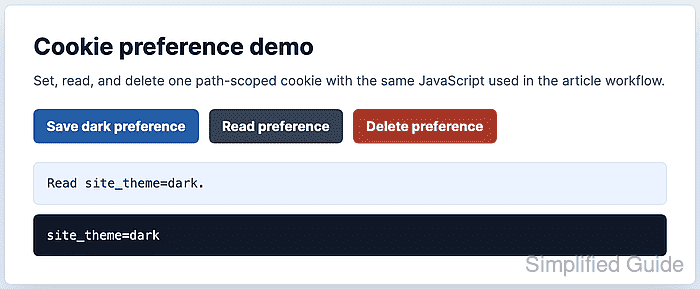
- Click Read preference and confirm the helper returns the decoded value.
Read site_theme=dark.
site_theme=dark
- Click Delete preference and confirm the cookie is gone.
Deleted site_theme.
document.cookie is empty
Max-Age=0 expires the cookie immediately. If a browser still shows the cookie, check whether a different Path or Domain was used when it was created.

Mohd Shakir Zakaria is a cloud architect with deep roots in software development and open-source advocacy. Certified in AWS, Red Hat, VMware, ITIL, and Linux, he specializes in designing and managing robust cloud and on-premises infrastructures.


