A Java application that terminates TLS or signs artifacts needs a keystore that actually contains a private-key entry, not only a trusted certificate. keytool creates the keystore file and the alias entry, and keytool -list should show PrivateKeyEntry before the file is handed to an application server, build tool, or service wrapper.
Current JDK releases use PKCS12 as the default keystore type, but naming it explicitly keeps the command clear across older runtimes and deployment notes. The example command creates app-server.p12, stores one RSA 3072-bit key pair under the alias app-server, and assigns the certificate subject with -dname.
The generated certificate is self-signed. That is enough to prove the keystore and private key were created, but public TLS usually requires a certificate signing request and an imported CA-issued certificate chain before the keystore is used by a server or client.
Steps to create a Java keystore with keytool:
- Choose the keystore file, alias, and certificate subject.
Item Example Purpose Keystore file app-server.p12 File that will hold the private key and certificate entry. Alias app-server Name used later to list, replace, export, or select the entry. Subject CN=app.example.com, OU=Platform, O=Example Corp, C=US Distinguished name placed in the self-signed certificate. Use a stable alias that identifies the application or endpoint, not a temporary ticket number. Many Java servers and build tools later refer to this alias directly.
- Store the keystore password in an environment variable for the current shell.
$ export KEYSTORE_PASS='changeit-Example-2026'
Use a real secret instead of the example value. If shell history or process environments are tightly controlled on the host, omit -storepass:env KEYSTORE_PASS from the later commands and let keytool prompt for the password instead.
- Generate the keystore and private-key entry.
$ keytool -genkeypair \
  -alias app-server \
  -keyalg RSA \
  -keysize 3072 \
  -validity 365 \
  -keystore app-server.p12 \
  -storetype PKCS12 \
  -dname "CN=app.example.com, OU=Platform, O=Example Corp, C=US" \
  -storepass:env KEYSTORE_PASS
Generating 3072-bit RSA key pair and self-signed certificate (SHA384withRSA) with a validity of 365 days
	for: CN=app.example.com, OU=Platform, O=Example Corp, C=US
The command creates a self-signed certificate attached to the new private key. Replace the subject values with the application hostname and organization details that belong in the certificate request or temporary self-signed certificate.
- Restrict local access to the keystore file on Linux or macOS.
$ chmod 600 app-server.p12
Protect app-server.p12 like a private key. Anyone who can copy the file and obtain the password can impersonate the application identity stored in the keystore.
- List the keystore to verify the private-key entry.
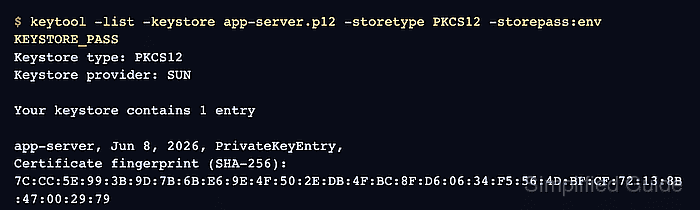
$ keytool -list -keystore app-server.p12 -storetype PKCS12 -storepass:env KEYSTORE_PASS
Keystore type: PKCS12
Keystore provider: SUN

Your keystore contains 1 entry

app-server, Jun 8, 2026, PrivateKeyEntry,
Certificate fingerprint (SHA-256): 7C:CC:5E:99:3B:9D:7B:6B:E6:9E:4F:50:2E:DB:4F:BC:8F:D6:06:34:F5:56:4D:BF:CF:72:13:8B:47:00:29:79
The alias should match the name used during creation, and the entry type should be PrivateKeyEntry. A trustedCertEntry belongs in a truststore instead of a server or signing keystore.
- Export the public certificate when another system needs to inspect it.
$ keytool -exportcert \
  -alias app-server \
  -keystore app-server.p12 \
  -storetype PKCS12 \
  -storepass:env KEYSTORE_PASS \
  -rfc \
  -file app-server.crt
Certificate stored in file <app-server.crt>
The exported app-server.crt file contains only the public certificate. It does not include the private key from app-server.p12.
- Print the exported certificate to confirm the subject and key details.
$ keytool -printcert -file app-server.crt
Owner: CN=app.example.com, OU=Platform, O=Example Corp, C=US
Issuer: CN=app.example.com, OU=Platform, O=Example Corp, C=US
Serial number: 9c666cfa4cc2645f
Valid from: Mon Jun 08 07:43:54 GMT 2026 until: Tue Jun 08 07:43:54 GMT 2027
Certificate fingerprints:
	 SHA1: D2:C4:E7:67:9B:2F:68:98:6D:C6:3C:11:88:D9:14:7F:54:5B:07:16
	 SHA256: 7C:CC:5E:99:3B:9D:7B:6B:E6:9E:4F:50:2E:DB:4F:BC:8F:D6:06:34:F5:56:4D:BF:CF:72:13:8B:47:00:29:79
Signature algorithm name: SHA384withRSA
Subject Public Key Algorithm: 3072-bit RSA key
Version: 3
##### snipped #####
- Clear the temporary password variable from the current shell.
$ unset KEYSTORE_PASS

Mohd Shakir Zakaria is a cloud architect with deep roots in software development and open-source advocacy. Certified in AWS, Red Hat, VMware, ITIL, and Linux, he specializes in designing and managing robust cloud and on-premises infrastructures.


