Restoring an iptables rules file replaces the live IPv4 firewall with a reviewed saved policy during maintenance, recovery, or handoff. The change takes effect when iptables-restore commits the file, so a syntax check and a rollback copy should happen before the apply step.
The restore file uses the format emitted by iptables-save. It contains table headers, chain policies, rule lines, and COMMIT markers, and iptables-restore can read that format from standard input or from a file path. Unless –noflush is used, each restored table is flushed before its new content is loaded.
A full restore can interrupt SSH, VPN, web traffic, forwarding, or Docker-managed rules when the file changes default policies or omits existing allow rules. Keep a second administrative session or console path open, use –wait to avoid xtables lock races, and restore IPv6 policy separately with ip6tables-restore when the host filters both address families.
Steps to restore iptables rules from a file:
- Open a terminal on the Linux host with an account that can use sudo.
- Save the current runtime rules to a rollback file.
$ sudo iptables-save > ~/iptables-before-restore.rules
Keep the rollback file outside the target rules path so it can be restored with sudo iptables-restore --wait 5 ~/iptables-before-restore.rules if the new policy blocks required access.
- Confirm the restore file is in iptables-save format.
- /etc/iptables/rules.v4
*filter
:INPUT DROP [0:0]
:FORWARD DROP [0:0]
:OUTPUT ACCEPT [0:0]
-A INPUT -i lo -j ACCEPT
-A INPUT -m conntrack --ctstate ESTABLISHED,RELATED -j ACCEPT
-A INPUT -p tcp -s 198.51.100.0/24 --dport 443 -m conntrack --ctstate NEW -j ACCEPT
COMMIT
A file that sets :INPUT DROP must include allow rules for the current management path before it is applied.
If the file came from another host, confirm the intended iptables-nft or iptables-legacy backend before restoring it, and review ordered-rule conflicts before the restore window. Related: How to check the active iptables backend
Tool: Firewall Shadow Rule Checker - Test the rules file without committing it.
$ sudo iptables-restore --test /etc/iptables/rules.v4
No output means the file parsed successfully. A parse error must be fixed before the restore command is run.
- Apply the rules file and wait for the xtables lock if another firewall process is running.
$ sudo iptables-restore --wait 5 /etc/iptables/rules.v4
Omit --noflush for a full replacement restore. Use --noflush only for a deliberate merge because declared user-defined chains are still rebuilt.
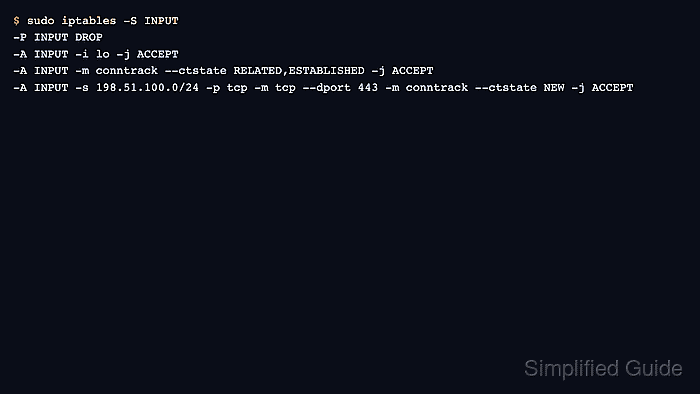
- List the restored chain to confirm the expected policy and rules are active.
$ sudo iptables -S INPUT
-P INPUT DROP
-A INPUT -i lo -j ACCEPT
-A INPUT -m conntrack --ctstate RELATED,ESTABLISHED -j ACCEPT
-A INPUT -s 198.51.100.0/24 -p tcp -m tcp --dport 443 -m conntrack --ctstate NEW -j ACCEPT
- Test one service or path that the restored rules should allow from an allowed client.
$ curl -I https://server.example.com
HTTP/1.1 200 OK
##### snipped #####
If the management session drops or an expected service fails, restore the rollback file from the console or the second administrative session.
- Save or hand off the restored runtime rules to the host's persistence method when the policy should survive reboot.

Mohd Shakir Zakaria is a cloud architect with deep roots in software development and open-source advocacy. Certified in AWS, Red Hat, VMware, ITIL, and Linux, he specializes in designing and managing robust cloud and on-premises infrastructures.


