Blocking traffic with iptables can either make packets disappear or send a clear failure back to the client. Choosing between DROP and REJECT changes how scanners, health checks, applications, and users experience the blocked path.
DROP ends rule traversal without replying, so TCP clients usually wait until their own timeout. REJECT is also a terminating target, but it returns an ICMP error or a TCP reset when the rule and protocol support that response.
Use DROP when silent blocking is the desired signal, such as unwanted internet noise. Use REJECT when fast failure is better for controlled clients, internal troubleshooting, load balancer health checks, or routes that should fail closed without long waits.
Related: How to block a port with iptables
Related: How to block an IP address with iptables
Related: How to list iptables rules with counters
Tool: iptables Rule Generator
Steps to choose REJECT or DROP in iptables:
- Identify the packet path and client expectation before adding a block rule.
Use INPUT for services on the local host, FORWARD for routed traffic, and OUTPUT for locally generated traffic. Choose REJECT only when the client should receive a visible failure.
- List the chain that will receive the block.
$ sudo iptables --list INPUT --line-numbers --numeric --verbose
Chain INPUT (policy ACCEPT 0 packets, 0 bytes)
num   pkts bytes target     prot opt in     out     source               destination
Rule order matters. Insert the chosen block before broader ACCEPT rules that would otherwise permit the same traffic.
Related: How to list iptables rules with counters - Add a DROP rule when silent timeout behavior is intended.
$ sudo iptables -A INPUT -p tcp --dport 8080 -j DROP
DROP is usually appropriate for unsolicited traffic where a delayed client timeout is acceptable.
- Add a TCP REJECT rule when immediate connection failure is intended.
$ sudo iptables -A INPUT -p tcp --dport 8081 -j REJECT --reject-with tcp-reset
--reject-with tcp-reset applies only to TCP rules. For UDP, use an ICMP reject type such as --reject-with icmp-port-unreachable.
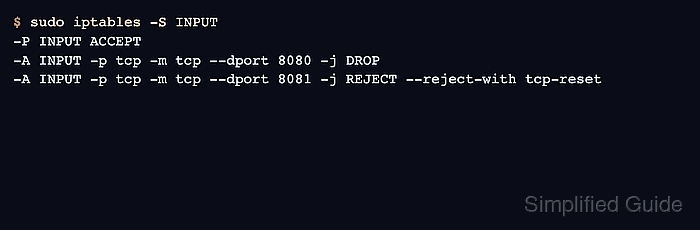
- Print the selected rules in command form.
$ sudo iptables -S INPUT
-P INPUT ACCEPT
-A INPUT -p tcp -m tcp --dport 8080 -j DROP
-A INPUT -p tcp -m tcp --dport 8081 -j REJECT --reject-with tcp-reset
- Test the DROP path from a separate client.
$ nc -vz -w 2 server.example.com 8080
nc: connect to server.example.com port 8080 (tcp) timed out: Operation now in progress
A timeout is expected with DROP when no earlier rule accepts the packet and no upstream device sends a different failure.
- Test the REJECT path from the same client.
$ nc -vz -w 2 server.example.com 8081
nc: connect to server.example.com port 8081 (tcp) failed: Connection refused
Fast failure helps internal clients and monitoring systems distinguish a deliberate block from packet loss or an unreachable host.
- Check counters on both blocking rules.
$ sudo iptables --list INPUT --line-numbers --numeric --verbose --exact
Chain INPUT (policy ACCEPT 0 packets, 0 bytes)
num      pkts      bytes target     prot opt in     out     source               destination
1           2       120 DROP       tcp  --  *      *       0.0.0.0/0            0.0.0.0/0            tcp dpt:8080
2           2       120 REJECT     tcp  --  *      *       0.0.0.0/0            0.0.0.0/0            tcp dpt:8081 reject-with tcp-reset
The counters prove the client tests reached the chosen rules. A zero counter usually means another rule or upstream firewall handled the packets first.
- Replace the target if the client behavior is wrong.
$ sudo iptables -D INPUT -p tcp --dport 8080 -j DROP
$ sudo iptables -A INPUT -p tcp --dport 8080 -j REJECT --reject-with tcp-reset
Reordering or replacing block rules can immediately change client behavior. Keep management access and rollback commands ready on remote systems.
Related: How to delete an iptables rule - Save the chosen behavior after testing from the real client path.
$ sudo netfilter-persistent save
run-parts: executing /usr/share/netfilter-persistent/plugins.d/15-ip4tables save
Persist only the target that matches the operational need: silent timeout for DROP or explicit failure for REJECT.
Related: How to save iptables rules permanently

Mohd Shakir Zakaria is a cloud architect with deep roots in software development and open-source advocacy. Certified in AWS, Red Hat, VMware, ITIL, and Linux, he specializes in designing and managing robust cloud and on-premises infrastructures.


