Publishing an internal service through a Linux gateway needs more than a port allow rule. Traffic that reaches the gateway on the public-facing interface must be translated to the backend address, permitted through the FORWARD chain, and returned through the same gateway so the client sees a complete TCP connection.
The nat table's PREROUTING chain performs destination NAT before routing chooses the outgoing interface. The filter table's FORWARD chain then allows the routed packets between the outside and inside interfaces, while a scoped POSTROUTING masquerade rule can force backend replies back through the gateway when the backend would otherwise reply by another path.
Command examples use wan0 as the outside interface, lan0 as the backend-side interface, gateway address 203.0.113.10, backend address 10.10.0.20, public TCP port 8080, and backend TCP port 80. Replace those values before running commands, keep a console or second administrative session open on remote gateways, and save the rules only after an external client request and the packet counters prove the NAT and filter rules matched. The masquerade rule hides the original client address from the backend; omit it only when the backend already routes replies through the gateway and preserving client addresses is required.
Steps to configure port forwarding with iptables:
- Identify the gateway interfaces and addresses.
$ ip -br addr
lo               UNKNOWN        127.0.0.1/8 ::1/128
wan0             UP             203.0.113.10/24
lan0             UP             10.10.0.1/24
wan0 receives client traffic. lan0 reaches the backend network.
- Confirm the backend service responds from the gateway before changing firewall rules.
$ curl -sS http://10.10.0.20/
backend service through gateway
Fix backend routing, listener, or application errors before adding the port forward. A DNAT rule cannot repair a closed backend service.
- Check the active iptables backend.
$ iptables --version
iptables v1.8.11 (nf_tables)
Current Ubuntu and Debian systems commonly use the nftables compatibility backend for the plain iptables command. Keep checks, saves, and restores on the same backend. Related: How to check the active iptables backend
- Save the current runtime rules as a rollback file.
$ sudo iptables-save > ~/iptables.before-port-forward.rules
Run the restore command from console access or from a session that still works if the port forward breaks required traffic: sudo iptables-restore < ~/iptables.before-port-forward.rules.
- Enable IPv4 packet forwarding for the current runtime.
$ sudo sysctl -w net.ipv4.ip_forward=1
net.ipv4.ip_forward = 1
This immediately lets the host route IPv4 packets between interfaces when firewall rules and routes allow it. Do not enable forwarding on a host that should remain a single-interface endpoint.
- Make IPv4 forwarding survive reboot.
$ sudoedit /etc/sysctl.d/99-ip-forward.conf
Add the forwarding setting.
net.ipv4.ip_forward = 1
Apply the file without waiting for a reboot.
$ sudo sysctl -p /etc/sysctl.d/99-ip-forward.conf
net.ipv4.ip_forward = 1
Systemd-based distributions read /etc/sysctl.d/*.conf at boot through systemd-sysctl. Keep gateway forwarding in a small dedicated file so it remains easy to audit.
- Review the current FORWARD chain before inserting rules.
$ sudo iptables --list FORWARD --line-numbers --numeric --verbose
Chain FORWARD (policy DROP 0 packets, 0 bytes)
num   pkts bytes target     prot opt in     out     source               destination
If the chain has broad DROP or REJECT rules, insert the port-forward rules above them instead of appending after them. Related: How to insert an iptables rule at a specific position
- Allow new and established forwarded traffic from clients to the backend service.
$ sudo iptables -A FORWARD -i wan0 -o lan0 -p tcp -d 10.10.0.20 --dport 80 -m conntrack --ctstate NEW,ESTABLISHED -j ACCEPT
The FORWARD chain sees the translated backend destination, not the original public gateway port.
Tool: iptables Rule Generator
- Allow established return traffic from the backend to clients.
$ sudo iptables -A FORWARD -i lan0 -o wan0 -p tcp -s 10.10.0.20 --sport 80 -m conntrack --ctstate ESTABLISHED -j ACCEPT
conntrack ties the reply packets to the forwarded connection opened by the client.
- Add the DNAT rule for the public gateway port.
$ sudo iptables -t nat -A PREROUTING -i wan0 -p tcp --dport 8080 -j DNAT --to-destination 10.10.0.20:80
Replace 8080 with the port clients connect to on the gateway. Replace 10.10.0.20:80 with the backend address and service port.
- Add a scoped masquerade rule for the backend return path.
$ sudo iptables -t nat -A POSTROUTING -o lan0 -p tcp -d 10.10.0.20 --dport 80 -j MASQUERADE
MASQUERADE makes the backend see the gateway's inside address instead of the original client address. Skip this rule only when backend routing already sends replies through the gateway and backend logs must retain original client addresses.
- Confirm the FORWARD rules are present.
$ sudo iptables -S FORWARD
-P FORWARD DROP
-A FORWARD -d 10.10.0.20/32 -i wan0 -o lan0 -p tcp -m tcp --dport 80 -m conntrack --ctstate NEW,ESTABLISHED -j ACCEPT
-A FORWARD -s 10.10.0.20/32 -i lan0 -o wan0 -p tcp -m tcp --sport 80 -m conntrack --ctstate ESTABLISHED -j ACCEPT
- Confirm the nat table contains the DNAT and masquerade rules.
$ sudo iptables -t nat -S
-P PREROUTING ACCEPT
-P INPUT ACCEPT
-P OUTPUT ACCEPT
-P POSTROUTING ACCEPT
-A PREROUTING -i wan0 -p tcp -m tcp --dport 8080 -j DNAT --to-destination 10.10.0.20:80
-A POSTROUTING -d 10.10.0.20/32 -o lan0 -p tcp -m tcp --dport 80 -j MASQUERADE
- Test the gateway port from a separate client on the expected outside network path.
$ curl -sS http://203.0.113.10:8080/
backend service through gateway
A local test on the gateway can miss interface, route, and upstream filtering problems. Use a client that reaches the same gateway address and port as real users.
- Check the DNAT counter after the client request.
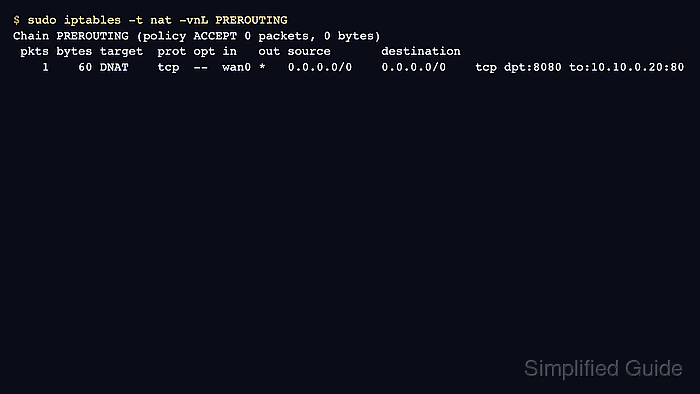
$ sudo iptables -t nat -vnL PREROUTING
Chain PREROUTING (policy ACCEPT 0 packets, 0 bytes)
 pkts bytes target     prot opt in     out     source               destination
    1    60 DNAT       tcp  --  wan0   *       0.0.0.0/0            0.0.0.0/0            tcp dpt:8080 to:10.10.0.20:80
The pkts and bytes counters on the DNAT rule increase when traffic reaches the gateway port and matches the translation rule.
- Check the masquerade counter when the return-path rule is used.
$ sudo iptables -t nat -vnL POSTROUTING
Chain POSTROUTING (policy ACCEPT 0 packets, 0 bytes)
 pkts bytes target     prot opt in     out     source               destination
    1    60 MASQUERADE tcp  --  *      lan0    0.0.0.0/0            10.10.0.20           tcp dpt:80
A zero counter here means the example's masquerade rule did not match. Check the backend address, backend port, and inside interface name.
- Check the FORWARD counters for both directions.
$ sudo iptables -L FORWARD -n -v --line-numbers
Chain FORWARD (policy DROP 0 packets, 0 bytes)
num   pkts bytes target     prot opt in     out     source               destination
1        6   397 ACCEPT     tcp  --  wan0   lan0    0.0.0.0/0            10.10.0.20           tcp dpt:80 ctstate NEW,ESTABLISHED
2        6   537 ACCEPT     tcp  --  lan0   wan0    10.10.0.20          0.0.0.0/0            tcp spt:80 ctstate ESTABLISHED
Both directional counters should increase after a successful TCP request through the gateway.
- Save the verified runtime rules through the host's existing persistence method.
$ sudo netfilter-persistent save
run-parts: executing /usr/share/netfilter-persistent/plugins.d/15-ip4tables save
Save only after the external client test and counters succeed. Persisting a partial DNAT, forwarding, or return-path policy can break the service again after reboot or firewall reload.

Mohd Shakir Zakaria is a cloud architect with deep roots in software development and open-source advocacy. Certified in AWS, Red Hat, VMware, ITIL, and Linux, he specializes in designing and managing robust cloud and on-premises infrastructures.


