Writing line protocol to InfluxDB OSS v2 sends a measurement, tags, fields, and an optional timestamp into a bucket without going through a client library. Operators and developers use this check to confirm that a bucket accepts a point before wiring an application, agent, or migration job to the same endpoint.
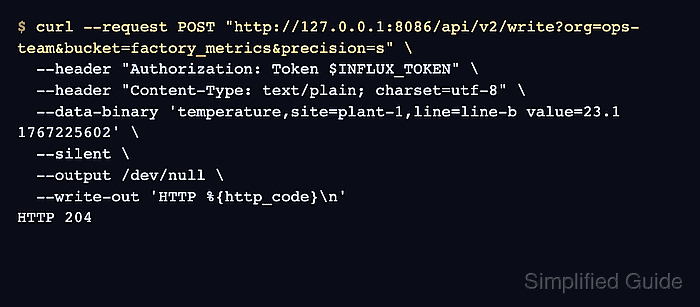
The v2 write endpoint is /api/v2/write. The request URL selects the organization, bucket, and timestamp precision, while the Authorization header carries an API token that can write to the destination bucket.
The sample point uses a Unix timestamp in seconds, so the request sets precision=s. Keep that precision aligned with the timestamp in the line protocol string or InfluxDB will store the point at the wrong time.
Steps to write line protocol to InfluxDB v2:
- Choose the InfluxDB URL, organization, bucket, and timestamp precision for the write.
InfluxDB URL: http://127.0.0.1:8086
Organization: ops-team
Bucket: factory_metrics
Precision: seconds
Use a scratch bucket or clearly disposable series when production data should not keep validation points.
- Set the API token for the current terminal session.
$ export INFLUX_TOKEN='API_TOKEN'
Use a token with write permission on the target bucket. Do not paste a real token into shared transcripts, screenshots, or shell history.
- Post one line protocol point to the v2 write endpoint.
$ curl --request POST "http://127.0.0.1:8086/api/v2/write?org=ops-team&bucket=factory_metrics&precision=s" \
  --header "Authorization: Token $INFLUX_TOKEN" \
  --header "Content-Type: text/plain; charset=utf-8" \
  --data-binary 'temperature,site=plant-1,line=line-b value=23.1 1767225602' \
  --silent \
  --output /dev/null \
  --write-out 'HTTP %{http_code}\n'
HTTP 204
HTTP 204 means InfluxDB OSS v2 accepted the full batch. Failed writes return an error response for malformed line protocol, a missing bucket or organization, or a token that cannot write to the bucket.
- Query the bucket for the inserted point.
$ influx query --host http://127.0.0.1:8086 --org ops-team 'from(bucket: "factory_metrics") |> range(start: 2026-01-01T00:00:00Z, stop: 2026-01-01T00:01:00Z) |> filter(fn: (r) => r._measurement == "temperature") |> filter(fn: (r) => r.line == "line-b") |> keep(columns: ["_time", "_value", "site", "line"])'
Result: _result
Table: keys: [line, site]
           line:string             site:string                      _time:time                  _value:float
----------------------  ----------------------  ------------------------------  ----------------------------
                line-b                 plant-1  2026-01-01T00:00:02.000000000Z                          23.1
An empty result usually means the bucket, organization, token scope, tag predicate, or timestamp precision does not match the write.
Related: How to run a Flux query in InfluxDB v2

Mohd Shakir Zakaria is a cloud architect with deep roots in software development and open-source advocacy. Certified in AWS, Red Hat, VMware, ITIL, and Linux, he specializes in designing and managing robust cloud and on-premises infrastructures.


