Deleting a data range in InfluxDB v2 removes points from one bucket when a bad backfill, duplicate import, or sensitive sample has to be erased without changing bucket retention. A safe delete starts with a narrow time window and a predicate that selects the measurement or tag values to remove.
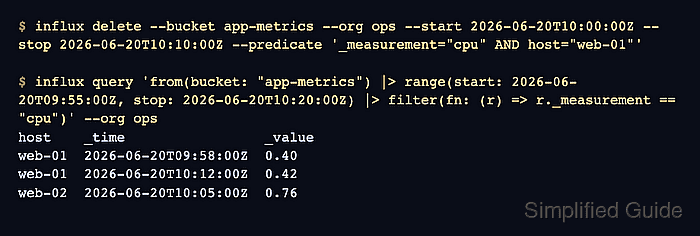
influx delete sends a delete request through the active CLI profile or through supplied --host, --org, and --token flags. The time window uses RFC3339 timestamps, and the predicate matches series keys such as _measurement and tags.
Deletion is irreversible for the matching points. Query the candidate data first, run the delete once, and query both the target range and nearby control data afterward so the removed series and preserved points are visible.
Steps to delete an InfluxDB v2 data range:
- List the bucket and confirm the organization context.
$ influx bucket list --org ops
ID                  Name          Retention   Shard group duration   Organization ID      Schema Type
##### snipped #####
8554fda1e294bf34    app-metrics   infinite    168h0m0s              0cf6679f260eeacd     implicit
Use an active CLI profile or include --host, --org, and --token on each command when the profile is not already selected.
- Query the candidate points before deleting them.
$ influx query '
from(bucket: "app-metrics")
  |> range(start: 2026-06-20T09:55:00Z, stop: 2026-06-20T10:20:00Z)
  |> filter(fn: (r) => r._measurement == "cpu" and r.host == "web-01")
  |> keep(columns: ["_time", "_value", "host"])
' --org ops
Result: _result
Table: keys: [host]
           host:string                      _time:time                  _value:float
----------------------  ------------------------------  ----------------------------
                web-01  2026-06-20T09:58:00.000000000Z                           0.4
                web-01  2026-06-20T10:05:00.000000000Z                          0.95
                web-01  2026-06-20T10:12:00.000000000Z                          0.42
- Delete only the selected measurement and tag values from the time range.
$ influx delete --bucket app-metrics --org ops --start 2026-06-20T10:00:00Z --stop 2026-06-20T10:10:00Z --predicate '_measurement="cpu" AND host="web-01"'
Without --predicate, influx delete removes every point in the bucket between --start and --stop. InfluxDB v2 delete predicates match measurements and tags, not field values.
- Query the deleted range again.
$ influx query '
from(bucket: "app-metrics")
  |> range(start: 2026-06-20T10:00:00Z, stop: 2026-06-20T10:10:00Z)
  |> filter(fn: (r) => r._measurement == "cpu" and r.host == "web-01")
' --org ops
No output means no matching rows remain in that range. If rows still appear, the delete predicate did not match the stored series keys or the delete request has not finished processing.
- Query the surrounding data to confirm unrelated points remain.
$ influx query '
from(bucket: "app-metrics")
  |> range(start: 2026-06-20T09:55:00Z, stop: 2026-06-20T10:20:00Z)
  |> filter(fn: (r) => r._measurement == "cpu")
  |> keep(columns: ["_time", "_value", "host"])
' --org ops
Result: _result
Table: keys: [host]
           host:string                      _time:time                  _value:float
----------------------  ------------------------------  ----------------------------
                web-01  2026-06-20T09:58:00.000000000Z                           0.4
                web-01  2026-06-20T10:12:00.000000000Z                          0.42
Table: keys: [host]
           host:string                      _time:time                  _value:float
----------------------  ------------------------------  ----------------------------
                web-02  2026-06-20T10:05:00.000000000Z                          0.76

Mohd Shakir Zakaria is a cloud architect with deep roots in software development and open-source advocacy. Certified in AWS, Red Hat, VMware, ITIL, and Linux, he specializes in designing and managing robust cloud and on-premises infrastructures.


