Configuring Telegraf dual writes sends the same collected metrics to a current InfluxDB target and a migration target at the same time. Existing dashboards and alerts can keep reading from the current bucket while the new database receives matching data for comparison before a cutover.
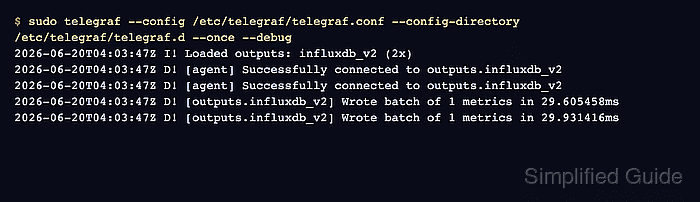
Telegraf fans out metrics by loading more than one output plugin block. Use one influxdb_v2 output block per independent InfluxDB target, because multiple URLs inside a single output block are for one cluster and Telegraf writes to only one URL from that list per interval.
Existing input, processor, and aggregator plugins can stay unchanged while the second output is added. Tokens stay outside the output configuration, the one-shot test proves both outputs accepted a batch, and final queries check both targets before production readers move to the migration database.
Steps to configure Telegraf dual writes for InfluxDB migration:
- Collect the current and migration target connection details.
Record each target's URL, write token, organization, and bucket or database name. For InfluxDB 3 targets that use the v2 write API, set organization to an empty string and use the database name as bucket.
- Open the Telegraf environment file.
$ sudoedit \
  /etc/default/telegraf
- Add token variables for both write targets.
- /etc/default/telegraf
INFLUX_CURRENT_TOKEN="current-write-token"
INFLUX_TARGET_TOKEN="target-write-token"
The environment file contains write tokens. Keep it readable only by accounts that already administer Telegraf and InfluxDB.
- Restrict the environment file permissions.
$ sudo chmod 600 \
  /etc/default/telegraf
- Change to the Telegraf drop-in directory.
$ cd \
  /etc/telegraf/telegraf.d
- Open a dedicated dual-write output file.
$ sudoedit dual-write.conf
- Add one influxdb_v2 output block for each target.
- dual-write.conf
# Current InfluxDB target
[[outputs.influxdb_v2]]
  urls = ["https://current-influxdb.example.net"]
  token = "${INFLUX_CURRENT_TOKEN}"
  organization = "example-org"
  bucket = "telegraf_metrics"

# Migration InfluxDB target
[[outputs.influxdb_v2]]
  urls = ["https://target-influxdb.example.net"]
  token = "${INFLUX_TARGET_TOKEN}"
  organization = "example-org"
  bucket = "telegraf_metrics"
Do not put both independent targets in one urls array. A single output block with multiple URLs is treated as one cluster target, and only one URL is written each interval.
- Create a temporary probe input for the cutover check.
$ sudoedit \
  dual-write-check.conf
- Add a one-line metric probe.
- dual-write-check.conf
[[inputs.exec]]
  commands = [
    ["printf", "dual_write_check,host=migration-host status=1i\n"],
  ]
  data_format = "influx"
The probe creates one metric named dual_write_check during the one-shot validation run. Remove it before restarting the permanent service.
- Run one collection and write cycle with debug output.
$ sudo env \
  INFLUX_CURRENT_TOKEN='current-write-token' \
  INFLUX_TARGET_TOKEN='target-write-token' \
  telegraf --config /etc/telegraf/telegraf.conf \
  --config-directory /etc/telegraf/telegraf.d \
  --once \
  --debug
##### snipped #####
I! Loaded outputs: influxdb_v2 (2x)
D! [agent] Successfully connected to outputs.influxdb_v2
D! [agent] Successfully connected to outputs.influxdb_v2
D! [outputs.influxdb_v2] Wrote batch of 1 metrics
D! [outputs.influxdb_v2] Wrote batch of 1 metrics
Use the real token values from a protected terminal or secret manager for the one-shot command. Telegraf 1.38 and newer fail closed when a referenced environment variable is unset.
- Query the current target for the probe metric.
$ influx query \ --host https://current-influxdb.example.net \ --org example-org \ ' from(bucket: "telegraf_metrics") |> range(start: -15m) |> filter(fn: (r) => r._measurement == "dual_write_check" ) |> keep(columns: [ "_measurement", "host", "_field", "_value", ]) ' Result: _result Table: keys: [_field, _measurement, host] ##### snipped ##### status dual_write_check migration-host 1 - Query the migration target for the same probe metric.
$ influx query \
  --host https://target-influxdb.example.net \
  --org example-org \
  '
from(bucket: "telegraf_metrics")
  |> range(start: -15m)
  |> filter(fn: (r) =>
    r._measurement == "dual_write_check"
  )
  |> keep(columns: [
    "_measurement",
    "host",
    "_field",
    "_value",
  ])
'
Result: _result
Table: keys: [_field, _measurement, host]
##### snipped #####
status  dual_write_check  migration-host  1
If the migration target is InfluxDB 3, run the equivalent SQL or InfluxQL query against the target database and check for dual_write_check with the same host tag and value.
- Remove the temporary probe input.
$ sudo rm dual-write-check.conf
- Restart the Telegraf service with the permanent dual-write outputs.
$ sudo systemctl \
  restart telegraf
- Confirm the Telegraf service is active.
$ systemctl is-active \
  telegraf
active
- Check that the restarted service loaded both outputs.
$ sudo journalctl \
  --unit=telegraf \
  --since -5m \
  --no-pager
##### snipped #####
I! Loaded inputs: cpu disk mem
I! Loaded outputs: influxdb_v2 (2x)
I! Tags enabled: host=migration-host

Mohd Shakir Zakaria is a cloud architect with deep roots in software development and open-source advocacy. Certified in AWS, Red Hat, VMware, ITIL, and Linux, he specializes in designing and managing robust cloud and on-premises infrastructures.


