A Hyperledger Fabric private data collection lets selected channel organizations keep sensitive chaincode state in their peer side databases while every channel peer stores only the endorsed private-data hashes. Configuring the collection with the chaincode lifecycle is the point where the channel agrees which organizations may persist, read, write, endorse, and eventually purge that private state.
Fabric reads collection membership from a JSON collection definition that is approved and committed with the chaincode definition. Every organization that approves the lifecycle definition must use the same collection file, because a different file changes the definition and leaves that organization out of readiness.
The sample values use the fabric-samples test network, channel mychannel, chaincode name private, and the asset-transfer private-data contract. Replace the MSP IDs, package ID, sequence, peer endpoints, certificate paths, collection names, and sample asset payload before committing a production chaincode definition.
Steps to configure a Hyperledger Fabric private data collection:
- Change to the Fabric channel-admin workspace.
$ cd fabric-samples/test-network
The channel and chaincode package must already exist. Deploy the chaincode first when the target package is not installed on the endorsing peers.
Related: How to deploy Hyperledger Fabric chaincode - Add the Fabric binaries and sample config directory to the current shell.
$ export PATH="$PWD/../bin:$PATH"
$ export FABRIC_CFG_PATH="$PWD/../config"
- Set the channel, orderer, and peer certificate values.
$ export CHANNEL_NAME=mychannel
$ export ORDERER_ADDRESS=localhost:7050
$ export ORDERER_HOST=orderer.example.com
$ export ORDERER_CA="$PWD/organizations/ordererOrganizations/example.com/orderers/orderer.example.com/msp/tlscacerts/tlsca.example.com-cert.pem"
$ export ORG1_TLS_ROOTCERT="$PWD/organizations/peerOrganizations/org1.example.com/peers/peer0.org1.example.com/tls/ca.crt"
$ export ORG2_TLS_ROOTCERT="$PWD/organizations/peerOrganizations/org2.example.com/peers/peer0.org2.example.com/tls/ca.crt"
- Load the Org1 admin identity.
$ export CORE_PEER_TLS_ENABLED=true
$ export CORE_PEER_LOCALMSPID=Org1MSP
$ export CORE_PEER_MSPCONFIGPATH="$PWD/organizations/peerOrganizations/org1.example.com/users/Admin@org1.example.com/msp"
$ export CORE_PEER_TLS_ROOTCERT_FILE="$ORG1_TLS_ROOTCERT"
$ export CORE_PEER_ADDRESS=localhost:7051
- Query the installed private-data chaincode package ID from the Org1 peer.
$ peer lifecycle chaincode queryinstalled
Installed chaincodes on peer:
Package ID: private_1.0:2d0ef0bf48c7d7d39e74c4dfbf0ec9b6e902ae4c1b9f375e5d9a7efb1a6fd3c2, Label: private_1.0
Use the package ID returned by the peer where the package was installed. A package ID copied from another build can make the lifecycle definition point at code that this peer does not have.
- Save the lifecycle values for the collection-enabled definition.
$ export CC_NAME=private
$ export CC_VERSION=1.0
$ export CC_SEQUENCE=1
$ export CC_PACKAGE_ID=private_1.0:2d0ef0bf48c7d7d39e74c4dfbf0ec9b6e902ae4c1b9f375e5d9a7efb1a6fd3c2
$ export COLLECTION_CONFIG=collections_config.json
Use the next integer for CC_SEQUENCE when adding or changing collections on an already committed chaincode definition. A collection update is a chaincode definition update even when the package stays the same.
Related: How to upgrade Hyperledger Fabric chaincode - Create the collection definition file.
- collections_config.json
[
  {
    "name": "assetCollection",
    "policy": "OR('Org1MSP.member', 'Org2MSP.member')",
    "requiredPeerCount": 1,
    "maxPeerCount": 1,
    "blockToLive": 1000000,
    "memberOnlyRead": true,
    "memberOnlyWrite": true
  },
  {
    "name": "Org1MSPPrivateCollection",
    "policy": "OR('Org1MSP.member')",
    "requiredPeerCount": 0,
    "maxPeerCount": 1,
    "blockToLive": 3,
    "memberOnlyRead": true,
    "memberOnlyWrite": false,
    "endorsementPolicy": {
      "signaturePolicy": "OR('Org1MSP.member')"
    }
  },
  {
    "name": "Org2MSPPrivateCollection",
    "policy": "OR('Org2MSP.member')",
    "requiredPeerCount": 0,
    "maxPeerCount": 1,
    "blockToLive": 3,
    "memberOnlyRead": true,
    "memberOnlyWrite": false,
    "endorsementPolicy": {
      "signaturePolicy": "OR('Org2MSP.member')"
    }
  }
]
policy controls which organization peers may persist the collection. requiredPeerCount is the minimum dissemination count before endorsement succeeds, maxPeerCount is the extra dissemination target count, and blockToLive controls private database purge timing. Use 0 for private data that should not expire by block height.
- Validate the collection file as strict JSON.
$ jq empty "$COLLECTION_CONFIG"
No output means the file parsed successfully. This check does not prove that MSP IDs, policies, or collection names match the chaincode, so keep the lifecycle readiness check as the runtime gate.
Tool: JSON Validator - Review the collection names before approval.
$ jq -r '.[].name' "$COLLECTION_CONFIG"
assetCollection
Org1MSPPrivateCollection
Org2MSPPrivateCollection
- Approve the collection-enabled definition for Org1.
$ peer lifecycle chaincode approveformyorg \
  -o "$ORDERER_ADDRESS" \
  --ordererTLSHostnameOverride "$ORDERER_HOST" \
  --channelID "$CHANNEL_NAME" \
  --name "$CC_NAME" \
  --version "$CC_VERSION" \
  --package-id "$CC_PACKAGE_ID" \
  --sequence "$CC_SEQUENCE" \
  --collections-config "$COLLECTION_CONFIG" \
  --tls \
  --cafile "$ORDERER_CA"
2026-06-21 08:11:42.084 UTC [chaincodeCmd] ClientWait -> INFO 001 txid [4bb9c5ef4fdfb81d2f4ad59f5d78dd5df4c65e6024d5c4629e9c3a6c938319ad] committed with status (VALID) at localhost:7051
- Load the Org2 admin identity.
$ export CORE_PEER_LOCALMSPID=Org2MSP
$ export CORE_PEER_MSPCONFIGPATH="$PWD/organizations/peerOrganizations/org2.example.com/users/Admin@org2.example.com/msp"
$ export CORE_PEER_TLS_ROOTCERT_FILE="$ORG2_TLS_ROOTCERT"
$ export CORE_PEER_ADDRESS=localhost:9051
- Approve the same collection-enabled definition for Org2.
$ peer lifecycle chaincode approveformyorg \
  -o "$ORDERER_ADDRESS" \
  --ordererTLSHostnameOverride "$ORDERER_HOST" \
  --channelID "$CHANNEL_NAME" \
  --name "$CC_NAME" \
  --version "$CC_VERSION" \
  --package-id "$CC_PACKAGE_ID" \
  --sequence "$CC_SEQUENCE" \
  --collections-config "$COLLECTION_CONFIG" \
  --tls \
  --cafile "$ORDERER_CA"
2026-06-21 08:12:16.502 UTC [chaincodeCmd] ClientWait -> INFO 001 txid [e94c218da9e088dc6d2a39cd418dd13e6bd39c43d53b96320f5f9886a724f8f6] committed with status (VALID) at localhost:9051
Do not edit the collection JSON between organization approvals. A whitespace-only JSON formatting change is safe after parsing, but any value change creates a different lifecycle definition.
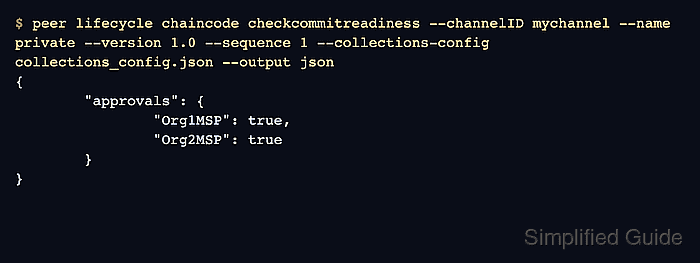
- Check whether the channel is ready to commit the definition with the collection file.
$ peer lifecycle chaincode checkcommitreadiness \
  --channelID "$CHANNEL_NAME" \
  --name "$CC_NAME" \
  --version "$CC_VERSION" \
  --sequence "$CC_SEQUENCE" \
  --collections-config "$COLLECTION_CONFIG" \
  --tls \
  --cafile "$ORDERER_CA" \
  --output json
{
        "approvals": {
                "Org1MSP": true,
                "Org2MSP": true
        }
}
A false approval means that organization has not approved the same name, version, sequence, endorsement policy, and collection configuration.
- Commit the collection-enabled chaincode definition.
$ peer lifecycle chaincode commit \
  -o "$ORDERER_ADDRESS" \
  --ordererTLSHostnameOverride "$ORDERER_HOST" \
  --channelID "$CHANNEL_NAME" \
  --name "$CC_NAME" \
  --version "$CC_VERSION" \
  --sequence "$CC_SEQUENCE" \
  --collections-config "$COLLECTION_CONFIG" \
  --tls \
  --cafile "$ORDERER_CA" \
  --peerAddresses localhost:7051 \
  --tlsRootCertFiles "$ORG1_TLS_ROOTCERT" \
  --peerAddresses localhost:9051 \
  --tlsRootCertFiles "$ORG2_TLS_ROOTCERT"
2026-06-21 08:12:59.771 UTC [chaincodeCmd] ClientWait -> INFO 001 txid [5aab9e413074cf0e77f54f8e93929937144d7e5d018d6c153421e55f7d8575bb] committed with status (VALID) at localhost:7051
2026-06-21 08:12:59.772 UTC [chaincodeCmd] ClientWait -> INFO 002 txid [5aab9e413074cf0e77f54f8e93929937144d7e5d018d6c153421e55f7d8575bb] committed with status (VALID) at localhost:9051
- Query the committed chaincode definition.
$ peer lifecycle chaincode querycommitted --channelID "$CHANNEL_NAME" --name "$CC_NAME"
Committed chaincode definition for chaincode 'private' on channel 'mychannel':
Version: 1.0, Sequence: 1, Endorsement Plugin: escc, Validation Plugin: vscc, Approvals: [Org1MSP: true, Org2MSP: true]
- Invoke the private-data chaincode with a transient asset payload as an authorized Org1 member.
$ peer chaincode invoke \
  -o "$ORDERER_ADDRESS" \
  --ordererTLSHostnameOverride "$ORDERER_HOST" \
  --tls \
  --cafile "$ORDERER_CA" \
  -C "$CHANNEL_NAME" \
  -n "$CC_NAME" \
  --peerAddresses localhost:7051 \
  --tlsRootCertFiles "$ORG1_TLS_ROOTCERT" \
  -c '{"function":"CreateAsset","Args":[]}' \
  --transient '{"asset_properties":"eyJvYmplY3RUeXBlIjoiYXNzZXQiLCJhc3NldElEIjoiYXNzZXQxIiwiY29sb3IiOiJncmVlbiIsInNpemUiOjIwLCJhcHByYWlzZWRWYWx1ZSI6MTAwfQ=="}'
2026-06-21 08:13:41.303 UTC [chaincodeCmd] chaincodeInvokeOrQuery -> INFO 001 Chaincode invoke successful. result: status:200
The transient value is the base64 form of the private asset JSON. Private input belongs in the transient map so the proposal can use it without writing the raw value into the public transaction payload.
Related: How to invoke Hyperledger Fabric chaincode - Query the organization-specific private details as an authorized Org1 member.
$ peer chaincode query -C "$CHANNEL_NAME" -n "$CC_NAME" -c '{"function":"ReadAssetPrivateDetails","Args":["Org1MSPPrivateCollection","asset1"]}'
{"assetID":"asset1","appraisedValue":100}
- Switch to an Org2 member identity.
$ export CORE_PEER_LOCALMSPID=Org2MSP
$ export CORE_PEER_MSPCONFIGPATH="$PWD/organizations/peerOrganizations/org2.example.com/users/User1@org2.example.com/msp"
$ export CORE_PEER_TLS_ROOTCERT_FILE="$ORG2_TLS_ROOTCERT"
$ export CORE_PEER_ADDRESS=localhost:9051
- Confirm that Org2 cannot read the Org1-only collection.
$ peer chaincode query -C "$CHANNEL_NAME" -n "$CC_NAME" -c '{"function":"ReadAssetPrivateDetails","Args":["Org1MSPPrivateCollection","asset1"]}'
Error: endorsement failure during query. response: status:500 message:"failed to read asset details: GET_STATE failed: tx creator does not have read access permission on privatedata in chaincodeName:private collectionName: Org1MSPPrivateCollection"
The error is the expected memberOnlyRead boundary for the Org1MSPPrivateCollection. Peers outside the collection can still validate the public private-data hash written to the channel ledger.
Related: How to query Hyperledger Fabric chaincode

Mohd Shakir Zakaria is a cloud architect with deep roots in software development and open-source advocacy. Certified in AWS, Red Hat, VMware, ITIL, and Linux, he specializes in designing and managing robust cloud and on-premises infrastructures.


