Installing Hyperledger Fabric on a Red Hat-family Linux host prepares the local Fabric samples, CLI binaries, and container images needed to run the Fabric test network. The same package-manager path fits RHEL, CentOS Stream, Rocky Linux, AlmaLinux, and Fedora systems where DNF manages packages and Docker Engine runs the sample network.
The upstream install-fabric.sh script clones fabric-samples, downloads the Fabric CLI tools into fabric-samples/bin, and pulls the Fabric peer, orderer, chaincode, base OS, and Fabric CA container images. The script defaults to the stable Fabric line used by the current sample network unless a version is supplied with --fabric-version or --ca-version.
Red Hat-family hosts need a few distro-specific checks before the sample network runs. Minimal systems often already provide curl through curl-minimal, network.sh expects the which command, and SELinux-enforcing hosts need relabeled sample-network bind mounts before peer and orderer containers can read generated material.
Steps to install Hyperledger Fabric on Red Hat-family Linux:
- Open a terminal with sudo privileges.
- Install the required Red Hat-family packages.
$ sudo dnf install dnf-plugins-core git jq ca-certificates tar gzip shadow-utils which libselinux-utils
Installed:
  dnf-plugins-core
  git
  jq
  libselinux-utils
  shadow-utils
  which
##### snipped #####
Complete!
Do not force-install the full curl package on minimal RHEL or Rocky Linux systems unless replacing curl-minimal is intentional. The Fabric installer only needs a working curl command.
- Confirm that curl is available.
$ curl --version
curl 7.76.1 (x86_64-redhat-linux-gnu) libcurl/7.76.1 OpenSSL/3.2.2 zlib/1.2.11
##### snipped #####
- Add the Docker RPM repository for RHEL-compatible hosts.
$ sudo dnf config-manager --add-repo https://download.docker.com/linux/rhel/docker-ce.repo
Adding repo from: https://download.docker.com/linux/rhel/docker-ce.repo
Use https://download.docker.com/linux/centos/docker-ce.repo on CentOS Stream. On Fedora, use sudo dnf config-manager addrepo --from-repofile https://download.docker.com/linux/fedora/docker-ce.repo.
- Install Docker Engine and the Docker Compose plugin.
$ sudo dnf install docker-ce docker-ce-cli containerd.io docker-buildx-plugin docker-compose-plugin
Installed:
  containerd.io
  docker-buildx-plugin
  docker-ce
  docker-ce-cli
  docker-compose-plugin
##### snipped #####
Complete!
- Enable and start the Docker service.
$ sudo systemctl enable --now docker
- Add your user to the docker group.
$ sudo usermod -aG docker "$USER"
Start a new login session before continuing so the shell receives the new group membership. Without that session refresh, the Fabric scripts may need sudo for Docker access.
- Confirm that the active shell can reach Docker.
$ docker --version
Docker version 29.6.0, build fb59821
- Confirm that Docker Compose is available.
$ docker compose version
Docker Compose version v5.1.4
- Create a working directory for the Fabric samples.
$ mkdir -p "$HOME/fabric-work"
- Change to the Fabric working directory.
$ cd "$HOME/fabric-work"
- Download the official Fabric install script.
$ curl -sSLO https://raw.githubusercontent.com/hyperledger/fabric/main/scripts/install-fabric.sh
- Make the install script executable.
$ chmod +x install-fabric.sh
- Review the install script options.
$ ./install-fabric.sh -h Usage: ./install-fabric.sh [-f|--fabric-version <arg>] [-c|--ca-version <arg>] <comp-1> [<comp-2>] ... [<comp-n>] ... <comp> Component to install, one or more of docker | binary | samples | podman First letter of component also accepted; If none specified docker | binary | samples is assumed -f, --fabric-version: FabricVersion (default: '2.5.16') -c, --ca-version: Fabric CA Version (default: '1.5.17') - Download the Fabric samples, CLI binaries, and container images.
$ ./install-fabric.sh docker samples binary
Clone hyperledger/fabric-samples repo
===> Cloning hyperledger/fabric-samples repo

Pull Hyperledger Fabric binaries
===> Downloading version 2.5.16 platform specific fabric binaries
==> Done.
===> Downloading version 1.5.17 platform specific fabric-ca-client binary
==> Done.

Pull Hyperledger Fabric docker images
====>  ghcr.io/hyperledger/fabric-peer:2.5.16
====>  ghcr.io/hyperledger/fabric-orderer:2.5.16
====>  ghcr.io/hyperledger/fabric-ccenv:2.5.16
====>  ghcr.io/hyperledger/fabric-baseos:2.5.16
====>  ghcr.io/hyperledger/fabric-ca:1.5.17
===> List out hyperledger images
hyperledger/fabric-peer:2.5.16
hyperledger/fabric-orderer:2.5.16
hyperledger/fabric-ca:1.5.17
##### snipped #####
Use ./install-fabric.sh --fabric-version <version> --ca-version <version> docker samples binary only when a project must match a specific Fabric release.
- Add the downloaded Fabric binaries to the current shell path.
$ export PATH="$PWD/fabric-samples/bin:$PATH"
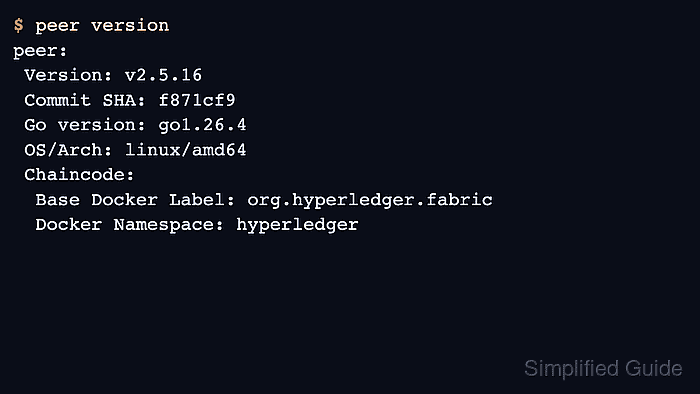
- Verify the Fabric peer binary.
$ peer version
peer:
 Version: v2.5.16
 Commit SHA: f871cf9
 Go version: go1.26.4
 OS/Arch: linux/amd64
 Chaincode:
  Base Docker Label: org.hyperledger.fabric
  Docker Namespace: hyperledger
The exact Fabric version, commit, Go version, and architecture reflect the release and host architecture selected by the installer.
- Verify that the Fabric peer image exists locally.
$ docker image ls hyperledger/fabric-peer
REPOSITORY                    TAG       IMAGE ID       CREATED        SIZE
hyperledger/fabric-peer       2.5       58979b65744b   2 weeks ago    215MB
hyperledger/fabric-peer       2.5.16    58979b65744b   2 weeks ago    215MB
hyperledger/fabric-peer       latest    58979b65744b   2 weeks ago    215MB
- Check whether SELinux is enforcing.
$ getenforce
Enforcing
If the result is Disabled or Permissive, no SELinux relabeling is needed for the local test network.
- On SELinux-enforcing hosts, relabel the sample-network bind mounts before the first test-network run.
# Apply the same pattern to the Fabric test-network compose files.
volumes:
  - ../organizations/peerOrganizations/org1.example.com/peers/peer0.org1.example.com:/etc/hyperledger/fabric:z
  - ${DOCKER_SOCK}:/host/var/run/docker.sock:z
security_opt:
  - label:disable
Add the :z suffix to the bind mounts in fabric-samples/test-network/compose/compose-ca.yaml, compose-test-net.yaml, and the active Docker or Podman compose file. Use security_opt: label:disable only on the peer services that mount the Docker socket.
- Change to the Fabric test network directory.
$ cd fabric-samples/test-network
- Start the test network and create the sample channel.
$ ./network.sh up createChannel
Using docker and docker compose
Creating channel 'mychannel'.
Bringing up network
LOCAL_VERSION=v2.5.16
DOCKER_IMAGE_VERSION=v2.5.16
##### snipped #####
Status: 201
{
        "name": "mychannel",
        "url": "/participation/v1/channels/mychannel",
        "consensusRelation": "consenter",
        "status": "active",
        "height": 1
}
Channel 'mychannel' joined
The sample network is for local learning and chaincode testing, not for production topology design.
Related: How to run the Hyperledger Fabric test network - Stop the test network after the smoke test.
$ ./network.sh down
Using docker and docker compose
Stopping network
Container peer0.org1.example.com Removed
Container peer0.org2.example.com Removed
Container orderer.example.com Removed
Network fabric_test Removed
Volume compose_orderer.example.com Removed
Volume compose_peer0.org1.example.com Removed
Volume compose_peer0.org2.example.com Removed
Run ./network.sh up createChannel again when the local Fabric lab is needed.

Mohd Shakir Zakaria is a cloud architect with deep roots in software development and open-source advocacy. Certified in AWS, Red Hat, VMware, ITIL, and Linux, he specializes in designing and managing robust cloud and on-premises infrastructures.


