Renewing a Hyperledger Fabric certificate replaces an expiring Fabric CA enrollment certificate in an existing MSP before the identity stops authenticating. It is a maintenance task for admin, client, peer, or orderer identities that were originally enrolled with Fabric CA.
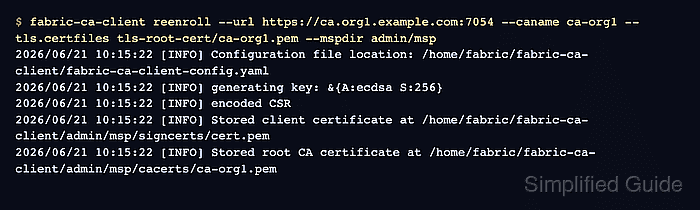
fabric-ca-client reenroll authenticates with the current MSP certificate and writes a new signed certificate into the selected MSP directory. The CA server keeps the identity record, while the client refreshes signcerts and may create a new private key under keystore unless key reuse is requested.
Run renewal before the current certificate expires. If the certificate is already expired, the CA server must allow expired-certificate reenrollment with ca.reenrollignorecertexpiry or the identity needs a new enrollment path through an authorized registrar.
Steps to renew a Fabric CA enrollment certificate:
- Inspect the certificate currently stored in the MSP directory.
$ openssl x509 -in admin/msp/signcerts/cert.pem -noout -subject -issuer -dates -serial
subject=C=US, ST=North Carolina, O=Hyperledger, OU=client, CN=admin
issuer=C=US, ST=North Carolina, O=Hyperledger, OU=Fabric, CN=fabric-ca-server
notBefore=Jun 21 09:42:00 2025 GMT
notAfter=Jun 21 09:42:00 2026 GMT
serial=549BFD4DAE9A4AEC1A27990DE0675BDA569AC9AC
Use the MSP path that the Fabric client, peer, or orderer actually uses. For a peer local MSP, this is the path configured as peer.mspConfigPath. For an orderer local MSP, it is General.LocalMSPDir.
- Back up the MSP directory before replacing certificate material.
$ cp -a admin/msp admin/msp.before-renewal
The renewed MSP may contain a new private key. Keep the backup until a Fabric command, node startup, or application connection has succeeded with the renewed MSP.
- Reenroll the identity into the same MSP directory.
$ fabric-ca-client reenroll --url https://ca.org1.example.com:7054 --caname ca-org1 --tls.certfiles tls-root-cert/ca-org1.pem --mspdir admin/msp
2026/06/21 10:15:22 [INFO] Configuration file location: /home/fabric/fabric-ca-client/fabric-ca-client-config.yaml
2026/06/21 10:15:22 [INFO] generating key: &{A:ecdsa S:256}
2026/06/21 10:15:22 [INFO] encoded CSR
2026/06/21 10:15:22 [INFO] Stored client certificate at /home/fabric/fabric-ca-client/admin/msp/signcerts/cert.pem
2026/06/21 10:15:22 [INFO] Stored root CA certificate at /home/fabric/fabric-ca-client/admin/msp/cacerts/ca-org1.pem
Omit --caname when the server has only the default CA. Add --csr.keyrequest.reusekey only when the deployment policy requires the existing private key to be reused.
- Inspect the renewed certificate in the MSP directory.
$ openssl x509 -in admin/msp/signcerts/cert.pem -noout -subject -issuer -dates -serial
subject=C=US, ST=North Carolina, O=Hyperledger, OU=client, CN=admin
issuer=C=US, ST=North Carolina, O=Hyperledger, OU=Fabric, CN=fabric-ca-server
notBefore=Jun 21 10:15:00 2026 GMT
notAfter=Jun 21 10:15:00 2027 GMT
serial=7AA491352FE32301B2E9B0E38DA16483617A382E
The subject and issuer should still match the intended identity and CA, while the serial number and validity window should reflect the renewed certificate.
Tool: SSL Certificate Decoder - Restart any peer or orderer process that keeps the renewed local MSP in memory.
$ docker compose restart peer0.org1.example.com
 Container peer0.org1.example.com Restarting
 Container peer0.org1.example.com Started
Use the service manager for the actual deployment, such as systemd, Kubernetes, or Docker Compose. Admin and client MSPs used by short-lived CLI commands normally take effect on the next command invocation.
- Run a CA-authenticated certificate lookup with the renewed MSP.
$ fabric-ca-client certificate list --id admin --notrevoked --notexpired --url https://ca.org1.example.com:7054 --caname ca-org1 --tls.certfiles tls-root-cert/ca-org1.pem --mspdir admin/msp
Certificate:
    Data:
        Serial Number: 7AA491352FE32301B2E9B0E38DA16483617A382E
        Issuer: C=US,ST=North Carolina,O=Hyperledger,OU=Fabric,CN=fabric-ca-server
        Validity
            Not Before: Jun 21 10:15:00 2026 UTC
            Not After : Jun 21 10:15:00 2027 UTC
        Subject: C=US,ST=North Carolina,O=Hyperledger,OU=client,CN=admin
##### snipped #####
The lookup may also show earlier unrevoked certificates for the same enrollment ID. The important check is that the renewed serial appears and the command succeeds with the renewed MSP.

Mohd Shakir Zakaria is a cloud architect with deep roots in software development and open-source advocacy. Certified in AWS, Red Hat, VMware, ITIL, and Linux, he specializes in designing and managing robust cloud and on-premises infrastructures.


