Homebrew services keep formula-provided daemons such as databases, cache servers, model servers, and local web servers running in the background under the active Homebrew prefix. Managing those daemons through brew services keeps the formula name, generated service file, and launch manager state aligned when a local service needs a planned stop, start, or restart.
On macOS, Homebrew sends service requests to launchctl. On Linux, it uses systemctl. Running the command as the normal Homebrew user creates user-level login services under ~/Library/LaunchAgents or ~/.config/systemd/user, while sudo brew services targets boot-level service locations and should be reserved for services that truly need that scope.
A service formula name is the required target, not a process name or executable path. After the Homebrew state is correct, confirm the daemon with its own client, socket, or port check because a registered service file does not prove the application is ready.
Steps to start and stop a Homebrew service:
- Open a terminal as the user that owns the Homebrew installation.
Use sudo brew services only when the service must run from the boot-level service manager. Running Homebrew services as root targets a different service location than the normal user command.
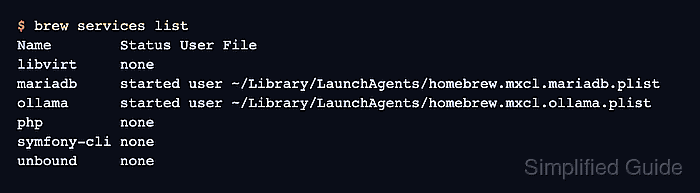
- List services known to the current Homebrew user.
$ brew services list
Name        Status User File
libvirt     none
mariadb     started user ~/Library/LaunchAgents/homebrew.mxcl.mariadb.plist
ollama      started user ~/Library/LaunchAgents/homebrew.mxcl.ollama.plist
php         none
symfony-cli none
unbound     none
started means Homebrew sees a running service. none means the formula has a service definition but no registered service for this user. stopped can appear when a registered service file is present but the daemon is not running.
- Inspect the target service before changing it.
$ brew services info mariadb
mariadb (homebrew.mxcl.mariadb)
Running: true
Loaded: true
Schedulable: false
User: user
PID: 1662
Replace mariadb with the formula name from the first column of brew services list, such as postgresql@16, redis, nginx, or ollama.
- Stop the service when the maintenance window is ready.
$ brew services stop mariadb
Stopping `mariadb`... (might take a while)
==> Successfully stopped `mariadb` (label: homebrew.mxcl.mariadb)
Stopping a database, web server, broker, or model server interrupts local clients using that service.
Default stop also unregisters the service from launching at login or boot. Use brew services stop --keep mariadb when the service should stop now but remain registered for the next login or boot.
- Confirm the service is no longer started.
$ brew services info mariadb
mariadb (homebrew.mxcl.mariadb)
Running: false
Loaded: false
Schedulable: false
After a default stop, brew services list commonly shows none for the formula because the service file has been unregistered. After stop --keep, a stopped but still registered service can show stopped instead.
- Start the service and register it at login.
$ brew services start mariadb
==> Successfully started `mariadb` (label: homebrew.mxcl.mariadb)
Use brew services run mariadb instead of start when the service should run now without being registered for the next login or boot.
- Confirm Homebrew sees the service as running.
$ brew services info mariadb
mariadb (homebrew.mxcl.mariadb)
Running: true
Loaded: true
Schedulable: false
User: user
PID: 1662
- Restart the service after a package upgrade or configuration change that needs a fresh daemon process.
$ brew services restart mariadb
Stopping `mariadb`... (might take a while)
==> Successfully stopped `mariadb` (label: homebrew.mxcl.mariadb)
==> Successfully started `mariadb` (label: homebrew.mxcl.mariadb)
restart stops the service if needed, starts it again, and registers it for login or boot. Use it when a changed service file, upgraded formula, or daemon configuration must be loaded by a new process.
- Run a service-specific readiness check.
$ mariadb-admin ping
mysqld is alive
Replace the mariadb-admin check with the normal client, socket, HTTP, or port check for the service formula. The final check should prove the application behind the Homebrew service is usable, not only that Homebrew created a service file.

Mohd Shakir Zakaria is a cloud architect with deep roots in software development and open-source advocacy. Certified in AWS, Red Hat, VMware, ITIL, and Linux, he specializes in designing and managing robust cloud and on-premises infrastructures.


