Long RAG prompts can contain relevant passages that a language model underuses when they fall near the center of the context. Haystack LostInTheMiddleRanker moves the strongest retrieved passages toward the prompt edges without assigning new relevance scores.
The component expects Document objects that are already ordered by a retriever or scoring ranker. Its top_k value limits how many documents enter the reordered result, while word_count_threshold can stop selection when their combined content reaches a word budget.
The ranker works entirely in memory and does not call a model or external service. It changes only document order, leaving each document's content and metadata available to PromptBuilder.
Steps to use the LostInTheMiddle ranker in Haystack:
- Create rank-context.py with the imports and pre-ranked document list.
$ cat > rank-context.py <<'PY' from haystack import Document from haystack.components.builders import PromptBuilder from haystack.components.rankers import LostInTheMiddleRanker documents = [ Document(content="Primary refund policy.", meta={"label": "rank-1"}), Document(content="Refund exception details.", meta={"label": "rank-2"}), Document(content="Account eligibility notes.", meta={"label": "rank-3"}), Document(content="Regional processing times.", meta={"label": "rank-4"}), Document(content="Supporting billing context.", meta={"label": "rank-5"}), Document(content="Archived policy background.", meta={"label": "rank-6"}), ] PY - Append the LostInTheMiddleRanker stage with a six-document output limit.
$ cat >> rank-context.py <<'PY'

ranker = LostInTheMiddleRanker(top_k=6)
ranked_documents = ranker.run(documents=documents)["documents"]
PY
The input order must already represent relevance. In a Pipeline, the upstream retriever or scoring ranker's documents output belongs on this component's documents input.
- Append the PromptBuilder stage that consumes the reordered documents.
$ cat >> rank-context.py <<'PY' template = """{% for document in documents %}[{{ document.meta.label }}] {{ document.content }} {% endfor %}""" builder = PromptBuilder(template=template, required_variables=["documents"]) prompt = builder.run(documents=ranked_documents)["prompt"] PY - Append an edge assertion and the prompt-order output.
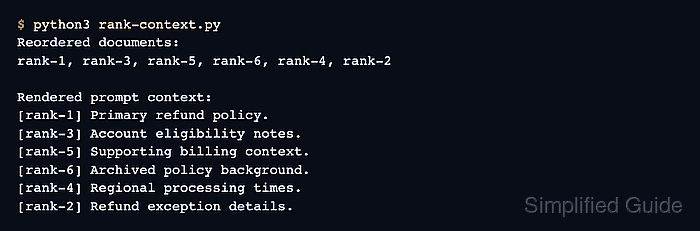
$ cat >> rank-context.py <<'PY' labels = [document.meta["label"] for document in ranked_documents] assert labels[0] == "rank-1" and labels[-1] == "rank-2" print("Reordered documents:") print(", ".join(labels)) print("\nRendered prompt context:") print(prompt) PY - Run rank-context.py to verify the strongest two passages occupy opposite prompt edges.
$ python3 rank-context.py
Reordered documents:
rank-1, rank-3, rank-5, rank-6, rank-4, rank-2

Rendered prompt context:
[rank-1] Primary refund policy.
[rank-3] Account eligibility notes.
[rank-5] Supporting billing context.
[rank-6] Archived policy background.
[rank-4] Regional processing times.
[rank-2] Refund exception details.

Mohd Shakir Zakaria is a cloud architect with deep roots in software development and open-source advocacy. Certified in AWS, Red Hat, VMware, ITIL, and Linux, he specializes in designing and managing robust cloud and on-premises infrastructures.


