Structured exports often reach a Haystack project as JSON arrays, API responses, or knowledge-base records rather than plain text files. Converting those records into Document objects gives the indexing pipeline a content field to embed or search and metadata fields to filter later.
JSONConverter reads JSON sources and uses a jq filter to choose the records that should become documents. The content_key value becomes each document's content, while extra_meta_fields copies selected fields into document metadata.
The converter skips objects that do not match the configured shape, so the record selector and content key should be checked with a small fixture before running it on a large export. A short output check should show the expected document count, one content value per record, and the metadata fields needed by the retriever or document store.
Steps to convert JSON files to Haystack documents:
- Install the optional jq dependency in the Python environment that runs Haystack.
$ python -m pip install jq
Collecting jq
##### snipped #####
Successfully installed jq-1.11.0
JSONConverter imports the Python jq package when it is initialized. Install haystack-ai first if the project environment does not already import haystack.
Related: How to install Haystack with pip - Save a JSON fixture with the records to convert.
- faq-records.json
{
  "records": [
    {
      "question": "How do I reset SSO access?",
      "answer": "Open the identity portal and choose Reset password.",
      "category": "account",
      "source": "helpdesk"
    },
    {
      "question": "When is the search index rebuilt?",
      "answer": "The index is rebuilt after content imports finish.",
      "category": "search",
      "source": "runbook"
    }
  ]
}
For a wrapped API export, the jq_schema value should select the array items rather than wrapper fields such as pagination or status data. The example records live under records.
- Create the converter script.
- json_to_documents.py
from pathlib import Path

from haystack.components.converters import JSONConverter


converter = JSONConverter(
    jq_schema=".records[]",
    content_key="answer",
    extra_meta_fields={"question", "category", "source"},
)

result = converter.run(sources=[Path("faq-records.json")])
documents = result["documents"]

print(f"documents: {len(documents)}")
for number, document in enumerate(documents, start=1):
    print(f"{number}. content: {document.content}")
    print(f"   question: {document.meta['question']}")
    print(f"   category: {document.meta['category']}")
    print(f"   source: {document.meta['source']}")
Use extra_meta_fields=“*” only when every non-content field is safe and useful as metadata. A small named set avoids copying large payload fields or private values by accident.
- Run the converter script.
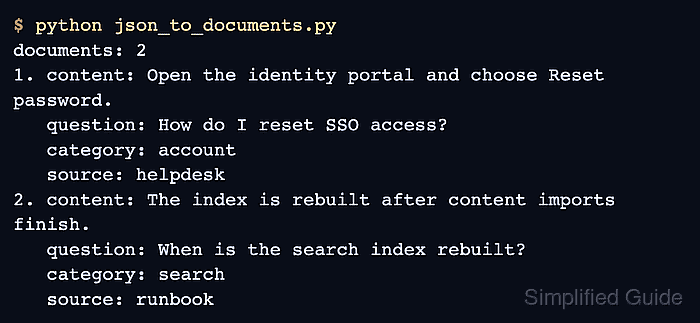
$ python json_to_documents.py
documents: 2
1. content: Open the identity portal and choose Reset password.
   question: How do I reset SSO access?
   category: account
   source: helpdesk
2. content: The index is rebuilt after content imports finish.
   question: When is the search index rebuilt?
   category: search
   source: runbook
- Check that the output matches the intended mapping.
The documents: 2 line confirms the jq_schema selected both records. Each content line comes from answer, and the question, category, and source lines confirm metadata extraction.
- Remove the sample fixture and script after copying the pattern into the indexing pipeline.
$ rm faq-records.json json_to_documents.py

Mohd Shakir Zakaria is a cloud architect with deep roots in software development and open-source advocacy. Certified in AWS, Red Hat, VMware, ITIL, and Linux, he specializes in designing and managing robust cloud and on-premises infrastructures.


