Text converters often preserve page headers, footer labels, page numbers, and layout spacing alongside the words that belong in search results. Haystack DocumentCleaner can remove that noise before splitting or indexing while keeping each Document object in the preprocessing flow.
Repeated-page-text detection depends on form-feed-separated pages, and DocumentCleaner performs broad whitespace cleanup before it looks for shared headers and footers. A first pass can therefore preserve the page boundaries while removing repeated text, leaving a second pass to normalize the remaining content.
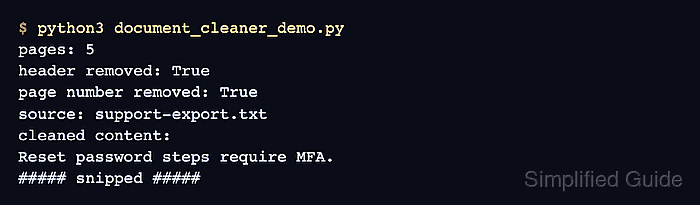
Broad whitespace cleanup suits plain text but can flatten headings, lists, and tables produced by Markdown converters. The sample targets plain-text converter output and proves that five page boundaries plus the original source metadata survive the cleanup.
Steps to clean Haystack documents with DocumentCleaner:
- Create document_cleaner_demo.py with the imports and five source pages.
- document_cleaner_demo.py
from haystack import Document
from haystack.components.preprocessors import DocumentCleaner


pages = [
    "ACME SUPPORT EXPORT\nInternal footer text\n\n Reset   password steps require MFA. \nPage 1 of 5",
    "ACME SUPPORT EXPORT\nInternal footer text\n\n Account   recovery requests need ticket ID. \nPage 2 of 5",
    "ACME SUPPORT EXPORT\nInternal footer text\n\n Billing   export requests go to finance. \nPage 3 of 5",
    "ACME SUPPORT EXPORT\nInternal footer text\n\n Security   questions are deprecated. \nPage 4 of 5",
    "ACME SUPPORT EXPORT\nInternal footer text\n\n Profile   update requests need email proof. \nPage 5 of 5",
]
The haystack-ai package must already be installed in the active Python environment.
Related: How to install Haystack with pip - Append a Document object below the pages list.
raw_document = Document(
    content="\f".join(pages),
    meta={"source": "support-export.txt"},
)
The form-feed character preserves the five page boundaries required by repeated-header and repeated-footer detection.
- Append the layout-preserving cleaner below raw_document.
layout_cleaner = DocumentCleaner(
    remove_repeated_substrings=True,
    remove_extra_whitespaces=False,
    remove_empty_lines=False,
)
layout_result = layout_cleaner.run(documents=[raw_document])
Disabling whitespace and empty-line cleanup in this pass leaves the form-feed structure available until exact repeated page text has been removed.
- Append the text-normalization cleaner below layout_result.
text_cleaner = DocumentCleaner(
    remove_empty_lines=True,
    remove_extra_whitespaces=True,
    remove_substrings=["Internal footer text"],
    remove_regex=r"Page \d+ of \d+",
    strip_whitespaces=True,
)
cleaned_result = text_cleaner.run(documents=layout_result["documents"])
remove_substrings removes the fixed footer label, while remove_regex removes page numbers whose digits vary between pages.
- Append the cleanup checks below cleaned_result.
cleaned_document = cleaned_result["documents"][0]
print(f"pages: {len(cleaned_document.content.split(chr(12)))}")
print(f"header removed: {'ACME SUPPORT EXPORT' not in cleaned_document.content}")
print(f"page number removed: {'Page 1 of 5' not in cleaned_document.content}")
print(f"source: {cleaned_document.meta['source']}")
print("cleaned content:")
print(cleaned_document.content.replace("\f", "\n--- page break ---\n"))
- Run the completed cleaner program to verify cleaned page content and retained source metadata.
$ python3 document_cleaner_demo.py
pages: 5
header removed: True
page number removed: True
source: support-export.txt
cleaned content:
Reset password steps require MFA.
--- page break ---
Account recovery requests need ticket ID.
--- page break ---
Billing export requests go to finance.
--- page break ---
Security questions are deprecated.
--- page break ---
Profile update requests need email proof.
A successful run reports five pages, two True removal checks, and support-export.txt before printing only the retained page text.
Related: How to write documents with DocumentWriter in Haystack
Related: How to create an in-memory document store in Haystack

Mohd Shakir Zakaria is a cloud architect with deep roots in software development and open-source advocacy. Certified in AWS, Red Hat, VMware, ITIL, and Linux, he specializes in designing and managing robust cloud and on-premises infrastructures.


