Retrieval and answer pipelines often need to treat a quick question differently from a long, multi-part request. ConditionalRouter in Haystack checks pipeline data against ordered conditions and publishes the output of the first matching route, so a short query and a long query leave on separate paths with their text intact.
A single-output route pairs a Jinja2 condition with an output template, an output name, and an output type. The output names become the router's output sockets, so Pipeline.connect() wires them to downstream components.
Only the selected route publishes a value, so the component waiting on the other output does not run. That differs from a fan-out branch, which sends the same value to more than one component. A query length check also needs no model, API key, or document store, so the routing can be proved before a generator is attached to either path.
Steps to use ConditionalRouter in Haystack:
- Create a file named query_length_router.py in your text editor with the pipeline imports.
- query_length_router.py
from haystack import Pipeline
from haystack.components.builders import PromptBuilder
from haystack.components.routers import ConditionalRouter
The code was run with Python 3.12 and haystack-ai 3.4.1, which requires Python 3.11 or later.
- Add the short-query route below the imports.
short_route = {
    "condition": "{{ query|length <= 20 }}",
    "output": "{{ query }}",
    "output_name": "short_query",
    "output_type": str,
}
condition selects the route when it evaluates to true. output is the value to publish, output_name becomes the router's output socket, and output_type declares that socket's type. The length filter counts characters, so a query of exactly 20 characters stays on this route.
- Add the fallback route for longer queries below short_route.
long_route = {
    "condition": "{{ True }}",
    "output": "{{ query }}",
    "output_name": "long_query",
    "output_type": str,
}
This condition is always true, so the route takes every query that an earlier route did not select.
- Create the router below long_route with the short-query route listed first.
router = ConditionalRouter(routes=[short_route, long_route])
Routes are checked in list order and the first true condition wins, so listing long_route first would send every query to long_query. A run that matches no route raises NoRouteSelectedException, which the fallback route prevents.
- Add a prompt builder for each path below the router.
short_prompt = PromptBuilder(
    template="Answer briefly: {{ query }}",
)
long_prompt = PromptBuilder(
    template="Outline: {{ query }}",
)
Each template shapes the query for its own path without calling a model, and its prompt output can feed a generator.
- Register the router and both prompt builders in a new pipeline below the prompt builders.
pipeline = Pipeline()
pipeline.add_component("router", router)
pipeline.add_component("short_prompt", short_prompt)
pipeline.add_component("long_prompt", long_prompt)
- Connect each named router output to its prompt builder below the component registrations.
pipeline.connect("router.short_query", "short_prompt.query")
pipeline.connect("router.long_query", "long_prompt.query")
The name after router. must match an output_name value, otherwise connect() raises PipelineConnectError.
- Add one short and one long test query below the connections.
queries = [
    "What is a pipeline?",
    "Compare BM25 and embeddings",
]
- Add the pipeline run loop below the test queries.
for query in queries:
    result = pipeline.run(
        {"router": {"query": query}},
        include_outputs_from={"router"},
    )
    for name, output in result.items():
        print(f"{name}: {output}")
A connected output is passed to the next component and normally left out of the result, so include_outputs_from keeps the router's named output visible.
- Save query_length_router.py.
- Run query_length_router.py from the Python environment that has haystack-ai installed.
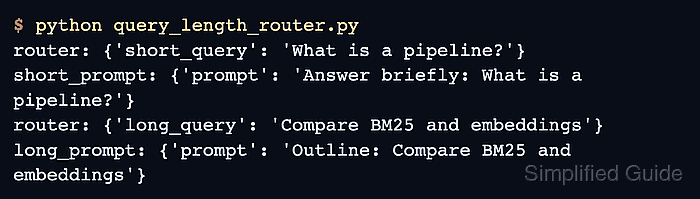
$ python query_length_router.py
router: {'short_query': 'What is a pipeline?'}
short_prompt: {'prompt': 'Answer briefly: What is a pipeline?'}
router: {'long_query': 'Compare BM25 and embeddings'}
long_prompt: {'prompt': 'Outline: Compare BM25 and embeddings'}
The router lines show short_query for the first query and long_query for the second, each carrying the original text. Only the matching prompt builder appears after each router line, because the other path did not run.