A tool-calling agent can turn a model's request into an external action before anyone has reviewed it. Human approval in a Haystack agent pauses a selected tool call so an operator can reject it before execution or approve its arguments.
ConfirmationHook applies that decision at the before_tool hook point. A blocking strategy with AlwaysAskPolicy asks on each call to the mapped tool, including repeated calls with the same arguments. Tools without a matching strategy remain outside that approval control.
Console approval suits an agent running with an operator at its terminal. A deterministic generator and an in-memory tool make it possible to check rejection and approval without a model account, API key, or external change. The invocation count distinguishes a skipped call from a call that actually ran.
Steps to add human approval to a Haystack agent:
- Install Haystack 3.4.1 in an activated Python 3.12 environment.
$ python -m pip install "haystack-ai==3.4.1"
The code uses the Haystack 3 hook API. Python 3.12 and Haystack 3.4.1 were used for the run shown here.
- Create a file named approval_demo.py in your text editor.
The file builds a local approval check before the hook is attached to a tool with external effects.
- Enter the imports and the in-memory tool in approval_demo.py.
from haystack import component
from haystack.components.agents import Agent
from haystack.dataclasses import ChatMessage, ToolCall
from haystack.hooks.human_in_the_loop import (
    AlwaysAskPolicy,
    BlockingConfirmationStrategy,
    ConfirmationHook,
    SimpleConsoleUI,
)
from haystack.tools import tool

invocations = []

@tool
def record_action(label: str) -> str:
    """Record a label in memory."""
    invocations.append(label)
    return f"Recorded {label}"
The list changes only inside the tool function. A returned rejection message alone cannot increase its length.
- Append a generator that requests the same tool call at the start of each run.
@component
class RequestGenerator:
    @component.output_types(replies=list[ChatMessage])
    def run(self, messages: list[ChatMessage], tools=None):
        if len(messages) == 1:
            reply = ChatMessage.from_assistant(tool_calls=[
                ToolCall(
                    tool_name="record_action",
                    arguments={"label": "approval-demo"},
                    id="record-1",
                )
            ])
        else:
            reply = ChatMessage.from_assistant(
                "Request finished."
            )
        return {"replies": [reply]}
This generator supplies a known request rather than calling a language model. It stops requesting tools after the agent adds the decision or tool result to the conversation.
- Append the approval strategy and its tool-name mapping.
strategy = BlockingConfirmationStrategy(
    confirmation_policy=AlwaysAskPolicy(),
    confirmation_ui=SimpleConsoleUI(),
)
confirmation = ConfirmationHook(
    confirmation_strategies={"record_action": strategy},
)
The mapping must match the registered tool's name. A tool omitted from this mapping has no approval strategy here. For a real tool, approval permits its side effects; rejection does not undo earlier actions. Arguments injected from agent state are not shown by this confirmation UI, so a prompt alone does not review those values.
- Append the agent constructor with the confirmation hook registered before tool execution.
agent = Agent(
    chat_generator=RequestGenerator(),
    tools=[record_action],
    hooks={"before_tool": [confirmation]},
)
For an existing agent, the configured chat generator and tools remain in place. The confirmation hook belongs in its existing before_tool list, and its strategy mapping names the sensitive tool. SimpleConsoleUI needs interactive terminal input; a web service needs an approval interface appropriate to its request handling.
- Append two agent runs that display the invocation count and tool response.
for attempt in (1, 2):
    print(f"Request {attempt}")
    result = agent.run(messages=[
        ChatMessage.from_user("Record approval-demo.")
    ])
    print("Tool invocations:", len(invocations))
    for message in result["messages"]:
        for tool_result in message.tool_call_results:
            print(tool_result.result)
- Save approval_demo.py.
- Run approval_demo.py from its directory.
$ python approval_demo.py
- Reject request 1 by entering n at the confirmation prompt.
Confirm execution? (y=confirm / n=reject / m=modify): n
Feedback message (optional):
- Leave the optional feedback empty by pressing Enter.
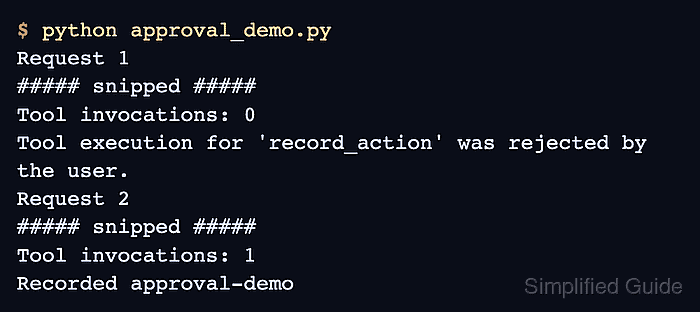
Tool invocations: 0
Tool execution for 'record_action' was rejected by the user.
The zero count shows that the rejected request did not enter the tool function.
- Approve request 2 by entering y at the confirmation prompt.
Request 2

--- Tool Execution Request ---
Tool: record_action
Description: Record a label in memory.
Arguments:
  label: approval-demo
------------------------------
Confirm execution? (y=confirm / n=reject / m=modify): y
- Verify that the invocation count is 1 and the tool result contains the approved label.
Tool invocations: 1
Recorded approval-demo
A count of 1 after rejection followed by approval shows that only the approved call ran. A different count or a missing result means the approval behavior has not been established.