Taking one HAProxy backend server out for patching or a restart should move new requests away from that server without making the whole service unavailable. The Runtime API drain state is the right boundary when the server should keep health checks while the rest of the backend pool continues serving users.
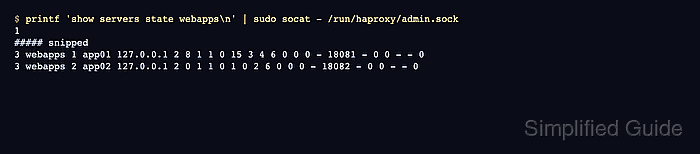
The runtime command changes the running HAProxy process, not /etc/haproxy/haproxy.cfg. Use set server <backend>/<server> state drain for the maintenance target, then use show servers state <backend> and a real request through the listener to confirm that ordinary requests are going elsewhere.
Runtime API changes are memory-only unless server-state preservation is configured before reloads. Avoid reloading HAProxy during the maintenance window, or save and load server state deliberately, and confirm the remaining backend pool can handle normal traffic before taking a busy server out.
Steps to drain an HAProxy backend server for maintenance:
- Confirm the backend and server names that HAProxy already uses for the maintenance target.
- /etc/haproxy/haproxy.cfg
global
    stats socket /run/haproxy/admin.sock mode 660 level admin

frontend web
    bind 127.0.0.1:8080
    default_backend webapps

backend webapps
    balance roundrobin
    option httpchk GET /
    server app01 127.0.0.1:18081 check
    server app02 127.0.0.1:18082 check
The examples below drain webapps/app01 through a UNIX socket at /run/haproxy/admin.sock. Replace webapps, app01, the socket path, and the test URL with values from your running configuration. Related: How to enable the HAProxy runtime socket
- Validate the HAProxy configuration before applying any socket or backend-name change needed for the maintenance window.
$ sudo haproxy -c -V -f /etc/haproxy/haproxy.cfg
Configuration file is valid
Current HAProxy can exit successfully from haproxy -c -f without printing a success line. Add -V when a visible transcript is needed, and make automation check the command exit status.
- Check the current server state before draining the target.
$ printf 'show servers state webapps\n' | sudo socat - /run/haproxy/admin.sock
1
# be_id be_name srv_id srv_name srv_addr srv_op_state srv_admin_state srv_uweight srv_iweight srv_time_since_last_change srv_check_status srv_check_result srv_check_health srv_check_state srv_agent_state bk_f_forced_id srv_f_forced_id srv_fqdn srv_port srvrecord srv_use_ssl srv_check_port srv_check_addr srv_agent_addr srv_agent_port
3 webapps 1 app01 127.0.0.1 2 0 1 1 0 15 3 4 6 0 0 0 - 18081 - 0 0 - - 0
3 webapps 2 app02 127.0.0.1 2 0 1 1 0 1 0 2 6 0 0 0 - 18082 - 0 0 - - 0
In this output, srv_op_state value 2 means the server is running, and srv_admin_state value 0 means no forced drain or maintenance bit is set. Match values by the header line because this state dump is a versioned format.
- Send a normal request through the HAProxy listener before the drain so the baseline route is known.
$ curl http://127.0.0.1:8080/
app02

$ curl http://127.0.0.1:8080/
app01
Use the real service URL, not a direct backend URL. If the target server is already absent from normal traffic, pause the maintenance and inspect health checks, weights, sticky-session rules, or recent runtime changes first.
- Put the target server into drain state through the runtime socket.
$ printf 'set server webapps/app01 state drain\n' | sudo socat - /run/haproxy/admin.sock
The drain state stops regular new traffic and keeps health checks running. Use maint only when the server should receive no regular traffic and no health checks.
- Confirm that the server is now explicitly drained.
$ printf 'show servers state webapps\n' | sudo socat - /run/haproxy/admin.sock
1
# be_id be_name srv_id srv_name srv_addr srv_op_state srv_admin_state srv_uweight srv_iweight srv_time_since_last_change srv_check_status srv_check_result srv_check_health srv_check_state srv_agent_state bk_f_forced_id srv_f_forced_id srv_fqdn srv_port srvrecord srv_use_ssl srv_check_port srv_check_addr srv_agent_addr srv_agent_port
3 webapps 1 app01 127.0.0.1 2 8 1 1 0 15 3 4 6 0 0 0 - 18081 - 0 0 - - 0
3 webapps 2 app02 127.0.0.1 2 0 1 1 0 1 0 2 6 0 0 0 - 18082 - 0 0 - - 0
In the srv_admin_state column, decimal 8 is the 0x08 forced-drain bit. The server still shows srv_op_state 2 because it is up and being checked, but it is no longer selected for ordinary new load-balanced requests.
- Verify that new requests go to another backend before touching the server under maintenance.
$ curl http://127.0.0.1:8080/
app02

$ curl http://127.0.0.1:8080/
app02

$ curl http://127.0.0.1:8080/
app02
Draining does not forcibly close every connection that already exists. If the application uses long-lived sessions, WebSockets, sticky cookies, or connection reuse, confirm from application logs, HAProxy stats, or connection tracking that the target is quiet enough before restarting it.
- Complete the server maintenance while the target remains drained.
Keep the drain state in place until the application on app01 has finished patching, restarting, warmup, cache fill, or any service-specific readiness check. Do not reload HAProxy during this period unless server-state preservation is already configured.
- Return the server to normal service after maintenance is complete.
$ printf 'set server webapps/app01 state ready\n' | sudo socat - /run/haproxy/admin.sock
- Confirm that the drain bit is gone and traffic can reach the restored server again.
$ printf 'show servers state webapps\n' | sudo socat - /run/haproxy/admin.sock
1
# be_id be_name srv_id srv_name srv_addr srv_op_state srv_admin_state srv_uweight srv_iweight srv_time_since_last_change srv_check_status srv_check_result srv_check_health srv_check_state srv_agent_state bk_f_forced_id srv_f_forced_id srv_fqdn srv_port srvrecord srv_use_ssl srv_check_port srv_check_addr srv_agent_addr srv_agent_port
3 webapps 1 app01 127.0.0.1 2 0 1 1 0 15 3 4 6 0 0 0 - 18081 - 0 0 - - 0
3 webapps 2 app02 127.0.0.1 2 0 1 1 0 1 0 2 6 0 0 0 - 18082 - 0 0 - - 0

$ curl http://127.0.0.1:8080/
app02

$ curl http://127.0.0.1:8080/
app01
Round-robin order can differ by traffic history, connection reuse, and algorithm. The successful restore signal is that app01 no longer has the forced-drain admin bit and can receive normal traffic again.

Mohd Shakir Zakaria is a cloud architect with deep roots in software development and open-source advocacy. Certified in AWS, Red Hat, VMware, ITIL, and Linux, he specializes in designing and managing robust cloud and on-premises infrastructures.


