A sed replacement is useful when a hostname, path, label, or setting appears in local text files and the edit must be repeatable from the terminal. A careless in-place command can rewrite too much or leave no restore path, so preview the substitution first and keep a backup while changing real files.
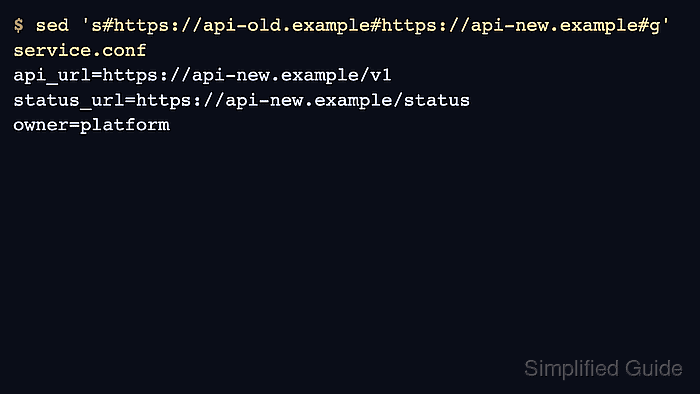
The substitution command uses the form s#old#new#g in these examples. The # delimiter keeps URL-style text readable without escaping every slash, and the final g flag replaces every matching occurrence on each line instead of only the first one.
Use sed -i.bak when saving the replacement back to the same files. The attached .bak suffix creates a backup beside each edited file and avoids the GNU sed versus BSD/macOS sed difference around no-backup in-place edits.
Steps to replace text in files with sed:
- Work from files whose target text has already been identified.
- service.conf
api_url=https://api-old.example/v1
status_url=https://api-old.example/status
owner=platform
- worker.conf
api_url=https://api-old.example/worker
queue=default
Use copies while testing a broad replacement. Once the pattern is confirmed, run the same command against the real files.
- Preview the replacement against one file without changing it.
$ sed 's#https://api-old.example#https://api-new.example#g' service.conf
api_url=https://api-new.example/v1
status_url=https://api-new.example/status
owner=platform
The command prints the changed text to the terminal because it does not use -i. If the preview changes the wrong text, stop here and narrow the search string.
Related: How to preview replacements with sed
- Apply the replacement in place with a backup suffix.
$ sed -i.bak 's#https://api-old.example#https://api-new.example#g' service.conf worker.conf
The -i.bak form creates service.conf.bak and worker.conf.bak before saving the edited files. Keep the suffix attached to -i so the command works on both GNU sed and BSD/macOS sed.
In the replacement side of a sed substitution, & expands to the matched text and backslashes can change the replacement. Preview first when the new value contains either character.
- Confirm the edited files contain the new value.
$ grep -n 'api-new.example' service.conf worker.conf
service.conf:1:api_url=https://api-new.example/v1
service.conf:2:status_url=https://api-new.example/status
worker.conf:1:api_url=https://api-new.example/worker
- Check that the old value is gone from the edited files.
$ grep -n 'api-old.example' service.conf worker.conf
No output means grep did not find the old hostname in the edited files.
- Review the backups before deleting them.
$ grep -n 'api-old.example' service.conf.bak worker.conf.bak
service.conf.bak:1:api_url=https://api-old.example/v1
service.conf.bak:2:status_url=https://api-old.example/status
worker.conf.bak:1:api_url=https://api-old.example/worker
If the replacement was too broad, restore a file with cp service.conf.bak service.conf and rerun sed with a narrower search string.
Tool: Text Diff Comparator can compare an edited file with its .bak copy before the backup is deleted.

Mohd Shakir Zakaria is a cloud architect with deep roots in software development and open-source advocacy. Certified in AWS, Red Hat, VMware, ITIL, and Linux, he specializes in designing and managing robust cloud and on-premises infrastructures.


