Configuration reviews need active values, not commented examples or blank spacing around them. A short grep, sed, and awk pipeline can turn simple key-value files into a compact audit table before comparing environments or handing settings to another operator.
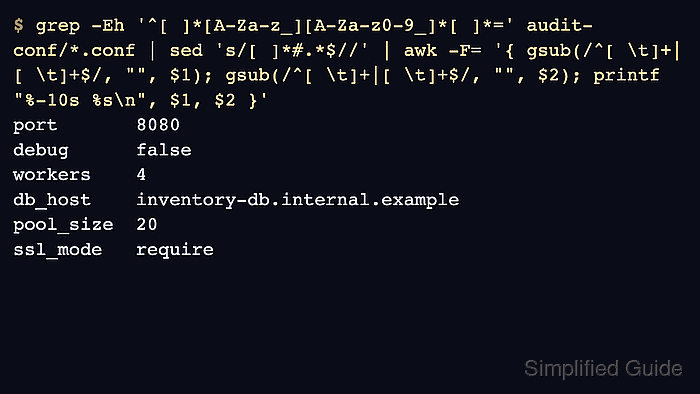
The command targets plain text configuration files where active settings use key = value or key=value. grep selects assignment lines that start with a key, sed removes inline comments, and awk trims whitespace around each key and value before printing an aligned list.
Use the pipeline for simple INI-style or application config snippets where # starts a comment and values do not need a format-aware parser. Use the application's own config dump or a parser such as python, jq, or yq when values can contain quoted # characters, nested blocks, arrays, YAML indentation, or JSON.
Steps to audit configuration values with grep, awk, and sed:
- Create a small directory for sample configuration files.
$ mkdir -p audit-conf
- Add a sample application config with active settings, a commented example, a blank line, and an inline comment.
- audit-conf/app.conf
# Example application settings
port = 8080
# port = 9000
debug = false

workers=4 # active worker count
- Add a second config file so the audit reads more than one source file.
- audit-conf/database.conf
# Database settings
db_host = inventory-db.internal.example
# db_host = staging-db.internal.example
pool_size = 20
ssl_mode = require
- Print active assignments as an audit table.
$ grep -Eh '^[ ]*[A-Za-z_][A-Za-z0-9_]*[ ]*=' audit-conf/*.conf \
  | sed 's/[ ]*#.*$//' \
  | awk -F= '{ gsub(/^[ \t]+|[ \t]+$/, "", $1); gsub(/^[ \t]+|[ \t]+$/, "", $2); printf "%-10s %s\n", $1, $2 }'
port       8080
debug      false
workers    4
db_host    inventory-db.internal.example
pool_size  20
ssl_mode   require
grep -Eh prints only assignment lines and hides file names. sed removes anything after # on those lines. awk -F= splits each remaining line at the equals sign, trims surrounding whitespace, and prints the key beside its value.
- Confirm that the table contains only active settings. The output should include port 8080, workers 4, and db_host inventory-db.internal.example, while the commented port = 9000 and staging-db.internal.example examples should be absent.
Do not paste real secrets from production config files into tickets, articles, or shared chat. Redact passwords, tokens, and private endpoints before sharing an audit table.
- Run the same pattern against real files by changing the glob after the command. For example, use /etc/myapp/*.conf when those files use the same simple key=value syntax.
If the application provides a command that prints the active runtime configuration, prefer that command for final verification because it can include defaults, includes, environment overrides, and generated settings that are not visible in one file.
- Remove the sample directory after testing.
$ rm -r audit-conf

Mohd Shakir Zakaria is a cloud architect with deep roots in software development and open-source advocacy. Certified in AWS, Red Hat, VMware, ITIL, and Linux, he specializes in designing and managing robust cloud and on-premises infrastructures.


