A Logstash syslog input gives network devices, appliances, and Linux hosts a direct listener for RFC3164-style syslog messages. It helps when routers, firewalls, switches, or servers can forward syslog but cannot run Filebeat or another local collector.
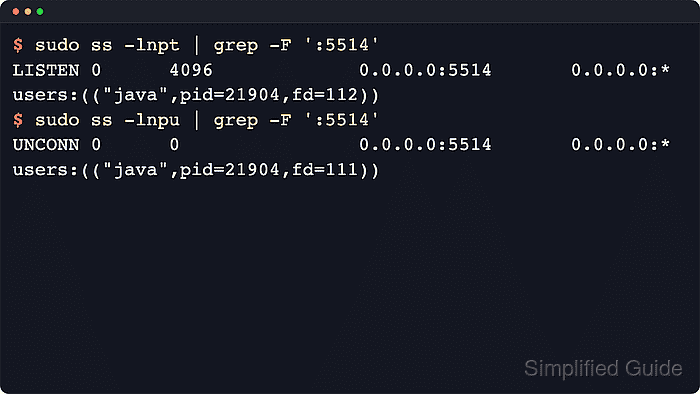
The syslog input plugin parses the priority header, timestamp, host, and program name, then emits a Logstash event for the rest of the pipeline. It starts both TCP and UDP listeners on the configured port, and ecs_compatibility decides whether parsed fields use ECS paths such as [log][syslog][priority] or legacy root fields such as priority.
Package-based installs normally load pipeline files from the path named in /etc/logstash/pipelines.yml, often /etc/logstash/conf.d/*.conf. Start validation on an unprivileged port such as 5514, guard any temporary stdout output so it prints only events from the new syslog input, and expose the listener to remote senders only after the parser and firewall rules are confirmed.
Related: How to configure a Logstash TCP input
Related: How to configure a Logstash UDP input
Tool: Syslog Severity Mix Analyzer
Steps to configure a Logstash syslog input:
- Confirm the active package pipeline manifest.
$ sudo cat /etc/logstash/pipelines.yml
# This file is where you define your pipelines. You can define multiple.
# For more information on multiple pipelines, see the documentation:
#   https://www.elastic.co/guide/en/logstash/current/multiple-pipelines.html

- pipeline.id: main
  path.config: "/etc/logstash/conf.d/*.conf"
Use the path.config value from this file when the host uses a custom pipeline ID, a different directory, or more than one pipeline.
- Confirm that the planned syslog port is free on both transports.
$ sudo ss --no-header --listening --numeric --tcp --udp 'sport = :5514'
No output means no TCP or UDP listener is currently bound to port 5514.
The syslog input opens both transports on the same port. Ports below 1024, including 514, are privileged and can prevent package-managed Logstash from starting as the non-root logstash user.
- Create a dedicated syslog input pipeline file.
input {
  syslog {
    id => "syslog_main_5514"
    host => "0.0.0.0"
    port => 5514
    ecs_compatibility => "v8"
    add_field => { "[@metadata][input_id]" => "syslog_main_5514" }
  }
}

output {
  if [@metadata][input_id] == "syslog_main_5514" {
    stdout {
      id => "stdout_syslog_debug"
      codec => rubydebug
    }
  }
}
The stdout output is a validation output. The [@metadata][input_id] guard keeps it from printing unrelated events when package installs concatenate several files into one pipeline.
Related: How to configure a Logstash stdout outputBinding to 0.0.0.0 accepts syslog from every reachable interface. Restrict the port with host firewall rules or bind to a specific service address when only one network should reach the listener.
- Test the pipeline file with the packaged settings directory and a temporary data path.
$ sudo -u logstash /usr/share/logstash/bin/logstash \
  --path.settings /etc/logstash \
  --path.data /tmp/logstash-syslog-configtest \
  --config.test_and_exit \
  -f /etc/logstash/conf.d/20-syslog-input.conf
Using bundled JDK: /usr/share/logstash/jdk
[2026-06-18T20:20:31,429][WARN ][logstash.config.source.multilocal] Ignoring the 'pipelines.yml' file because command line options are specified
##### snipped
[2026-06-18T20:20:31,845][INFO ][logstash.javapipeline    ][main] Pipeline `main` is configured with `pipeline.ecs_compatibility: v8` setting.
Configuration OK
[2026-06-18T20:20:31,846][INFO ][logstash.runner          ] Using config.test_and_exit mode. Config Validation Result: OK. Exiting Logstash
The temporary --path.data directory must be writable by the logstash user and keeps the validation away from the service data directory. The /etc/logstash/pipelines.yml warning is expected because -f validates only the file passed on the command line.
--config.test_and_exit validates syntax and plugin settings only. It does not prove sender traffic, firewall reachability, custom grok parsing, or a production output.
- Restart Logstash so the service loads the syslog input.
$ sudo systemctl restart logstash.service
Restarting Logstash briefly pauses every active pipeline while inputs reopen and outputs reconnect.
- Confirm that the service returned to the running state.
$ systemctl is-active logstash.service
active
If the command returns failed or stays in activating too long, inspect the Logstash journal before sending test syslog traffic.
- Confirm that both syslog listeners opened on port 5514.
$ sudo journalctl --unit=logstash.service --since "5 minutes ago" --no-pager
Jun 18 20:14:36 logstash-01 logstash[21437]: [INFO ][logstash.inputs.syslog][main][syslog_main_5514] Starting syslog udp listener {address: "0.0.0.0:5514"}
Jun 18 20:14:36 logstash-01 logstash[21437]: [INFO ][logstash.inputs.syslog][main][syslog_main_5514] Starting syslog tcp listener {address: "0.0.0.0:5514"}
If only one transport should be exposed, use the dedicated tcp or udp input instead of the syslog input.
- Send a test RFC3164 syslog message to the listener.
$ logger --rfc3164 --server 127.0.0.1 --port 5514 --udp --tag logstash-test "syslog input test"
Replace 127.0.0.1 with the Logstash host address when testing from another sender, or add --tcp and remove --udp when the real sender uses TCP.
- Query the Logstash pipeline stats API and confirm the named syslog input handled the event.
$ curl --silent --show-error 'http://127.0.0.1:9600/_node/stats/pipelines/main?pretty'
{
  "pipelines" : {
    "main" : {
      "events" : {
        "in" : 1,
        "filtered" : 1,
        "out" : 1
      },
      "plugins" : {
        "inputs" : [ {
          "id" : "syslog_main_5514",
          "name" : "syslog",
          "messages_received" : 1,
          "events" : {
            "out" : 1
          }
        } ],
        "outputs" : [ {
          "id" : "stdout_syslog_debug",
          "name" : "stdout",
          "events" : {
            "in" : 1,
            "out" : 1
          }
        } ]
      }
    }
  }
}
If the active pipeline ID is not main, replace it in the API path. The explicit plugin id values keep the counters readable when a pipeline has several inputs or outputs.
- Review the parsed event in the Logstash journal.
$ sudo journalctl --unit=logstash.service --since "5 minutes ago" --no-pager
Jun 18 20:15:01 logstash-01 logstash[21437]: {
Jun 18 20:15:01 logstash-01 logstash[21437]:   "message" => "syslog input test",
Jun 18 20:15:01 logstash-01 logstash[21437]:   "log" => { "syslog" => { "priority" => 13 } },
Jun 18 20:15:01 logstash-01 logstash[21437]:   "host" => { "hostname" => "edge01" },
Jun 18 20:15:01 logstash-01 logstash[21437]:   "process" => { "name" => "logstash-test" }
Jun 18 20:15:01 logstash-01 logstash[21437]: }
The parsed priority value, sender hostname, tag, and message show that the syslog input parsed the test line instead of treating it as a plain unstructured string.
- Replace the temporary stdout output with the production output after validation.
$ sudoedit /etc/logstash/conf.d/20-syslog-input.conf
Keep the syslog input block and route matching events to the output used on the host, such as Elasticsearch, a file, or another pipeline. Re-run the configuration test and restart Logstash after changing the output.
Related: How to configure Logstash output to Elasticsearch
Related: How to configure a Logstash file output - Remove the temporary validation data path.
$ sudo rm --recursive --force /tmp/logstash-syslog-configtest

Mohd Shakir Zakaria is a cloud architect with deep roots in software development and open-source advocacy. Certified in AWS, Red Hat, VMware, ITIL, and Linux, he specializes in designing and managing robust cloud and on-premises infrastructures.


