A Logstash stdout output prints events after the input and filter stages, which makes it useful when checking field names, conditionals, tags, and event shape before sending data to another output.
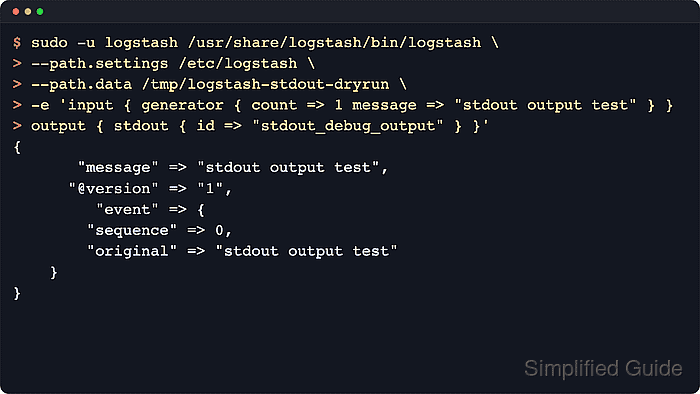
The plugin writes to the standard output stream of the running Logstash process. A plain stdout { } block uses the rubydebug codec by default, while codec ⇒ json prints one JSON event per line when another tool needs compact output.
Package-managed Linux installs normally load pipeline files from /etc/logstash/conf.d through /etc/logstash/pipelines.yml and run under the logstash service account. Keep stdout scoped to a test branch or a short debug window because it prints full event payloads into the foreground terminal or the service console stream.
Related: How to debug Logstash pipelines
Steps to configure a Logstash stdout output:
- Check the active packaged pipeline manifest.
$ sudo cat /etc/logstash/pipelines.yml
# This file is where you define your pipelines. You can define multiple.
# For more information on multiple pipelines, see the documentation:
#   https://www.elastic.co/guide/en/logstash/current/multiple-pipelines.html

- pipeline.id: main
  path.config: "/etc/logstash/conf.d/*.conf"
Add the stdout output to the path.config directory for the pipeline that should print events. A host with multiple pipeline IDs may use a different directory for the affected pipeline.
Related: How to configure Logstash pipelines - Dry-run a one-event foreground pipeline with the default stdout codec.
$ sudo -u logstash /usr/share/logstash/bin/logstash \
  --path.settings /etc/logstash \
  --path.data /tmp/logstash-stdout-dryrun \
  -e 'input { generator { count => 1 message => "stdout output test" } }
output { stdout { id => "stdout_debug_output" } }' \
  --log.level=warn
Using bundled JDK: /usr/share/logstash/jdk
##### snipped #####
{
      "@version" => "1",
         "event" => {
        "original" => "stdout output test",
        "sequence" => 0
    },
       "message" => "stdout output test"
}
The generator input emits one sample event and stops. The explicit output id gives the plugin a stable name in monitoring API output when a pipeline has more than one output.
Logstash rejects superuser runs by default when allow_superuser is false, so package-based tests should run as the logstash service account unless that setting was intentionally changed.
- Create an empty sample log file that the logstash service account can read.
$ sudo install -o logstash -g logstash -m 0640 \
  /dev/null /var/lib/logstash/stdout-output.log
The dedicated sample file keeps service-managed validation away from production inputs and makes the first stdout event easy to identify.
- Add a dedicated pipeline fragment named 50-stdout.conf in the active pipeline directory.
input {
  file {
    path => [
      "/var/lib/logstash/stdout-output.log"
    ]
    start_position => "end"
    sincedb_path => "/var/lib/logstash/stdout.sincedb"
    tags => ["stdout_debug"]
  }
}

output {
  if "stdout_debug" in [tags] {
    stdout {
      id => "stdout_debug_output"
    }
  }
}
The stdout plugin defaults to rubydebug, so the sample output remains readable without an explicit codec block. Add codec ⇒ json inside stdout { } when a compact JSON line is easier to inspect.
Leaving stdout in a busy production branch can expose full event payloads and increase journal or console log volume quickly.
- Test the pipeline file with the packaged settings directory and a temporary data path.
$ sudo -u logstash /usr/share/logstash/bin/logstash \
  --path.settings /etc/logstash \
  --path.data /tmp/logstash-stdout-configtest \
  --config.test_and_exit \
  -f /etc/logstash/conf.d/50-stdout.conf
Using bundled JDK: /usr/share/logstash/jdk
[WARN ][logstash.config.source.multilocal] Ignoring the 'pipelines.yml' file because command line options are specified
Configuration OK
The --path.data directory must be writable by the logstash user. Because this command uses -f, the warning about /etc/logstash/pipelines.yml being ignored is expected for this isolated test run.
- Restart the Logstash service so it loads the new output plugin.
$ sudo systemctl restart logstash.service
Restarting Logstash restarts every active pipeline in the service, so ingestion can pause briefly while plugins reopen their inputs and outputs.
- Append a sample line after the service starts.
$ echo 'stdout output test' | sudo tee -a \
  /var/lib/logstash/stdout-output.log
stdout output test
With start_position ⇒ “end”, only lines appended after the pipeline starts are picked up from this sample file.
- Query the Logstash pipeline stats API.
$ curl -s "http://localhost:9600/_node/stats/pipelines?pretty"
{
  "host" : "logstash-01",
  "version" : "9.4.2",
  "http_address" : "127.0.0.1:9600",
  ##### snipped #####
  "pipelines" : {
    "main" : {
      ##### snipped #####
      "plugins" : {
        "outputs" : [ {
          "id" : "stdout_debug_output",
          "name" : "stdout",
          "events" : {
            "in" : 1,
            "out" : 1
          }
        } ]
      }
    }
  }
}
The API is enabled by default on localhost. If the pipeline ID is not main, use the matching key under the pipelines object.
- Review recent Logstash service logs for the emitted event dump.
$ sudo journalctl --unit=logstash.service \
  --since "5 minutes ago" --no-pager --output=cat
{
      "@version" => "1",
         "event" => {
        "original" => "stdout output test"
    },
       "message" => "stdout output test",
          "tags" => [
        [0] "stdout_debug"
    ]
}
On package installs started with systemd, the service standard output stream is usually visible in the journal. If the API counters increase but the event dump is not in the journal, stop the service and run the same pipeline file in the foreground to inspect stdout directly.
Related: How to debug Logstash pipelines
- Remove the temporary one-off data directories.
$ sudo rm --recursive --force /tmp/logstash-stdout-dryrun /tmp/logstash-stdout-configtest
The configured pipeline file and sample input stay in place; only the validation workspaces created by the foreground commands are removed.

Mohd Shakir Zakaria is a cloud architect with deep roots in software development and open-source advocacy. Certified in AWS, Red Hat, VMware, ITIL, and Linux, he specializes in designing and managing robust cloud and on-premises infrastructures.


