Automatic pipeline reloads let Logstash replace a changed pipeline configuration without restarting the whole process. The setting is useful on packaged hosts where pipeline files change during tuning or small routing updates, and a full service restart would pause every pipeline at once.
The reload setting belongs in the Logstash settings file for a systemd service, or as --config.reload.automatic for a one-off command-line run. Packaged Debian and RPM installs normally read a pipeline manifest that points the main pipeline at .conf files unless that manifest was changed.
After config.reload.automatic is enabled, Logstash checks the configured pipeline files at config.reload.interval. A changed pipeline file is parsed, inputs and outputs are initialized, and the replacement pipeline is swapped into the same JVM only when validation succeeds; settings files, JVM options, plugins, and service overrides still need a service restart.
Related: How to configure Logstash pipelines
Related: How to debug Logstash pipelines
Steps to enable Logstash pipeline reloads:
- Set automatic reload in /etc/logstash/logstash.yml.
config.reload.automatic: true
config.reload.interval: 3s
Packaged Logstash services read /etc/logstash/logstash.yml at startup, so save this setting before the one restart that enables later automatic reloads. The interval value needs the s unit, such as 3s or 10s.
- Test the current pipeline configuration before restarting Logstash.
$ sudo -u logstash /usr/share/logstash/bin/logstash --path.settings /etc/logstash --path.data /tmp/logstash-configtest --config.test_and_exit
Using bundled JDK: /usr/share/logstash/jdk
Sending Logstash logs to /var/log/logstash which is now configured via log4j2.properties
[2026-06-18T20:43:05,689][INFO ][logstash.runner          ] Starting Logstash {"logstash.version" => "9.4.2", "jruby.version" => "jruby 10.0.5.0 (3.4.5) 2026-04-06 5db1ba72f3 OpenJDK 64-Bit Server VM 21.0.11+10-LTS on 21.0.11+10-LTS +indy +jit [aarch64-linux]"}
##### snipped #####
Configuration OK
[2026-06-18T20:43:06,130][INFO ][logstash.runner          ] Using config.test_and_exit mode. Config Validation Result: OK. Exiting Logstash
The throwaway --path.data directory keeps the validation run away from the live service data path under /var/lib/logstash. Current Logstash releases block superuser runs by default, so run validation as the logstash service account unless allow_superuser was intentionally changed.
- Restart the Logstash service once so it reads the reload setting.
$ sudo systemctl restart logstash.service
This restart pauses every active pipeline once. Later pipeline file edits can reload automatically, but changes to /etc/logstash/logstash.yml still require a service restart.
- Save a real change to the pipeline file that should reload, such as /etc/logstash/conf.d/10-main.conf.
$ sudoedit /etc/logstash/conf.d/10-main.conf
Logstash watches the pipeline files selected by path.config. Custom grok pattern files are picked up only when a pipeline reload is triggered, and files read only by plugin settings are not generally watched.
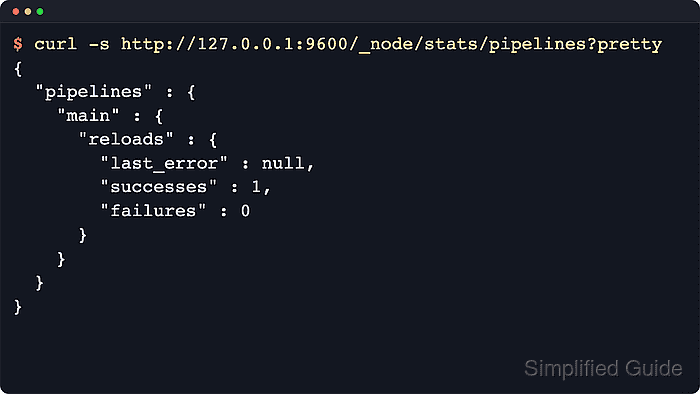
- Wait at least one config.reload.interval and inspect the pipeline stats API.
$ curl --silent http://localhost:9600/_node/stats/pipelines?pretty
{
  "pipelines" : {
    "main" : {
      "events" : {
        "in" : 0,
        "out" : 0
      },
##### snipped #####
      "reloads" : {
        "last_error" : null,
        "successes" : 1,
        "failures" : 0,
        "last_success_timestamp" : "2026-06-18T20:43:28.217350209Z"
      },
##### snipped #####
      "hash" : "4248a5a71fdf8b75dda3812ce3ef004126de31be96b9ea489519702e8c031aaf",
      "ephemeral_id" : "c037eddb-8818-4621-9505-62a357053057"
    }
  }
}
A successes value greater than 0 proves that Logstash has reloaded the pipeline successfully. If the API is secured, use the configured api.http.host, api.http.port, TLS setting, and credentials.
- Review recent service logs if the reload counter stays at 0 or last_error is populated.
$ sudo journalctl -u logstash.service --since "5 minutes ago" --no-pager
##### snipped #####
Jun 18 20:43:22 logstash-01 logstash[1842]: [2026-06-18T20:43:22,897][INFO ][logstash.pipelineaction.reload] Reloading pipeline {"pipeline.id" => :main}
Jun 18 20:43:27 logstash-01 logstash[1842]: [2026-06-18T20:43:27,074][INFO ][logstash.javapipeline    ][main] Pipeline terminated {"pipeline.id" => "main"}
Jun 18 20:43:28 logstash-01 logstash[1842]: [2026-06-18T20:43:28,213][INFO ][logstash.javapipeline    ][main] Pipeline started {"pipeline.id" => "main"}
Packaged installs also write Logstash internal logs under /var/log/logstash. Reload failures usually appear near the Failed to execute action or plugin initialization message.
Related: How to debug Logstash pipelines - Remove the temporary config-test data directory.
$ sudo rm -rf /tmp/logstash-configtest

Mohd Shakir Zakaria is a cloud architect with deep roots in software development and open-source advocacy. Certified in AWS, Red Hat, VMware, ITIL, and Linux, he specializes in designing and managing robust cloud and on-premises infrastructures.


