A Logstash HTTP output sends completed pipeline events to a webhook, ingestion API, or custom receiver over HTTP or HTTPS. It fits small handoffs where the receiver already exposes an API and the pipeline does not need Kafka, Redis, or another queue between Logstash and the destination.
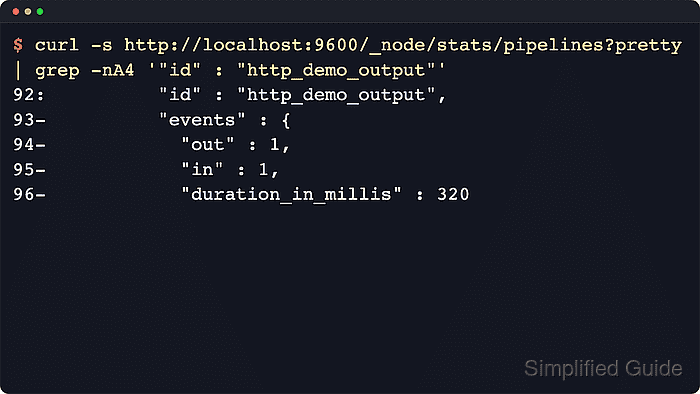
The http output plugin needs a destination url and an http_method, and format set to json sends each event as an application/json request. An explicit output id makes the route visible in the Logstash pipeline statistics API, which helps separate this receiver from other outputs in the same pipeline.
Retries need a deliberate choice because retry_failed set to true retries retryable HTTP status codes such as 429 and 500 indefinitely. Keep duplicate-sensitive receivers on bounded retries until the API can deduplicate requests, and use current ssl_… TLS option names such as ssl_certificate_authorities instead of removed legacy names such as cacert.
Steps to configure a Logstash HTTP output:
- Create a dedicated example input directory for the pipeline test.
$ sudo install -d -o logstash -g logstash -m 0750 /var/lib/logstash/examples
- Create an example source file that the logstash service account can read.
$ sudo install -o logstash -g logstash -m 0640 /dev/null /var/lib/logstash/examples/http-output.log
- Create 60-http-output.conf under /etc/logstash/conf.d.
$ sudoedit /etc/logstash/conf.d/60-http-output.conf
- Add the file input and HTTP output configuration.
input {
  file {
    path => ["/var/lib/logstash/examples/http-output.log"]
    start_position => "end"
    sincedb_path => "/var/lib/logstash/http-output-demo.sincedb"
    tags => ["http_output_demo"]
  }
}

output {
  if "http_output_demo" in [tags] {
    http {
      id => "http_demo_output"
      url => "https://receiver.example.net/logstash"
      http_method => "post"
      format => "json"
      headers => {
        "X-Logstash-Pipeline" => "http_demo_output"
      }
      automatic_retries => 1
      retry_failed => false
      socket_timeout => 10
      request_timeout => 30
    }
  }
}
Replace https://receiver.example.net/logstash with the destination endpoint. Keep API tokens in the Logstash keystore or service environment, add current ssl_… TLS settings only when the receiver uses a private CA or mutual TLS, and set retry_failed to true only after the receiver can safely handle repeated requests.
Related: How to create a Logstash keystore
Related: How to add a secret to a Logstash keystore
Tool: Application Programming Interface (API) Testing Tool - Test the pipeline configuration with the packaged settings directory and a temporary data path.
$ sudo -u logstash /usr/share/logstash/bin/logstash --path.settings /etc/logstash --path.data /tmp/logstash-configtest --config.test_and_exit -f /etc/logstash/conf.d/60-http-output.conf
Using bundled JDK: /usr/share/logstash/jdk
##### snipped #####
Configuration OK
[2026-06-18T17:20:00,000][INFO ][logstash.runner          ] Using config.test_and_exit mode. Config Validation Result: OK. Exiting Logstash
The temporary --path.data directory must be writable by the logstash user and keeps the check away from the live service data directory. If Logstash reports that the http output is missing, install or update logstash-output-http before retesting.
Related: How to test a Logstash pipeline configuration - Restart the Logstash service to load the updated pipeline.
$ sudo systemctl restart logstash
Restarting Logstash restarts every active pipeline in the service, which can briefly pause ingestion while inputs and outputs reopen.
- Confirm the Logstash service is running after the restart.
$ sudo systemctl status logstash --no-pager --lines=20 ● logstash.service - logstash Loaded: loaded (/usr/lib/systemd/system/logstash.service; enabled; preset: enabled) Active: active (running) since Thu 2026-06-18 17:19:53 UTC; 12s ago Main PID: 23144 (java) Tasks: 99 (limit: 28486) Memory: 1.0G ##### snipped ##### - Append a test event after the service is running.
$ printf 'logstash-http-output-test checkout accepted\n' | sudo tee -a /var/lib/logstash/examples/http-output.log
logstash-http-output-test checkout accepted
Because start_position is set to end, append the test event after Logstash starts so the file input treats it as new data.
- Check the Logstash pipeline stats API for the named HTTP output.
$ curl --silent http://localhost:9600/_node/stats/pipelines/main?pretty
{
  "pipelines" : {
    "main" : {
      ##### snipped #####
      "plugins" : {
        "outputs" : [ {
          "id" : "http_demo_output",
          "name" : "http",
          "events" : {
            "in" : 1,
            "out" : 1
          }
        } ]
      }
    }
  }
}
A rising events.out count shows that Logstash handed events to the named HTTP output plugin. The receiver must still record the request and return the expected HTTP status before the route is ready for production.
- Confirm the receiving API recorded the test request.
POST /logstash
content-type: application/json
x-logstash-pipeline: http_demo_output
message: logstash-http-output-test checkout accepted
tags: http_output_demo
Use the receiver's request history, access log, webhook delivery view, or API-side audit log. A 2xx response from the receiver and the expected event fields prove the HTTP handoff, while only seeing events.out in Logstash proves that the output plugin attempted delivery.
- Remove the temporary configuration-test data path.
$ sudo rm --recursive --force /tmp/logstash-configtest

Mohd Shakir Zakaria is a cloud architect with deep roots in software development and open-source advocacy. Certified in AWS, Red Hat, VMware, ITIL, and Linux, he specializes in designing and managing robust cloud and on-premises infrastructures.


