A Logstash http input turns HTTP requests into pipeline events. It fits webhook senders, CI jobs, and small applications that need a direct ingestion endpoint without deploying Beats or adding a message broker first.
The http input listens on a host and port, accepts requests with optional HTTP basic authentication or TLS, and decodes request bodies through codecs. The default additional_codecs mapping already sends application/json requests through the json codec, while other content types fall back to the default codec unless the pipeline overrides that mapping.
Keep the first listener bound to 127.0.0.1 when validating a new pipeline. If remote systems must post to Logstash, expose the input only on the intended service address and add ssl_enabled plus either user and password or ssl_client_authentication before moving beyond localhost.
Steps to configure a Logstash HTTP input:
- Create a dedicated pipeline file for the HTTP input.
$ sudoedit /etc/logstash/conf.d/20-http-input.conf
- Add the local listener and temporary stdout output.
input {
  http {
    id => "http_webhook_8080"
    host => "127.0.0.1"
    port => 8080
  }
}

output {
  stdout {
    codec => rubydebug
  }
}
The HTTP input already decodes application/json request bodies through the default additional_codecs mapping, so an explicit codec ⇒ json is usually unnecessary unless clients send a different content type or need a custom mapping. The temporary stdout output keeps the first validation focused on the input itself before a production output is added.
Omitting host binds the listener to 0.0.0.0 by default. If remote systems must connect, replace the localhost bind with the required service address and add ssl_enabled plus user and password or ssl_client_authentication. Logstash 9.0 and later fails to start when old HTTP input TLS keys such as ssl, ssl_verify_mode, or verify_mode are still present.
- Test the pipeline configuration with the packaged settings directory and a temporary data path.
$ sudo -u logstash /usr/share/logstash/bin/logstash --path.settings /etc/logstash --path.data /tmp/logstash-http-input-configtest --config.test_and_exit -f /etc/logstash/conf.d/20-http-input.conf
Using bundled JDK: /usr/share/logstash/jdk
[2026-06-18T15:25:14,073][INFO ][logstash.runner          ] Starting Logstash {"logstash.version" => "9.4.0", "jruby.version" => "jruby 10.0.5.0 (3.4.5) 2026-04-06 5db1ba72f3 OpenJDK 64-Bit Server VM 21.0.10+7-LTS on 21.0.10+7-LTS +indy +jit [aarch64-linux]"}
[2026-06-18T15:25:14,190][WARN ][logstash.config.source.multilocal] Ignoring the 'pipelines.yml' file because command line options are specified
[2026-06-18T15:25:14,441][INFO ][logstash.javapipeline    ][main] Pipeline `main` is configured with `pipeline.ecs_compatibility: v8` setting. All plugins in this pipeline will default to `ecs_compatibility => v8` unless explicitly configured otherwise.
Configuration OK
[2026-06-18T15:25:14,442][INFO ][logstash.runner          ] Using config.test_and_exit mode. Config Validation Result: OK. Exiting Logstash
The temporary --path.data directory must be writable by the logstash user. Using -f isolates this file for validation, so Logstash warns that /etc/logstash/pipelines.yml is ignored for that run.
Logstash 9.0 and later does not allow superuser runs by default. Running the same command as root fails unless allow_superuser is set to true in /etc/logstash/logstash.yml.
- Restart the Logstash service so it loads the new input.
$ sudo systemctl restart logstash
Restarting Logstash briefly pauses active pipelines, so senders may buffer, back off, or see temporary failures until the listener is back.
- Confirm the Logstash service returned to an active (running) state.
$ sudo systemctl status logstash --no-pager --lines=20
● logstash.service - logstash
     Loaded: loaded (/usr/lib/systemd/system/logstash.service; enabled; preset: enabled)
     Active: active (running) since Thu 2026-06-18 15:25:41 UTC; 16s ago
   Main PID: 22164 (java)
      Tasks: 95 (limit: 28486)
     Memory: 962.4M
        CPU: 15.104s
##### snipped #####
Jun 18 15:25:41 logstash-01 systemd[1]: Started logstash.service - logstash.
If the unit does not stay active (running), inspect /var/log/logstash/logstash-plain.log or the journal before retrying the restart.
- Send a test JSON event to the HTTP input endpoint.
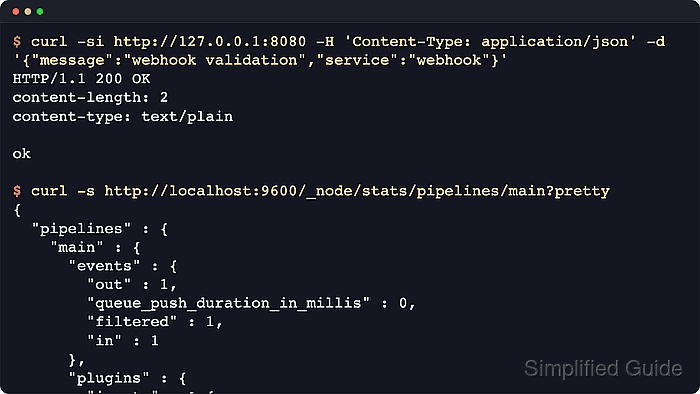
$ curl -si http://127.0.0.1:8080 -H 'Content-Type: application/json' -d '{"message":"webhook validation","service":"webhook"}'
HTTP/1.1 200 OK
content-length: 2
content-type: text/plain

ok
The HTTP input applies the json codec automatically for application/json requests. If clients send another content type, the default plain codec is used unless additional_codecs or codec is configured explicitly.
If the client receives 429 or times out, the pipeline is backlogged. Elastic's plugin reference recommends retrying with exponential backoff and jitter instead of sending the same request in a tight loop.
Tool: API Testing Tool
- Query the Logstash pipeline stats API and confirm the configured input id handled the event.
$ curl -s 'http://localhost:9600/_node/stats/pipelines/main?pretty'
{
  "version" : "9.4.0",
  "status" : "green",
  "pipelines" : {
    "main" : {
      "events" : {
        "out" : 1,
        "queue_push_duration_in_millis" : 0,
        "filtered" : 1,
        "in" : 1,
        "duration_in_millis" : 62
      },
      "plugins" : {
        "inputs" : [ {
          "id" : "http_webhook_8080",
          "name" : "http",
          "events" : {
            "out" : 1,
            "queue_push_duration_in_millis" : 0
          }
        } ]
      }
    }
  }
}
The input id makes the stats API easy to read when a pipeline has multiple listeners. On current package installs, the Logstash HTTP API uses the api.enabled, api.http.host, and api.http.port settings in /etc/logstash/logstash.yml; older http.* API setting names were removed in Logstash 9.0.
- Review recent Logstash journal lines for pipeline startup and the decoded event.
$ sudo journalctl --unit=logstash --since "5 minutes ago" --no-pager --lines=40
Jun 18 15:25:41 logstash-01 logstash[22164]: [2026-06-18T15:25:41,518][INFO ][logstash.javapipeline    ][main] Pipeline started {"pipeline.id"=>"main"}
Jun 18 15:25:41 logstash-01 logstash[22164]: [2026-06-18T15:25:41,520][INFO ][logstash.inputs.http     ][main][http_webhook_8080] Starting http input listener {address: "127.0.0.1:8080", ssl_enabled: false}
Jun 18 15:26:20 logstash-01 logstash[22164]:        "message" => "webhook validation"
With the temporary stdout output shown earlier, the journal includes the emitted event. After replacing stdout with a production output, confirm success at that destination instead of expecting full events in the journal.
When ECS compatibility is enabled and the JSON codec has no target, Logstash can warn that decoded payload fields may clash with ECS fields. Add a targeted JSON codec mapping when payload keys such as host, http, or url must stay separate.

Mohd Shakir Zakaria is a cloud architect with deep roots in software development and open-source advocacy. Certified in AWS, Red Hat, VMware, ITIL, and Linux, he specializes in designing and managing robust cloud and on-premises infrastructures.


