Adding GeoIP data in Logstash turns a public client address in an event into country, region, timezone, and coordinate fields. The geoip filter is useful when web, proxy, firewall, or application logs need location-aware searches, dashboard maps, routing rules, or review queues.
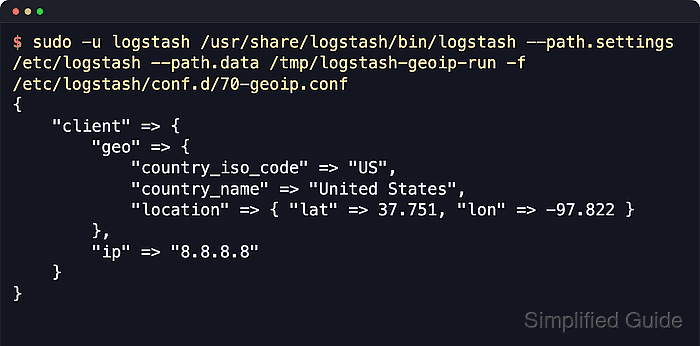
The filter reads one IP field, checks it against the bundled MaxMind GeoLite2 City database by default, and writes enrichment fields back into the event. With ECS compatibility enabled, parsing the address into [client][ip] lets geoip use [client][geo] as the default target, including [client][geo][location] for map and geospatial queries.
Private, loopback, link-local, and documentation addresses normally cannot be enriched because they are not unique public internet locations. If Logstash later cannot refresh a downloaded EULA database for 30 days, events can receive _geoip_expired_database instead of new geo fields until the database update path is fixed.
Related: How to parse logs with grok in Logstash
Related: How to use the Logstash mutate filter
Related: How to check Logstash pipeline metrics
Steps to use the Logstash geoip filter:
- Create a sample directory for the Logstash service account.
$ sudo install --directory --owner=logstash --group=logstash --mode=0750 /var/lib/logstash/examples
- Write one public-IP log event for the filter test.
$ printf '%s\n' '8.8.8.8 - - [18/Jun/2026:08:32:15 +0000] "GET /geoip-test HTTP/1.1" 200 123 "-" "curl/8.9.1"' | sudo tee /var/lib/logstash/examples/geoip.log >/dev/null
Use a public routable address for the test. Private ranges such as 10.0.0.0/8, 172.16.0.0/12, and 192.168.0.0/16 usually produce no GeoIP match.
- Open a temporary pipeline file for the GeoIP test.
$ sudo vi /etc/logstash/conf.d/70-geoip.conf
- Add the file input, IP parser, geoip filter, and temporary stdout output.
input {
  file {
    path => "/var/lib/logstash/examples/geoip.log"
    mode => "read"
    exit_after_read => true
    file_completed_action => "log"
    file_completed_log_path => "/tmp/logstash-geoip-completed.log"
    sincedb_path => "/tmp/logstash-geoip.sincedb"
  }
}

filter {
  grok {
    id => "extract_client_ip"
    match => { "message" => "%{IP:[client][ip]}" }
    tag_on_failure => ["_no_client_ip"]
  }

  if [client][ip] {
    geoip {
      id => "geoip_client"
      source => "[client][ip]"
      ecs_compatibility => "v8"
    }
  }
}

output {
  stdout {
    codec => rubydebug {
      metadata => false
    }
  }
}
Read mode treats the sample file as finite input, and exit_after_read lets the test process exit after the line is consumed. The completion log preserves the sample file instead of relying on the file input's default completion action.
If the source field is not an ip sub-field such as [client][ip], set an explicit target when ECS compatibility is enabled so the filter knows where to place the geo fields.
- Test the pipeline configuration.
$ sudo -u logstash /usr/share/logstash/bin/logstash --path.settings /etc/logstash --path.data /tmp/logstash-configtest --config.test_and_exit -f /etc/logstash/conf.d/70-geoip.conf
Using bundled JDK: /usr/share/logstash/jdk
##### snipped #####
[2026-06-18T15:21:31,490][INFO ][logstash.javapipeline    ][main] Pipeline `main` is configured with `pipeline.ecs_compatibility: v8` setting. All plugins in this pipeline will default to `ecs_compatibility => v8` unless explicitly configured otherwise.
Configuration OK
[2026-06-18T15:21:31,491][INFO ][logstash.runner          ] Using config.test_and_exit mode. Config Validation Result: OK. Exiting Logstash
The temporary --path.data directory keeps the validation away from the service data directory. Current Logstash packages should run this check as the logstash service account unless allow_superuser was changed deliberately.
Related: How to test a Logstash pipeline configuration - Run the pipeline once against the sample file.
$ sudo -u logstash /usr/share/logstash/bin/logstash --path.settings /etc/logstash --path.data /tmp/logstash-geoip-run -f /etc/logstash/conf.d/70-geoip.conf
Using bundled JDK: /usr/share/logstash/jdk
##### snipped #####
{
        "client" => {
        "geo" => {
              "continent_code" => "NA",
                "country_name" => "United States",
            "country_iso_code" => "US",
                    "timezone" => "America/Chicago",
                    "location" => {
                "lat" => 37.751,
                "lon" => -97.822
            }
        },
         "ip" => "8.8.8.8"
    },
       "message" => "8.8.8.8 - - [18/Jun/2026:08:32:15 +0000] \"GET /geoip-test HTTP/1.1\" 200 123 \"-\" \"curl/8.9.1\""
}
If the event has _geoip_lookup_failure, confirm that grok extracted [client][ip] and that the address is public and routable.
- Replace the temporary stdout output after the enriched event shape looks correct.
output {
  elasticsearch {
    hosts => ["http://elasticsearch.example.net:9200"]
    ilm_enabled => false
    index => "logstash-geoip-%{+YYYY.MM.dd}"
  }
}
When the default ECS target is kept, the elasticsearch output templates map [client][geo][location] as a geo_point. If target changes or a custom index template owns the index, map the final location field as geo_point before using maps.
Setting ilm_enabled => false keeps the explicit daily index pattern in effect. Secured clusters also need the current elasticsearch output authentication and TLS settings.
Related: How to configure Logstash output to Elasticsearch
Related: How to apply an Elasticsearch index template for Logstash data - Remove the one-shot file input settings before using the filter in a long-running service pipeline.
mode => "read"
exit_after_read => true
file_completed_action => "log"
file_completed_log_path => "/tmp/logstash-geoip-completed.log"
sincedb_path => "/tmp/logstash-geoip.sincedb"
Persistent file inputs normally tail new lines and store sincedb state under /var/lib/logstash or the default <path.data>/plugins/inputs/file location.
Related: How to configure a Logstash file input - Restart logstash.service after converting the tested filter into a service pipeline.
$ sudo systemctl restart logstash.service
Restarting Logstash briefly pauses active ingestion while pipelines stop, compile, and reconnect.

Mohd Shakir Zakaria is a cloud architect with deep roots in software development and open-source advocacy. Certified in AWS, Red Hat, VMware, ITIL, and Linux, he specializes in designing and managing robust cloud and on-premises infrastructures.


