Logstash conditionals let one pipeline choose different filter and output behavior for each event. They are useful when production errors, missing fields, parse-failure tags, and noisy debug records need different treatment before the event leaves Logstash.
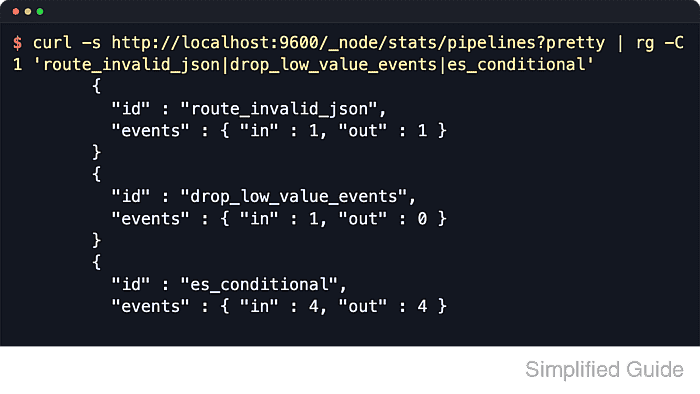
Conditionals can run in filter and output blocks. They support if, else if, and else branches, nested field references such as [log][level], equality checks, regex matches, list membership with in or not in, and boolean operators such as and and or.
A temporary [@metadata][route] value keeps the routing decision out of the final event while still letting the output block act on it. The presence check if [log][level] returns false for a missing field, a false value, or null, so branch order matters when missing data needs its own route.
Related: How to use the Logstash mutate filter
Related: How to parse logs with grok in Logstash
Steps to use Logstash conditionals:
- Create a temporary pipeline directory.
$ mkdir -p /tmp/lc/p
- Create the sample event file that exercises each branch.
- /tmp/lc/events.ndjson
{"log":{"level":"ERROR"},"env":"prod","message":"db failed"}
{"log":{"level":"INFO"},"env":"prod","message":"worker"}
{"log":{"level":"DEBUG"},"env":"prod","message":"healthcheck"}
{"env":"prod","message":"no level"}
{"tags":["_jsonparsefailure"],"message":"bad json"}
The records cover a production error branch, a default branch, a dropped debug branch, a missing-field branch, and an existing parse-failure tag.
Tool: JSON Validator - Create the conditional pipeline file.
- /tmp/lc/p/conditional.conf
input {
  file {
    id => "conditional_source"
    path => ["/tmp/lc/events.ndjson"]
    mode => "read"
    exit_after_read => true
    start_position => "beginning"
    sincedb_path => "/tmp/lc/sincedb"
    file_completed_action => "log"
    file_completed_log_path => "/tmp/lc/completed.log"
    codec => json
  }
}

filter {
  if [log][level] {
    mutate {
      id => "normalize_level"
      lowercase => ["[log][level]"]
    }
  }

  if "_jsonparsefailure" in [tags] {
    mutate {
      id => "route_invalid_json"
      add_tag => ["invalid_json"]
      replace => { "[@metadata][route]" => "invalid-json" }
    }
  } else if ![log][level] {
    mutate {
      id => "route_missing_level"
      add_tag => ["missing_level"]
      replace => { "[@metadata][route]" => "missing-level" }
    }
  } else if [log][level] == "error" and [env] == "prod" {
    mutate {
      id => "route_production_error"
      add_tag => ["production_error"]
      replace => { "[@metadata][route]" => "production-error" }
    }
  } else if [log][level] in ["debug", "trace"] or [message] =~ /^healthcheck/ {
    drop {
      id => "drop_low_value_events"
    }
  } else {
    mutate {
      id => "route_default"
      replace => { "[@metadata][route]" => "default" }
    }
  }
}

output {
  if [@metadata][route] {
    stdout {
      id => "show_route"
      codec => line {
        format => "%{[@metadata][route]} %{message}"
      }
    }
  }
}
Read mode processes the static sample once and exits after end of file. The stdout output prints only events that still have a route after filtering.
Related: How to configure a Logstash file input
Related: How to configure a Logstash stdout output - Change to the Logstash installation directory.
$ cd /usr/share/logstash
- Test the pipeline syntax.
$ bin/logstash \
  --path.data /tmp/lc/data-test \
  --config.test_and_exit \
  -f /tmp/lc/p
Using bundled JDK: /usr/share/logstash/jdk
##### snipped #####
Configuration OK
[2026-06-18T14:58:14,283][INFO ][logstash.runner          ] Using config.test_and_exit mode. Config Validation Result: OK. Exiting Logstash
The json codec may warn about ECS compatibility because this sample keeps parsed fields at the event root. Set a codec target in production when parsed JSON keys can collide with Elastic Common Schema fields.
Related: How to test a Logstash pipeline configuration - Run the pipeline against the sample events.
$ bin/logstash --path.data /tmp/lc/data-run --log.level error -f /tmp/lc/p
missing-level no level
default worker
invalid-json bad json
production-error db failed
The debug healthcheck record has no output because the drop branch removed it. Route output order can vary when Logstash uses multiple pipeline workers, but every non-dropped branch should appear once.
- Remove the temporary test files.
$ rm -rf /tmp/lc

Mohd Shakir Zakaria is a cloud architect with deep roots in software development and open-source advocacy. Certified in AWS, Red Hat, VMware, ITIL, and Linux, he specializes in designing and managing robust cloud and on-premises infrastructures.


