Installing Filebeat on Ubuntu adds Elastic's lightweight log shipper as a managed systemd service. The Elastic APT repository keeps the package on the same major branch as the rest of the Elastic Stack, which matters when logs are shipped to Elasticsearch or Logstash.
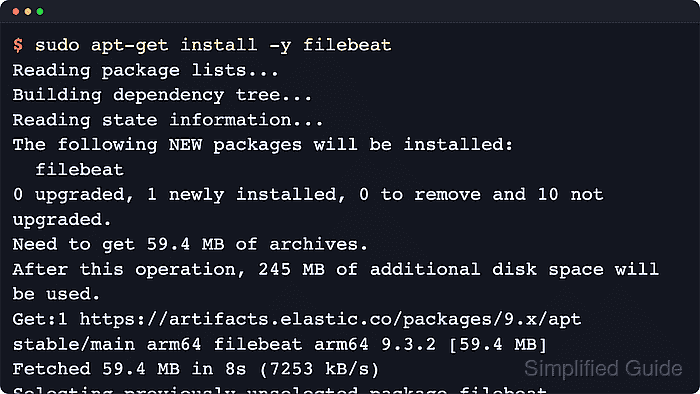
The DEB package installs the filebeat.service unit and sets package-specific config, data, and log paths through systemd. Starting Filebeat through the service keeps the runtime layout aligned with the Ubuntu package instead of the archive layout used by a manually extracted tarball.
The packaged configuration can pass syntax validation before any events are shipped. The sample filestream input is disabled, and the default Elasticsearch output points at localhost:9200, so installation is complete when the package is installed, the configuration parses, and the service can start; ingestion still needs a reachable output and at least one input or module.
Steps to install Filebeat on Ubuntu:
- Open a terminal with sudo privileges.
- Refresh the local APT package index.
$ sudo apt-get update
Hit:1 http://archive.ubuntu.com/ubuntu resolute InRelease
Hit:2 http://security.ubuntu.com/ubuntu resolute-security InRelease
##### snipped #####
Reading package lists... Done
- Install the repository prerequisites.
$ sudo apt-get install --assume-yes curl gnupg ca-certificates
Reading package lists... Done
Building dependency tree... Done
Reading state information... Done
The following NEW packages will be installed:
  curl gnupg
##### snipped #####
Setting up curl (8.18.0-1ubuntu2.1) ...
curl downloads the signing key, gnupg converts it into an APT keyring, and ca-certificates lets APT and curl validate HTTPS endpoints on minimal Ubuntu systems.
- Import the Elastic signing key into a dedicated APT keyring.
$ curl -fsSL https://artifacts.elastic.co/GPG-KEY-elasticsearch | sudo gpg --dearmor --yes -o /usr/share/keyrings/elasticsearch-keyring.gpg
The signed-by repository entry below limits this key to the Elastic repository instead of adding it as a global APT trust key.
- Save the Elastic APT repository definition for the 9.x branch.
$ echo "deb [signed-by=/usr/share/keyrings/elasticsearch-keyring.gpg] https://artifacts.elastic.co/packages/9.x/apt stable main" | sudo tee /etc/apt/sources.list.d/elastic-9.x.list
deb [signed-by=/usr/share/keyrings/elasticsearch-keyring.gpg] https://artifacts.elastic.co/packages/9.x/apt stable main
The 9.x branch controls the major version that APT installs and upgrades. Use the direct echo method; add-apt-repository creates a deb-src entry, and Elastic does not publish source packages for this repository.
- Refresh the package index after adding the Elastic repository.
$ sudo apt-get update
Get:1 https://artifacts.elastic.co/packages/9.x/apt stable InRelease [3249 B]
Get:2 https://artifacts.elastic.co/packages/9.x/apt stable/main arm64 Packages [54.9 kB]
##### snipped #####
Reading package lists... Done
The architecture label in the package list line reflects the local host, such as amd64 or arm64.
- Check the candidate Filebeat package version.
$ apt-cache policy filebeat
filebeat:
  Installed: (none)
  Candidate: 9.4.2
  Version table:
     9.4.2 500
        500 https://artifacts.elastic.co/packages/9.x/apt stable/main arm64 Packages
     9.4.1 500
        500 https://artifacts.elastic.co/packages/9.x/apt stable/main arm64 Packages
##### snipped #####
The exact candidate changes as Elastic publishes patch releases. Confirm that the selected package comes from the intended 9.x repository.
- Install the Filebeat package.
$ sudo apt-get install --assume-yes filebeat
Reading package lists... Done
Building dependency tree... Done
Reading state information... Done
The following NEW packages will be installed:
  filebeat
##### snipped #####
Setting up filebeat (9.4.2) ...
- Validate the packaged Filebeat configuration.
$ sudo filebeat test config -c /etc/filebeat/filebeat.yml
Config OK
Package installs keep /etc/filebeat/filebeat.yml owned by root with strict permissions by default, so preserve that ownership model when editing the file later.
Related: How to test a Filebeat configuration - Enable Filebeat at boot and start it now.
$ sudo systemctl enable --now filebeat
Created symlink '/etc/systemd/system/multi-user.target.wants/filebeat.service' -> '/usr/lib/systemd/system/filebeat.service'.
The default configuration targets localhost:9200 and leaves the sample filestream input disabled, so the journal can show connection retries and no harvested events until a real output and at least one input or module are configured.
- Confirm the Filebeat service is active.
$ sudo systemctl status filebeat --no-pager
● filebeat.service - Filebeat sends log files to Logstash or directly to Elasticsearch.
     Loaded: loaded (/usr/lib/systemd/system/filebeat.service; enabled; preset: enabled)
     Active: active (running) since Thu 2026-06-18 06:14:18 UTC; 146ms ago
       Docs: https://www.elastic.co/beats/filebeat
   Main PID: 775 (filebeat)
      Tasks: 10
     Memory: 57.7M
     CGroup: /system.slice/filebeat.service
             └─ /usr/share/filebeat/bin/filebeat --environment systemd -c /etc/filebeat/filebeat.yml --path.home /usr/share/filebeat --path.config /etc/filebeat --path.data /var/lib/filebeat --path.logs /var/log/filebeat
##### snipped #####
systemd stores Filebeat service logs in journald. Use sudo journalctl -u filebeat.service --no-pager --lines=30 when the unit does not stay active.
Related: How to manage the Filebeat service with systemctl in Linux - Confirm the installed Filebeat version.
$ filebeat version
filebeat version 9.4.2 (arm64), libbeat 9.4.2 [e98b93df5a916738f04a338ea2ddcf53ebd0bc0b built 2026-05-22 19:43:08 +0000 UTC] (FIPS-distribution: false)
The architecture tag changes with the local package, so amd64 hosts report amd64 instead of arm64.

Mohd Shakir Zakaria is a cloud architect with deep roots in software development and open-source advocacy. Certified in AWS, Red Hat, VMware, ITIL, and Linux, he specializes in designing and managing robust cloud and on-premises infrastructures.


