Checking Elasticsearch node stats shows per-node heap use, thread pool queues, filesystem headroom, and indexing pressure before cluster health alone explains where load is building. That view is useful when one data node, coordinator, or ingest-heavy node is slowing search or indexing while the rest of the cluster still looks serviceable.
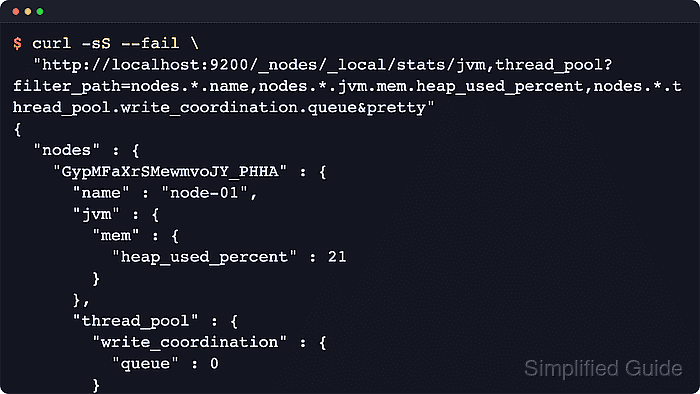
The Nodes stats API at /_nodes/stats returns JSON for each selected node. Use the CAT nodes view to choose a node name or confirm the local node first, then query only the jvm, thread_pool, fs, and indexing_pressure metrics needed for the current check.
Security-enabled clusters usually require the production HTTPS endpoint, authentication, CA trust, and a caller with cluster monitor or manage privilege. Newer Elasticsearch releases expose bulk coordination queueing under write_coordination; clusters that do not return that field still expose the main write thread pool counters.
Steps to check Elasticsearch node stats:
- List node names and basic pressure counters before choosing a selector.
$ curl --silent --show-error --fail "http://localhost:9200/_cat/nodes?v&h=name,ip,node.role,master,heap.percent,ram.percent,cpu,load_1m"
name    ip         node.role   master heap.percent ram.percent cpu load_1m
node-01 192.0.2.40 cdfhilmrstw *                29          84  14    4.29
CAT APIs are intended for human terminal checks. Use the JSON stats API for saved evidence, scripts, and monitoring integrations.
- Check the local node's heap usage and write queue pressure.
$ curl --silent --show-error --fail "http://localhost:9200/_nodes/_local/stats/jvm,thread_pool?filter_path=nodes.*.name,nodes.*.jvm.mem.heap_used_percent,nodes.*.thread_pool.write.queue,nodes.*.thread_pool.write_coordination.queue&pretty"
{
  "nodes" : {
    "lLmqR3iRSw2aNWr_ymXhHA" : {
      "name" : "node-01",
      "jvm" : {
        "mem" : {
          "heap_used_percent" : 29
        }
      },
      "thread_pool" : {
        "write" : {
          "queue" : 0
        },
        "write_coordination" : {
          "queue" : 0
        }
      }
    }
  }
}
Replace _local with a node name or node ID when the target is not the node handling the request. Add nodes.*.thread_pool.search.queue or rejection counters when search latency or rejected requests are the symptom.
- Inspect filesystem headroom and current indexing pressure for a named node.
$ curl --silent --show-error --fail "http://localhost:9200/_nodes/node-01/stats/fs,indexing_pressure?filter_path=nodes.*.name,nodes.*.fs.total.total_in_bytes,nodes.*.fs.total.available_in_bytes,nodes.*.indexing_pressure.memory.current.combined_coordinating_and_primary_in_bytes,nodes.*.indexing_pressure.memory.current.replica_in_bytes&pretty"
{
  "nodes" : {
    "lLmqR3iRSw2aNWr_ymXhHA" : {
      "name" : "node-01",
      "fs" : {
        "total" : {
          "total_in_bytes" : 1963569909760,
          "available_in_bytes" : 1670611075072
        }
      },
      "indexing_pressure" : {
        "memory" : {
          "current" : {
            "combined_coordinating_and_primary_in_bytes" : 0,
            "replica_in_bytes" : 0
          }
        }
      }
    }
  }
}
Low available_in_bytes can trigger shard allocation throttling or index write blocks when disk watermarks are crossed.
- Compare the same fields across all nodes to find outliers.
$ curl --silent --show-error --fail "http://localhost:9200/_nodes/stats/jvm,thread_pool,fs,indexing_pressure?filter_path=nodes.*.name,nodes.*.jvm.mem.heap_used_percent,nodes.*.thread_pool.write.queue,nodes.*.thread_pool.write_coordination.queue,nodes.*.fs.total.available_in_bytes,nodes.*.indexing_pressure.memory.current.combined_coordinating_and_primary_in_bytes&pretty"
{
  "nodes" : {
    "lLmqR3iRSw2aNWr_ymXhHA" : {
      "name" : "node-01",
      "jvm" : {
        "mem" : {
          "heap_used_percent" : 29
        }
      },
      "thread_pool" : {
        "write" : {
          "queue" : 0
        },
        "write_coordination" : {
          "queue" : 0
        }
      },
      "fs" : {
        "total" : {
          "available_in_bytes" : 1670611075072
        }
      },
      "indexing_pressure" : {
        "memory" : {
          "current" : {
            "combined_coordinating_and_primary_in_bytes" : 0
          }
        }
      }
    }
  }
}
A one-node lab returns one entry. In production, compare heap percentage, queued writes, indexing pressure, and available bytes across nodes with the same role.
- Save the full node stats payload when a deeper review is needed.
$ curl --silent --show-error --fail "http://localhost:9200/_nodes/stats?pretty" > node-stats.json
Full node stats can expose node names, roles, file paths, versions, plugins, repositories, and runtime details. Share the raw payload only through trusted troubleshooting channels.
Tool: JSON Validator - Confirm the stats request reached every selected node.
$ curl --silent --show-error --fail "http://localhost:9200/_nodes/stats?filter_path=_nodes&pretty"
{
  "_nodes" : {
    "total" : 1,
    "successful" : 1,
    "failed" : 0
  }
}
Investigate any nonzero failed count before treating node-stats.json as a complete node-level snapshot.

Mohd Shakir Zakaria is a cloud architect with deep roots in software development and open-source advocacy. Certified in AWS, Red Hat, VMware, ITIL, and Linux, he specializes in designing and managing robust cloud and on-premises infrastructures.


