Reverse DNS lets an IP address publish a hostname for logs, mail checks, and network investigation. A PTR lookup shows whether that address-to-name mapping exists and which hostname it returns.
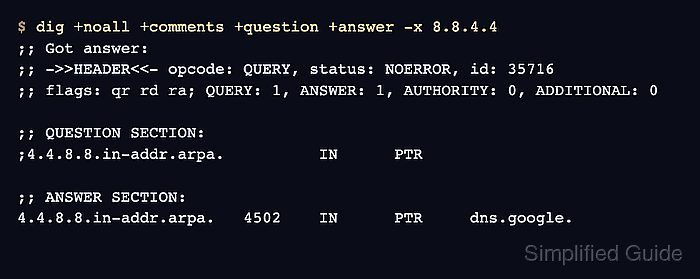
The dig -x option accepts either an IPv4 or IPv6 address. It constructs the corresponding in-addr.arpa or ip6.arpa name and requests a PTR record without requiring the reverse name to be written manually.
The resolver selected through /etc/resolv.conf supplies the visible answer unless an @server argument names another resolver. Public reverse DNS is normally controlled by the address owner or hosting provider, while private and split-horizon addresses may return names only through an internal resolver.
Steps to check PTR records with dig:
- Run a reverse lookup with the target IP address in place of 8.8.8.8.
$ dig -x 8.8.8.8
##### snipped #####
;; ->>HEADER<<- opcode: QUERY, status: NOERROR, id: 58237
;; flags: qr rd ra; QUERY: 1, ANSWER: 1, AUTHORITY: 0, ADDITIONAL: 0

;; QUESTION SECTION:
;8.8.8.8.in-addr.arpa.          IN      PTR

;; ANSWER SECTION:
8.8.8.8.in-addr.arpa.   4502    IN      PTR     dns.google.
##### snipped #####
The SERVER line in the complete output identifies the resolver that supplied the response.
Related: How to query a specific DNS server with dig - Read the header status when the Answer section contains no PTR row.
NOERROR with an empty Answer section means the reverse name has no PTR data in that resolver's view. NXDOMAIN means the queried reverse name does not exist. SERVFAIL, REFUSED, and a timeout are lookup failures, not proof that the address has no PTR record.
- Confirm that the Answer section contains an IN PTR row for the queried reverse name.
The final field is the returned hostname, while the number before IN is its remaining TTL in seconds. dig can exit with status 0 after receiving an NXDOMAIN response, so the DNS header and PTR row provide the result rather than the shell status alone.
Related: How to show short DNS answers with dig

Mohd Shakir Zakaria is a cloud architect with deep roots in software development and open-source advocacy. Certified in AWS, Red Hat, VMware, ITIL, and Linux, he specializes in designing and managing robust cloud and on-premises infrastructures.


