Uploading a whole directory to a file-transfer endpoint usually means the destination job expects one deployable bundle, not hundreds of separate files. For release staging, partner handoff, and backup export workflows, packaging the tree first keeps the transfer predictable and gives the receiver one artifact to verify.
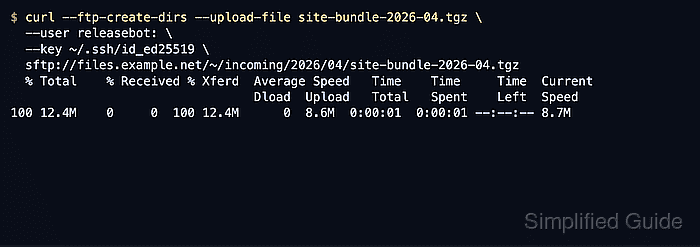
With cURL, a directory upload is really a file upload. cURL does not walk a local directory recursively and send each entry for FTP or SFTP, so the practical pattern is to archive the directory, upload that archive with --upload-file, and unpack it later only if the remote workflow needs the original tree again. If the destination truly requires each file to be transferred separately, use a different tool or a script loop outside this page.
In FTP URLs, a single slash after the hostname is relative to the login directory, while a double slash targets the server root. In SFTP URLs, paths are absolute by default, and /~/ means the remote login account's home directory. Check protocol support first because some curl builds include ftp but omit sftp, and use .netrc or SSH keys instead of putting credentials directly on the command line.
Related: How to use SFTP with cURL
Related: How to store curl credentials in a netrc file
Steps to upload directories to FTP or SFTP with cURL:
- Confirm that the local cURL build supports the protocol you need before preparing the transfer.
$ curl --version
curl 8.15.0 (x86_64-pc-linux-gnu) libcurl/8.15.0 OpenSSL/3.0.13 zlib/1.3.1 libssh2/1.11.1
Protocols: dict file ftp ftps gopher gophers http https imap imaps ipfs ipns mqtt pop3 pop3s rtsp scp sftp smb smbs smtp smtps telnet tftp
Features: alt-svc AsynchDNS HSTS HTTP2 IPv6 Largefile libz SSL threadsafe UnixSockets
The Protocols line must include ftp for FTP uploads and sftp for SFTP uploads. If sftp is missing, the SFTP steps on this page fail until you use a curl build with SSH support.
- Pack the directory into one archive before sending it.
$ cd /srv/releases
$ tar -czf partner-portal-2026-04.tar.gz partner-portal
$ ls -lh partner-portal-2026-04.tar.gz
-rw-r--r--  1 user  user   18M Apr 22 09:14 partner-portal-2026-04.tar.gz
cURL uploads files, not directory trees, so the archive becomes the single object that is transferred and verified.
- Upload the archive to the target FTP path and let cURL create missing remote directories when needed.
$ curl --ftp-create-dirs \
  --netrc \
  --upload-file partner-portal-2026-04.tar.gz \
  ftp://ftp-upload.example.net/incoming/releases/2026/04/partner-portal-2026-04.tar.gz
  % Total    % Received % Xferd  Average Speed   Time    Time     Time  Current
                                 Dload  Upload   Total   Spent    Left  Speed
100 18.2M    0     0  100 18.2M      0  12.0M  0:00:01  0:00:01 --:--:-- 12.1M
Use ftp://host//incoming/releases/... when the destination path must start at the server root instead of the login directory.
Plain FTP does not encrypt credentials or file contents. Use SFTP or FTPS when the network path is not already trusted.
- List the remote FTP directory and confirm that the uploaded archive name is present before any extract or publish job uses it.
$ curl --silent --show-error --list-only --netrc ftp://ftp-upload.example.net/incoming/releases/2026/04/
partner-portal-2026-04.tar.gz
The uploaded archive should appear in the listing before any downstream unpack, checksum, or deploy step runs.
- Upload the same archive to SFTP with SSH key authentication and let cURL create the missing directory tree.
$ curl --ftp-create-dirs \
  --user releasebot: \
  --key ~/.ssh/id_ed25519 \
  --upload-file partner-portal-2026-04.tar.gz \
  sftp://sftp-upload.example.net/~/incoming/releases/2026/04/partner-portal-2026-04.tar.gz
  % Total    % Received % Xferd  Average Speed   Time    Time     Time  Current
                                 Dload  Upload   Total   Spent    Left  Speed
100 18.2M    0     0  100 18.2M      0  11.3M  0:00:01  0:00:01 --:--:-- 11.4M
cURL usually derives the public key from --key automatically. Add --pubkey ~/.ssh/id_ed25519.pub only when the SSH backend cannot derive it.
- List the destination SFTP directory and confirm the archive landed where the remote workflow expects it.
$ curl --silent --show-error --list-only \
  --user releasebot: \
  --key ~/.ssh/id_ed25519 \
  sftp://sftp-upload.example.net/~/incoming/releases/2026/04/
partner-portal-2026-04.tar.gz
..
.
If the file lands in the wrong place, check the path style first. FTP defaults to the login directory, while SFTP paths are absolute unless you deliberately use /~/. Some SFTP servers also return . and .. in name-only listings.

Mohd Shakir Zakaria is a cloud architect with deep roots in software development and open-source advocacy. Certified in AWS, Red Hat, VMware, ITIL, and Linux, he specializes in designing and managing robust cloud and on-premises infrastructures.


