Component styles can become hard to scan when every descendant, state, and modifier repeats the same class prefix. Native CSS nesting keeps related selectors inside the component rule, so a card title, action, and featured state stay near the base card styles without a Sass or PostCSS build step.
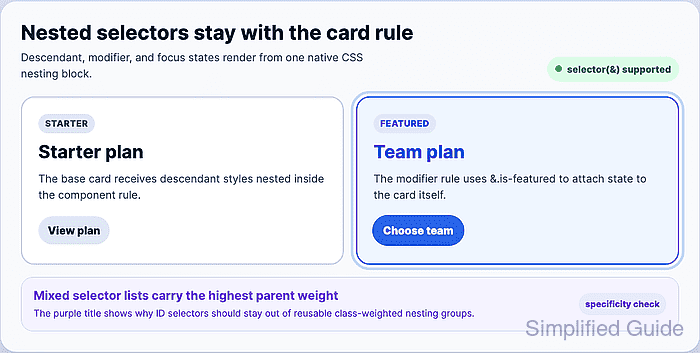
The & nesting selector represents the current parent selector. Use it when the nested selector must attach to the same element, such as &.is-featured or &:focus-within. Omit it for normal descendant selectors such as .plan-cardtitle, where the intended selector is .plan-card .plan-cardtitle.
Nesting changes the source shape, not the cascade rules. Specificity, cascade layers, source order, and support boundaries still decide which declaration wins, and selector lists follow :is()-style highest-specificity behavior. Keep mixed ID/class parent lists out of reusable component nesting unless that higher weight is intentional.
Related: How to add CSS feature-query fallbacks
Related: How to debug CSS specificity
Related: How to scope CSS rules to a component
Steps to nest CSS selectors in a component stylesheet:
- Add the component markup with normal and featured states.
- index.html
<section class="card-grid" aria-label="Plan cards">
  <article id="standard-plan" class="plan-card">
    <span class="plan-card__eyebrow">Starter</span>
    <h2 class="plan-card__title">Starter plan</h2>
    <p class="plan-card__copy">The base card receives nested descendant styles.</p>
    <a class="plan-card__action" href="#starter">View plan</a>
  </article>

  <article id="featured-plan" class="plan-card is-featured">
    <span class="plan-card__eyebrow">Featured</span>
    <h2 class="plan-card__title">Team plan</h2>
    <p class="plan-card__copy">The modifier rule attaches to the card itself.</p>
    <a class="plan-card__action" href="#team">Choose team</a>
  </article>
</section>
The same class names are used in both cards so the nested descendant and modifier rules can be checked against separate rendered states.
- Add the base component rule before nested child rules.
- styles.css
.plan-card {
  position: relative;
  display: grid;
  gap: 0.75rem;
  padding: 1.5rem;
  border: 2px solid #cbd5e1;
  border-radius: 1.25rem;
  background: #ffffff;
  color: #334155;
}
Keep base declarations first so the component has a readable default surface before descendant and state rules refine it.
- Nest descendant selectors inside the component rule.
- styles.css
@supports selector(&) {
  .plan-card {
    .plan-card__eyebrow {
      width: fit-content;
      padding: 0.3rem 0.65rem;
      border-radius: 999px;
      background: #e2e8f0;
      color: #334155;
      font-size: 0.8125rem;
      font-weight: 800;
      text-transform: uppercase;
    }

    .plan-card__title {
      margin: 0;
      color: #0f172a;
      font-size: 1.7rem;
    }

    .plan-card__copy {
      margin: 0;
      color: #475569;
    }
  }
}
Omitting & makes each nested selector a descendant of .plan-card. The nested .plan-cardtitle selector becomes .plan-card .plan-cardtitle.
- Nest action-link states inside the action selector.
- styles.css
@supports selector(&) {
  .plan-card {
    .plan-card__action {
      width: fit-content;
      padding: 0.55rem 0.9rem;
      border-radius: 999px;
      background: #e2e8f0;
      color: #0f172a;
      font-weight: 800;
      text-decoration: none;

      &:hover,
      &:focus-visible {
        background: #1d4ed8;
        color: #ffffff;
      }
    }
  }
}
Inside .plan-cardaction, & refers to the action selector. &:focus-visible targets .plan-card .plan-cardaction:focus-visible.
- Attach card-level states with &.
- styles.css
@supports selector(&) {
  .plan-card {
    &.is-featured {
      border-color: #2563eb;
      background: #eff6ff;

      .plan-card__eyebrow {
        background: #dbeafe;
        color: #1d4ed8;
      }

      .plan-card__title {
        color: #1d4ed8;
      }

      .plan-card__action {
        background: #2563eb;
        color: #ffffff;
      }
    }

    &:focus-within {
      outline: 4px solid #bfdbfe;
      outline-offset: 4px;
    }
  }
}
&.is-featured attaches the modifier to the same element as .plan-card. Without &, .is-featured would target a descendant element instead.
- Add a scratch element when mixed selector specificity needs to be checked.
- index.html
<section id="specificity-demo" class="specificity-card" aria-label="Specificity check">
  <h2 class="specificity-card__title">
    Mixed selector lists carry the highest parent weight
  </h2>
</section>
Use a temporary specificity check before grouping selectors with different weights in a reusable component block.
- Compare the mixed parent selector list against a later class-weighted selector.
- styles.css
@supports selector(&) {
  .specificity-card,
  #specificity-boost {
    .specificity-card__title {
      color: #7c3aed;
    }
  }

  .specificity-card .specificity-card__title {
    color: #0f766e;
  }
}
The nested selector list carries the highest parent weight, so the ID branch can make the purple rule beat the later class descendant rule even when the matched element only uses .specificity-card.
Related: How to debug CSS specificity - Check browser support for the nesting selector.
> CSS.supports("selector(&)")
true
Use @supports selector(&) around native nesting when the stylesheet needs to guard the enhancement. Keep required fallback rules outside the support block.
Related: How to add CSS feature-query fallbacks - Verify that the nested descendant title rule applies to the normal card.
> getComputedStyle(document.querySelector("#standard-plan .plan-card__title")).color
"rgb(15, 23, 42)"
- Verify that the &.is-featured rule applies to the featured card.
> getComputedStyle(document.querySelector("#featured-plan")).borderTopColor
"rgb(37, 99, 235)"
- Verify that the nested featured action override applies.
> getComputedStyle(document.querySelector("#featured-plan .plan-card__action")).backgroundColor
"rgb(37, 99, 235)"
- Focus the featured card action.
> document.querySelector("#featured-plan .plan-card__action").focus()
undefined
- Verify that the &:focus-within rule applies to the card.
> getComputedStyle(document.querySelector("#featured-plan")).outlineColor
"rgb(191, 219, 254)"
- Verify the mixed-specificity check before removing the scratch element.
> getComputedStyle(document.querySelector("#specificity-demo .specificity-card__title")).color
"rgb(124, 58, 237)"
The purple value confirms that the nested selector list carried the ID branch's weight.
- Remove the scratch specificity markup and scratch CSS.
Keep the reusable card nesting block after the selector shape has been checked.

Mohd Shakir Zakaria is a cloud architect with deep roots in software development and open-source advocacy. Certified in AWS, Red Hat, VMware, ITIL, and Linux, he specializes in designing and managing robust cloud and on-premises infrastructures.


