A quick question rarely needs the same reasoning capacity as a difficult code change. Claude Code lets you choose the model for the current conversation and save that choice for later sessions.
A saved default belongs to your user settings. A launch override lasts for one session, so a task can use another model without changing what the next plain launch uses.
The CLI must already be installed and signed in. Available models depend on your account and provider, and a model alias can move to a newer release without its name changing.
Steps to set the model in Claude Code:
- Open the model picker inside your Claude Code session.
> /model
- Highlight Haiku with the arrow keys.
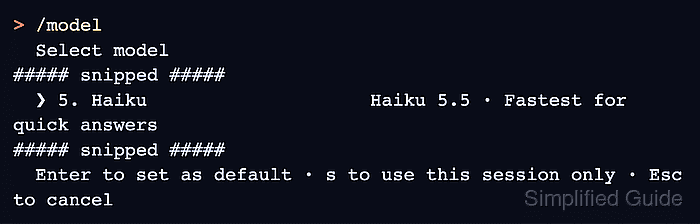
Haiku is the saved-default example; another available row works the same way. This picker offered Haiku 5.5. Other accounts or providers can offer different models.
- Press Enter to apply Haiku as your saved default.
Set model to Haiku 5.5 and saved as your default for new sessions
The picker stores the model value in ~/.claude/settings.json. Pressing s instead switches only the current session. Typing /model haiku directly also saves the default. Requests use the selected model's applicable usage limits and billing.
- Exit the current conversation with /exit.
> /exit
- Start a fresh session without a model flag.
$ claude
A fresh session tests the saved default. A resumed conversation can retain its previous model.
- Submit a small prompt to check that the model accepts requests.
What is 17 + 25? Answer briefly.
The response should give 42. A model name in the startup header alone does not prove access; a mistyped startup model value can fail only on the first request.
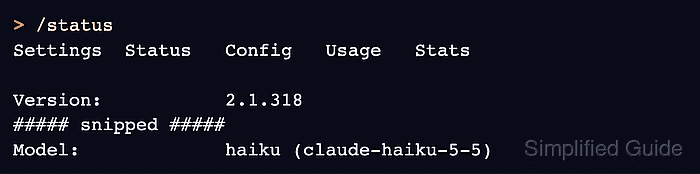
- Check the active model with /status.
> /status
##### snipped #####
Model:             haiku (claude-haiku-5-5)
##### snipped #####
The Model line should name Haiku. Aliases such as haiku, sonnet and opus follow releases; a full model ID such as claude-haiku-5-5 pins a particular version.
- Dismiss the status screen with Esc.
- Leave the session with /exit.
> /exit
- Launch one session on Sonnet.
$ claude --model sonnet
--model overrides the saved default for this launch. It does not replace the haiku value saved in your user settings.
- Send the same small prompt in the Sonnet session.
What is 17 + 25? Answer briefly.
- Inspect the temporary model with /status.
> /status
##### snipped #####
Model:             sonnet (claude-sonnet-5-5)
##### snipped #####
A successful response and a Model line naming Sonnet confirm the override is usable.
- Close the status screen with Esc.
- Exit the Sonnet session with /exit.
> /exit
- Launch Claude Code again without --model.
$ claude
- Send the small prompt once more in the new session.
What is 17 + 25? Answer briefly.
- Confirm that /status shows the saved Haiku model again.
> /status
##### snipped #####
Model:             haiku (claude-haiku-5-5)
##### snipped #####
The response and Haiku model line show that the Sonnet override left the default intact. If a new session starts on another model, an ANTHROPIC_MODEL environment variable, project or managed settings, or a resumed conversation can explain the difference. The startup header names a project or managed settings file when it supplies the model. An unwritable ~/.claude/settings.json can also prevent the choice from being saved.