Linux package managers check software signatures before installing programs system-wide. Claude Code has Anthropic-maintained APT, DNF, and APK repositories for a signed installation on Debian, Ubuntu, Fedora, and Alpine.
The stable repository holds a release that is usually about a week behind latest. A repository installation receives upgrades through the system package manager; Claude Code does not update it automatically.
Internet access and a supported x64 or ARM64 system with at least 4 GB of RAM are required. Package setup needs a sudo-enabled account on Debian, Ubuntu, or Fedora, or a root shell on Alpine. Anthropic lists Ubuntu 20.04+, Debian 10+, and Alpine 3.19+ in its system requirements. Installation does not require sign-in, while coding sessions require an account or API provider supported by Claude Code.
Steps to install Claude Code on Linux:
Complete the section for your distribution, then continue to the executable checks.
Debian and Ubuntu (APT)
- Refresh the distribution's package index.
$ sudo apt update
- Install the HTTPS and signing-key utilities.
$ sudo apt install --yes ca-certificates curl gnupg
- Create the directory for APT repository keys.
$ sudo install -d -m 0755 /etc/apt/keyrings
- Download Anthropic's release signing key.
$ sudo curl -fsSL https://downloads.claude.ai/keys/claude-code.asc -o /etc/apt/keyrings/claude-code.asc
- Compare the downloaded key's fingerprint with Anthropic's published fingerprint.
$ gpg --show-keys /etc/apt/keyrings/claude-code.asc
pub   rsa4096 2026-03-30 [SCE]
      31DDDE24DDFAB679F42D7BD2BAA929FF1A7ECACE
uid                      Anthropic Claude Code Release Signing <security@anthropic.com>
Trusting this key allows packages signed by its holder to install software system-wide. The fingerprint must match 31DD DE24 DDFA B679 F42D 7BD2 BAA9 29FF 1A7E CACE in Anthropic's installation documentation. A different fingerprint, an unreadable file, or no valid OpenPGP data means the repository must not be enabled.
- Allow APT to read the downloaded key.
$ sudo chmod 644 /etc/apt/keyrings/claude-code.asc
- Open the Claude Code repository file with elevated editing permission.
$ sudoedit /etc/apt/sources.list.d/claude-code.list
- Enter the stable repository definition in the file.
deb [signed-by=/etc/apt/keyrings/claude-code.asc] https://downloads.claude.ai/claude-code/apt/stable stable main
The signed-by option limits this key to this repository. If the file already contains a Claude Code repository definition, replace that definition while preserving unrelated entries.
- Save the repository file.
sudoedit installs the edited file when the editor exits.
- Refresh APT metadata from the newly added repository.
$ sudo apt update
The output should include https://downloads.claude.ai/claude-code/apt/stable stable InRelease without a signature error. A NO_PUBKEY error means APT could not verify the repository; a missing or unreadable key file must be corrected before installation. Signature verification must remain enabled.
- Install the Claude Code package.
$ sudo apt install --yes claude-code
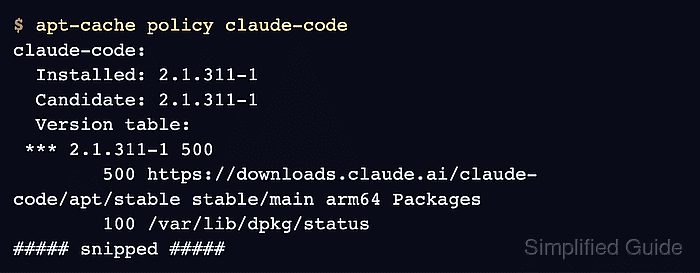
- Confirm that the installed package version comes from Anthropic's stable repository.
$ apt-cache policy claude-code
claude-code:
  Installed: 2.1.311-1
  Candidate: 2.1.311-1
  Version table:
 *** 2.1.311-1 500
        500 https://downloads.claude.ai/claude-code/apt/stable stable/main arm64 Packages
        100 /var/lib/dpkg/status
##### snipped #####
The installed version marked *** must have the downloads.claude.ai stable repository underneath it. Installed: (none) means installation did not complete. The version and architecture vary as packages change. Later upgrades use sudo apt update followed by sudo apt upgrade claude-code.
Fedora (DNF)
Anthropic also documents DNF installation for RHEL. The output here is from Fedora 45 on ARM64.
- Install the HTTPS and signing-key utilities.
$ sudo dnf -y install ca-certificates curl-minimal gnupg2
- Download Anthropic's release signing key.
$ sudo curl -fsSL https://downloads.claude.ai/keys/claude-code.asc -o /etc/pki/rpm-gpg/claude-code.asc
- Compare the downloaded key's fingerprint with Anthropic's published fingerprint.
$ gpg --show-keys /etc/pki/rpm-gpg/claude-code.asc
pub   rsa4096 2026-03-30 [SCE]
      31DDDE24DDFAB679F42D7BD2BAA929FF1A7ECACE
uid                      Anthropic Claude Code Release Signing <security@anthropic.com>
Trusting this key permits system-wide software installation by its holder. The fingerprint must match 31DD DE24 DDFA B679 F42D 7BD2 BAA9 29FF 1A7E CACE in Anthropic's documentation before continuing. The repository below uses this checked local key instead of downloading another copy at import time.
- Open the Claude Code repository file with elevated editing permission.
$ sudoedit /etc/yum.repos.d/claude-code.repo
- Enter the stable repository definition in the file.
[claude-code]
name=Claude Code
baseurl=https://downloads.claude.ai/claude-code/rpm/stable
enabled=1
gpgcheck=1
gpgkey=file:///etc/pki/rpm-gpg/claude-code.asc
If a [claude-code] section already exists, replace that section while preserving unrelated repositories. gpgcheck=1 requires signed packages.
- Save the repository file.
sudoedit installs the edited file when the editor exits.
- Install the Claude Code package.
$ sudo dnf -y install claude-code
##### snipped #####
Importing OpenPGP key 0x1A7ECACE:
 UserID     : "Anthropic Claude Code Release Signing <security@anthropic.com>"
 Fingerprint: 31DDDE24DDFAB679F42D7BD2BAA929FF1A7ECACE
 From       : file:///etc/pki/rpm-gpg/claude-code.asc
The key was successfully imported.
##### snipped #####
Complete!
DNF imports the previously checked key. A signature error blocks installation; disabling gpgcheck would remove this protection.
- Confirm the installed package's repository.
$ dnf info --installed claude-code
Installed packages
Name            : claude-code
Epoch           : 0
Version         : 2.1.311
Release         : 1
Architecture    : aarch64
Installed size  : 280.1 MiB
Source          : claude-code-2.1.311-1.src.rpm
From repository : claude-code
##### snipped #####
From repository must name claude-code, the repository configured with Anthropic's stable URL above. Later upgrades use sudo dnf upgrade claude-code.
Alpine (APK)
The package commands use a root shell. The output here is from Alpine 3.24 on ARM64.
- Install the HTTPS download utilities.
# apk add ca-certificates wget
Adding a key to /etc/apk/keys trusts its holder to supply system-wide packages. No further APK operation should run until the downloaded key's checksum matches Anthropic's published value.
- Download Anthropic's APK signing key.
# wget -O /etc/apk/keys/claude-code.rsa.pub https://downloads.claude.ai/keys/claude-code.rsa.pub
- Compare the key's checksum with Anthropic's published SHA-256 value.
# sha256sum /etc/apk/keys/claude-code.rsa.pub
395759c1f7449ef4cdef305a42e820f3c766d6090d142634ebdb049f113168b6  /etc/apk/keys/claude-code.rsa.pub
The checksum must match the value in Anthropic's APK instructions. A mismatch means the repository must not be used.
- Open Alpine's repository list in your text editor.
# vi /etc/apk/repositories
- Add the stable Claude Code repository at the end of the file.
https://downloads.claude.ai/claude-code/apk/stable
The distribution's existing main and community repository lines must remain in place. If the Claude Code stable line already exists, it needs no duplicate.
- Save the repository list.
- Refresh APK metadata from the configured repositories.
# apk update
The output should include https://downloads.claude.ai/claude-code/apk/stable without an UNTRUSTED signature error. Signature verification must remain enabled.
- Install the Claude Code package.
# apk add claude-code
(1/3) Installing libgcc (15.2.0-r5)
(2/3) Installing libstdc++ (15.2.0-r5)
(3/3) Installing claude-code (2.1.311-r1)
##### snipped #####
The APK package pulls in libgcc and libstdc++. Bundled search worked with this package; no separate ripgrep package or USE_BUILTIN_RIPGREP override was needed.
- Confirm the installed package's origin.
# apk policy claude-code
claude-code policy:
##### snipped #####
  2.1.311-r1:
    lib/apk/db/installed
    https://downloads.claude.ai/claude-code/apk/stable
The installed version must have both the installed-database entry and Anthropic's stable URL underneath it. Later upgrades use apk update followed by apk upgrade claude-code.
Verify the executable
Executable diagnostics run as your ordinary user, regardless of the package manager used for installation.
- Check that the installed Claude Code executable runs.
$ claude --version
2.1.311 (Claude Code)
The version should match the installed package, without its package revision suffix such as -1 or -r1.
- Inspect Claude Code's installation health.
$ claude doctor
Claude Code doctor

Running: package-manager (2.1.311)
Commit: e7d3b8365a0f
Platform: linux-arm64
Package manager: deb
Path: /usr/bin/claude
Config install method: not set
Search: OK (bundled)
Auto-updates: Managed by package manager
##### snipped #####
No installation issues found.
##### snipped #####
The output shown is from the APT installation. Each installation should resolve to /usr/bin/claude, identify deb, rpm, or apk as its package manager, and report no installation issues. A different path can mean an older installation takes precedence on PATH. Missing sign-in and Remote Control messages are expected before authentication. The separate Auto-update channel setting can still say latest; the configured repository determines which package is installed.
Related: Claude Code authentication