A repository often has build commands and conventions that are not obvious from its source files. A project CLAUDE.md gives Claude Code those instructions at the start of a new session.
/init generates a starting file from what Claude discovers in the repository. Reviewing that text matters because Claude can miss a test command or infer a convention that the project does not use.
Because /init calls the model, Claude Code needs to be installed and signed in. Project instructions are model context, so they can guide a response but cannot enforce a security boundary; permissions and hooks serve that separate purpose.
Trusting a repository lets Claude read, edit, and execute its files under your permission settings. Review unfamiliar repositories before approving access. Keep credentials and private account details out of CLAUDE.md because its contents are sent to the model and may be shared through version control.
Steps to create a CLAUDE.md file in Claude Code:
- Start Claude Code from your repository root.
$ claude
The working directory determines where /init creates the project file. A repository-root CLAUDE.md applies throughout that repository.
- Select Yes, I trust this folder if the trust prompt appears for a repository you trust.
- Generate the project instructions with /init.
> /init
Claude inspects the repository and writes CLAUDE.md with the commands and conventions it finds. The generated wording varies. If a project CLAUDE.md already exists, /init proposes improvements instead of starting from an empty file; its proposed changes still need review.
- Exit the session with /exit.
> /exit
- Open the repository-root CLAUDE.md in your text editor.
The alternative project location is .claude/CLAUDE.md. Personal ~/.claude/CLAUDE.md and CLAUDE.local.md have different scopes; they are not replacements for the shared project file.
- Correct any generated commands or conventions that disagree with the repository.
The build and test commands should match the project's own documentation and package configuration. Existing instructions that remain accurate belong in the file.
- Append an AGENTS.md import if that file contains shared instructions the project must retain.
@AGENTS.md
The import belongs on its own line at the end of CLAUDE.md, outside a Markdown code block. With the default instruction-file setting, adding CLAUDE.md stops automatic loading of AGENTS.md. An explicit import preserves those shared instructions; a duplicate existing import needs no second copy. /init may copy an individual rule without importing the file.
Related: Claude Code instruction-file loading - Add a checkable project rule at the end of CLAUDE.md.
## Before a project summary

- Before summarizing this project, run `npm test` and include its result in the summary.
This rule fits a project whose tests run with npm test. For another project, the rule needs that project's actual test command. It adds a request the repository contents alone would not imply.
- Save CLAUDE.md in the editor.
- Start a fresh Claude Code session from the same repository root.
$ claude
A new session checks the saved instructions without relying on the conversation that generated them.
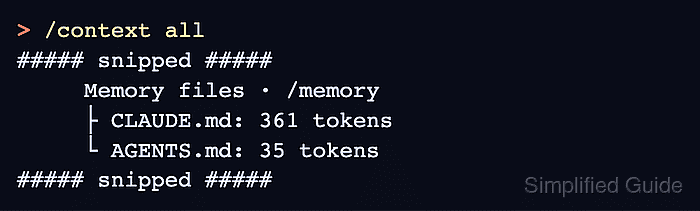
- Check the loaded files with /context all.
> /context all
##### snipped #####
     Memory files · /memory
     ├ CLAUDE.md: 361 tokens
     └ AGENTS.md: 35 tokens
##### snipped #####
Memory files must include CLAUDE.md; token counts depend on its contents. AGENTS.md also appeared here because the project file imported it. /context alone can collapse this list in fullscreen mode. /memory can list editable file locations that do not exist yet, so that menu alone does not prove the file loaded.
- Ask for a project summary without repeating the saved rule.
Give me a one-sentence overview of this project.
- Check the test run and its result in Claude's reply.
In the tested JavaScript project, Claude ran npm test before summarizing and reported one passing test with no failures. The command and result should match your project. A summary without the test run means the rule was not followed, even if CLAUDE.md appeared under Memory files. If the file is absent, check its location and the instruction-file loading settings; conflicting rules can also change the response.
Related: Troubleshoot CLAUDE.md instructions