OSDs are the storage daemons that hold object data in a Ceph cluster. Adding one on a new block device increases raw capacity and gives placement groups another target for replicated or erasure-coded data.
Cephadm uses ceph-volume inventory data to decide whether a device can become an OSD. A device with partitions, LVM state, a mount point, a file system, existing BlueStore data, or less than 5 GB of capacity is rejected before Ceph provisions it.
Use the specific-device command when a change ticket identifies one disk on one host. The broader ceph orch apply osd --all-available-devices path is persistent and can consume future matching disks, so keep that declarative mode for planned drive-group automation rather than a one-device capacity add.
Related: How to check Ceph cluster health
Related: How to add a host to a Ceph cluster with cephadm
Related: How to safely remove a Ceph OSD
Steps to add an OSD device to Ceph with cephadm:
- Check cluster health before changing OSD membership.
$ ceph health detail
HEALTH_OK
Start from a known cluster state so any later HEALTH_WARN can be tied to the new OSD or expected backfill.
Related: How to check Ceph cluster health - Refresh the device inventory on the target host.
$ ceph orch device ls --hostname=ceph-node2 --wide --refresh
HOST        PATH      TYPE  DEVICE ID   SIZE  AVAILABLE  REFRESHED  REJECT REASONS
ceph-node2  /dev/sdb  hdd   WDC-8TB-01  7.3T  Yes        4s ago
ceph-node2  /dev/sdc  hdd   WDC-8TB-02  7.3T  No         4s ago     Has a FileSystem
AVAILABLE must be Yes for the device path that will become an OSD. Match the path, size, and device ID to the maintenance record before continuing.
- Add the available device as an OSD.
$ ceph orch daemon add osd ceph-node2:/dev/sdb
Created osd(s) 22 on host 'ceph-node2'
The target block device is consumed by Ceph. Do not run this command against a disk with data that must be preserved.
- Refresh the orchestrator daemon table.
$ ceph orch ps --daemon_type osd --refresh
NAME    HOST        STATUS   REFRESHED  AGE  MEM USE  MEM LIM  VERSION  IMAGE ID      CONTAINER ID
osd.4   ceph-node1  running  5s ago     30d     2.1G        -  20.2.2   1a2b3c4d5e6f  aa11bb22cc33
osd.13  ceph-node2  running  5s ago     30d     2.0G        -  20.2.2   1a2b3c4d5e6f  bb22cc33dd44
osd.22  ceph-node2  running  5s ago     2m      1.7G        -  20.2.2   1a2b3c4d5e6f  cc33dd44ee55
The new daemon should appear as running on the host that owns the device. If it does not, inspect ceph orch ps --daemon_type osd and cluster health before retrying.
- Confirm the new OSD is placed under the expected host in the CRUSH tree.
$ ceph osd tree
ID  CLASS  WEIGHT    TYPE NAME             STATUS  REWEIGHT  PRI-AFF
-1         42.00000  root default
-3         12.00000      host ceph-node1
 4    hdd   6.00000          osd.4             up   1.00000  1.00000
 5    hdd   6.00000          osd.5             up   1.00000  1.00000
-5         18.00000      host ceph-node2
13    hdd   6.00000          osd.13            up   1.00000  1.00000
22    hdd   6.00000          osd.22            up   1.00000  1.00000
-7         12.00000      host ceph-node3
20    hdd   6.00000          osd.20            up   1.00000  1.00000
STATUS should show up and REWEIGHT should remain greater than 0 for a normal newly added OSD. Set the CRUSH device class separately if pool placement depends on classes.
Related: How to set a CRUSH device class in Ceph - Monitor backfill after the new capacity joins the cluster.
$ ceph -s
  cluster:
    id:     11111111-2222-3333-4444-555555555555
    health: HEALTH_WARN
            Degraded data redundancy: 64 pgs backfilling

  services:
    mon: 3 daemons, quorum ceph-node1,ceph-node2,ceph-node3 (age 3h)
    mgr: ceph-admin.abc123(active, since 3h)
    osd: 7 osds: 7 up (since 2m), 7 in (since 2m)

  data:
    pools:   4 pools, 256 pgs
    objects: 3.42M objects, 8.1 TiB
    usage:   24 TiB used, 82 TiB / 106 TiB avail
    pgs:     192 active+clean
             64 active+remapped+backfilling
Backfill or recovery warnings can be expected after adding capacity. Do not start another disruptive storage change until placement groups settle for the cluster's redundancy policy.
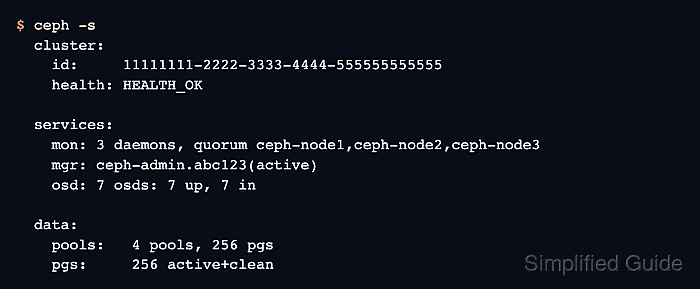
- Confirm the final OSD and placement group state after backfill finishes.
$ ceph -s
  cluster:
    id:     11111111-2222-3333-4444-555555555555
    health: HEALTH_OK

  services:
    mon: 3 daemons, quorum ceph-node1,ceph-node2,ceph-node3 (age 3h)
    mgr: ceph-admin.abc123(active, since 3h)
    osd: 7 osds: 7 up (since 18m), 7 in (since 18m)

  data:
    pools:   4 pools, 256 pgs
    objects: 3.42M objects, 8.1 TiB
    usage:   24 TiB used, 82 TiB / 106 TiB avail
    pgs:     256 active+clean

Mohd Shakir Zakaria is a cloud architect with deep roots in software development and open-source advocacy. Certified in AWS, Red Hat, VMware, ITIL, and Linux, he specializes in designing and managing robust cloud and on-premises infrastructures.


