A Ceph release upgrade replaces the container images used by monitors, managers, OSDs, and other managed daemons across the cluster. With cephadm, the orchestrator schedules those replacements from the manager daemon so a storage administrator can move a supported cluster to the next release without logging into every host.
cephadm upgrades the Ceph daemons it manages, but it does not remove the need for release-note review, configuration backup, client compatibility checks, or host package maintenance. The safest target is the next supported release or point release named by the official Ceph release notes for the source cluster.
Start from a cluster that is HEALTH_OK or has only understood warnings, has no down daemons, and has no recovering, incomplete, undersized, or backfilling placement groups. Keep the upgrade window separate from OSD replacement, pool layout changes, and client migrations so post-upgrade health checks point to one change.
Related: How to check Ceph cluster health
Related: How to back up Ceph cluster configuration
Related: How to manage Ceph services with cephadm
Steps to upgrade a Ceph cluster with cephadm:
- Check the cluster summary before the maintenance window.
$ ceph -s
  cluster:
    id:     11111111-2222-3333-4444-555555555555
    health: HEALTH_OK

  services:
    mon: 3 daemons, quorum ceph-node1,ceph-node2,ceph-node3 (age 3h)
    mgr: ceph-admin.abc123(active, since 3h), standbys: ceph-node2.def456
    osd: 6 osds: 6 up (since 3h), 6 in (since 3h)

  data:
    pools:   4 pools, 256 pgs
    objects: 3.42M objects, 8.1 TiB
    usage:   24 TiB used, 76 TiB / 100 TiB avail
    pgs:     256 active+clean
Resolve unexplained HEALTH_WARN, HEALTH_ERR, down daemons, recovery, backfill, incomplete, undersized, or peering states before starting an upgrade.
Related: How to check Ceph cluster health - Back up the cluster configuration before changing daemon images.
$ ceph orch ls --export > ceph-orch-services-before-upgrade.yaml
Keep the full configuration backup outside the Ceph cluster being upgraded. The exported service specs are only one part of the backup set.
Related: How to back up Ceph cluster configuration - Refresh the orchestrator view of managed daemons.
$ ceph orch ps --refresh
NAME                    HOST        STATUS         REFRESHED  AGE   VERSION  IMAGE ID
mon.ceph-node1          ceph-node1  running        6s ago     90d   19.2.4   a1b2c3d4e5f6
mon.ceph-node2          ceph-node2  running        6s ago     90d   19.2.4   a1b2c3d4e5f6
mon.ceph-node3          ceph-node3  running        6s ago     90d   19.2.4   a1b2c3d4e5f6
mgr.ceph-admin.abc123   ceph-admin  running        6s ago     90d   19.2.4   a1b2c3d4e5f6
osd.0                   ceph-node1  running        6s ago     90d   19.2.4   a1b2c3d4e5f6
osd.1                   ceph-node2  running        6s ago     90d   19.2.4   a1b2c3d4e5f6
osd.2                   ceph-node3  running        6s ago     90d   19.2.4   a1b2c3d4e5f6
Do not start while ceph orch ps shows stale refresh times, failed daemons, or unexpected old hosts. The upgrade controller relies on this inventory to schedule replacements.
- Confirm the current daemon versions.
$ ceph versions
{
    "mon": {
        "ceph version 19.2.4 (0a1b2c3d4e5f67890123456789abcdef01234567) squid (stable)": 3
    },
    "mgr": {
        "ceph version 19.2.4 (0a1b2c3d4e5f67890123456789abcdef01234567) squid (stable)": 2
    },
    "osd": {
        "ceph version 19.2.4 (0a1b2c3d4e5f67890123456789abcdef01234567) squid (stable)": 6
    },
    "overall": {
        "ceph version 19.2.4 (0a1b2c3d4e5f67890123456789abcdef01234567) squid (stable)": 11
    }
}
Mixed versions before the upgrade usually mean an earlier maintenance task is unfinished. Finish or roll back that task before starting a release upgrade.
- Set the target version from the official Ceph release notes.
$ TARGET_CEPH_VERSION=20.2.2
This example moves from Squid to Tentacle. Replace the value with the next supported target for the cluster being upgraded, and do not skip release families unless the Ceph release notes explicitly allow it.
- Start the cephadm upgrade.
$ ceph orch upgrade start --ceph-version "$TARGET_CEPH_VERSION"
Initiating upgrade to quay.io/ceph/ceph:v20.2.2
The upgrade replaces cluster daemons in a controlled order. Avoid pool changes, OSD removal, host drain work, and client migrations until the upgrade status and final health checks are complete. If the release plan requires placement-group counts to stay fixed, freeze the PG autoscaler before this step with ceph osd pool set noautoscale and unset it after upgrade success is confirmed.
- Check upgrade progress from the orchestrator.
$ ceph orch upgrade status
Upgrade to quay.io/ceph/ceph:v20.2.2 in progress
  services complete: mon, mgr
  currently upgrading: osd
  message: Restarting osd daemons on ceph-node2
If the status reports a blocking error, pause the upgrade before investigating and resume only after the named daemon or host issue is fixed.
- Watch the cephadm event stream from another terminal when progress needs closer inspection.
$ ceph -W cephadm
2026-06-29T10:16:42.117+0000 mgr.ceph-admin.abc123 [INF] Upgrade: Started upgrade to quay.io/ceph/ceph:v20.2.2
2026-06-29T10:18:09.441+0000 mgr.ceph-admin.abc123 [INF] Upgrade: Finished upgrading mon.ceph-node1
2026-06-29T10:22:31.908+0000 mgr.ceph-admin.abc123 [INF] Upgrade: Finished upgrading mgr.ceph-admin.abc123
2026-06-29T10:31:14.552+0000 mgr.ceph-admin.abc123 [INF] Upgrade: Finished upgrading osd.1
##### snipped #####
ceph -W cephadm follows the cephadm log channel. Stop the watch with Ctrl-C after collecting the needed progress or error lines.
- Check cluster health while daemons are being replaced.
$ ceph -s
  cluster:
    id:     11111111-2222-3333-4444-555555555555
    health: HEALTH_OK

  services:
    mon: 3 daemons, quorum ceph-node1,ceph-node2,ceph-node3 (age 20m)
    mgr: ceph-admin.abc123(active, since 18m), standbys: ceph-node2.def456
    osd: 6 osds: 6 up (since 16m), 6 in (since 16m)

  progress:
    Upgrade to 20.2.2 (42m)
      [================>....] 8/11 daemons upgraded
Stop and investigate if health changes from an understood warning to HEALTH_ERR, placement groups become inactive, or multiple daemon types fail to restart.
- Confirm that cephadm reports no active upgrade.
$ ceph orch upgrade status
No upgrade in progress
A paused or failed status is not complete. Use ceph orch upgrade resume only after the reported cause is corrected, and reserve ceph orch upgrade stop for an intentional abort before completion.
- Verify that managed daemon versions match the target release.
$ ceph versions
{
    "mon": {
        "ceph version 20.2.2 (0fcffee29411e3a38036764817b6e1afc59741cc) tentacle (stable)": 3
    },
    "mgr": {
        "ceph version 20.2.2 (0fcffee29411e3a38036764817b6e1afc59741cc) tentacle (stable)": 2
    },
    "osd": {
        "ceph version 20.2.2 (0fcffee29411e3a38036764817b6e1afc59741cc) tentacle (stable)": 6
    },
    "overall": {
        "ceph version 20.2.2 (0fcffee29411e3a38036764817b6e1afc59741cc) tentacle (stable)": 11
    }
}
After daemon versions match, update cephadm and ceph-common packages on admin hosts through the matching operating-system package repository so local tools do not lag behind the cluster release.
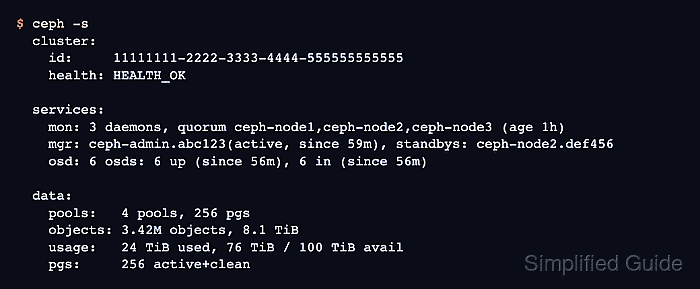
- Confirm the post-upgrade cluster health.
$ ceph -s
  cluster:
    id:     11111111-2222-3333-4444-555555555555
    health: HEALTH_OK

  services:
    mon: 3 daemons, quorum ceph-node1,ceph-node2,ceph-node3 (age 1h)
    mgr: ceph-admin.abc123(active, since 59m), standbys: ceph-node2.def456
    osd: 6 osds: 6 up (since 56m), 6 in (since 56m)

  data:
    pools:   4 pools, 256 pgs
    objects: 3.42M objects, 8.1 TiB
    usage:   24 TiB used, 76 TiB / 100 TiB avail
    pgs:     256 active+clean

Mohd Shakir Zakaria is a cloud architect with deep roots in software development and open-source advocacy. Certified in AWS, Red Hat, VMware, ITIL, and Linux, he specializes in designing and managing robust cloud and on-premises infrastructures.


