Detailed Apache logging is useful when a normal access log shows the symptom but not the decision that caused it. A missing file, rewrite loop, TLS handshake issue, reverse-proxy timeout, or repeated 4xx response may need both an error-log message from the responsible module and an access-log row with timing and host context.
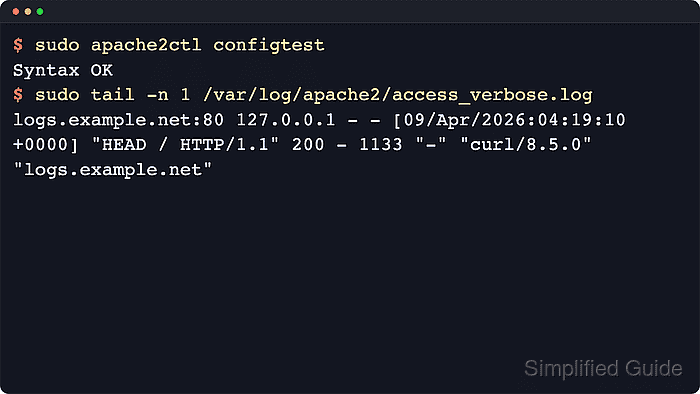
Apache controls diagnostic verbosity with LogLevel and request logging with LogFormat plus CustomLog. A server-wide level such as warn keeps routine noise low, while a module-specific token such as core:info, ssl:info, or rewrite:trace3 raises detail only for the module being investigated.
Verbose logging should be temporary on busy systems because it increases disk writes and can capture sensitive URLs, headers, or cookies if access-log formats are expanded too far. Debian and Ubuntu store these files under /etc/apache2/ and use the apache2 systemd unit; RHEL-family systems usually use /etc/httpd/ and the httpd service name.
Steps to configure verbose Apache logging:
- List the configuration files loaded by the running Apache configuration.
$ sudo apache2ctl -t -D DUMP_INCLUDES
Included configuration files:
  (*) /etc/apache2/apache2.conf
    (146) /etc/apache2/mods-enabled/access_compat.load
    (146) /etc/apache2/mods-enabled/alias.load
    (146) /etc/apache2/mods-enabled/auth_basic.load
##### snipped #####
    (222) /etc/apache2/conf-enabled/security.conf
    (225) /etc/apache2/sites-enabled/000-default.conf
Some hosts also print the AH00558 server-name warning before the include list. That warning does not stop the active configuration tree from being shown.
Related: Location for Apache configuration
- Find the current LogLevel directive before adding a temporary override.
$ sudo grep --recursive --line-number '^ *LogLevel' /etc/apache2/
/etc/apache2/apache2.conf:143:LogLevel warn
Keep the existing default in place and use a separate troubleshooting snippet so the temporary verbose setting can be removed cleanly.
- Create a temporary logging snippet.
$ sudoedit /etc/apache2/conf-available/verbose-logging.conf
- Set a quiet default and raise detail only for the module being investigated.
LogLevel warn core:info
core:info records lower-priority core messages, which is enough to prove missing-file diagnostics without enabling broad trace logging. For a rewrite problem, use a module-specific token such as rewrite:trace3 only while reproducing the failing request.
Trace levels from trace1 through trace8 can generate large error logs and slow request handling. Use the lowest trace level that exposes the problem and disable it after collecting evidence.
- Enable the temporary LogLevel snippet.
$ sudo a2enconf verbose-logging
Enabling conf verbose-logging.
To activate the new configuration, you need to run:
  service apache2 reload
- Create a verbose access-log format snippet.
$ sudoedit /etc/apache2/conf-available/verbose-access-log.conf
- Define a named access-log format with host, client, status, byte, and timing fields.
LogFormat "%v:%p %a %l %u %t \"%r\" %>s %b %D \"%{Referer}i\" \"%{User-Agent}i\" \"%{Host}i\"" verbose_timingThe format adds canonical vhost and port (%v:%p), client address (%a), response bytes (%b), request duration in microseconds (%D), and selected request headers without changing the existing standard format.
Avoid adding authentication headers, session cookies, bearer tokens, or other secret-bearing fields to verbose access logs.
- Enable the verbose access-log format snippet.
$ sudo a2enconf verbose-access-log
Enabling conf verbose-access-log.
To activate the new configuration, you need to run:
  service apache2 reload
- Add a second CustomLog line inside the affected VirtualHost.
<VirtualHost *:80>
    ServerName logs.example.net
    DocumentRoot /var/www/html

    ErrorLog ${APACHE_LOG_DIR}/error.log
    CustomLog ${APACHE_LOG_DIR}/access.log combined
    CustomLog ${APACHE_LOG_DIR}/access_verbose.log verbose_timing
</VirtualHost>
Writing verbose rows to a separate access_verbose.log file keeps the normal access log stable for parsers, dashboards, and rotation rules.
- Validate the updated configuration before reloading Apache.
$ sudo apache2ctl configtest
Syntax OK
Fix parser errors before reloading. A clean syntax test does not prove the log path, request path, or vhost match works at runtime.
Related: How to test Apache configuration
- Reload the running Apache service.
$ sudo systemctl reload apache2
Use sudo systemctl reload httpd on most RHEL-family systems.
- Request a missing file through the vhost to trigger a low-priority core message.
$ curl --head --silent --show-error --header "Host: logs.example.net" http://127.0.0.1/missing-file.html
HTTP/1.1 404 Not Found
Date: Sat, 06 Jun 2026 07:53:24 GMT
Server: Apache/2.4.66 (Ubuntu)
Content-Type: text/html; charset=iso-8859-1
If 127.0.0.1 does not hit the same virtual host locally, use the site hostname directly or a Host header that matches the changed vhost.
- Open the error log and confirm the verbose core message appears.
$ sudo cat /var/log/apache2/error.log
[Sat Jun 06 07:53:24.039958 2026] [mpm_event:notice] [pid 3407:tid 3407] AH00489: Apache/2.4.66 (Ubuntu) configured -- resuming normal operations
[Sat Jun 06 07:53:24.040008 2026] [core:notice] [pid 3407:tid 3407] AH00094: Command line: '/usr/sbin/apache2'
[Sat Jun 06 07:53:24.047836 2026] [core:info] [pid 3410:tid 3414] [client 127.0.0.1:34098] AH00128: File does not exist: /var/www/html/missing-file.html
The important signal is [core:info] on the missing-file line. On a busy host, open the log with the team's normal viewer or pager and search for the request path instead of dumping a large production log to the terminal.
- Send a normal request through the same vhost.
$ curl --head --silent --show-error --header "Host: logs.example.net" http://127.0.0.1/
HTTP/1.1 200 OK
Date: Sat, 06 Jun 2026 07:53:24 GMT
Server: Apache/2.4.66 (Ubuntu)
Last-Modified: Sat, 06 Jun 2026 07:53:22 GMT
ETag: "29b0-65391124b9ca8"
Accept-Ranges: bytes
Content-Length: 10672
Vary: Accept-Encoding
Content-Type: text/html
- Confirm that the verbose access log records the extra fields.
$ sudo cat /var/log/apache2/access_verbose.log
logs.example.net:80 127.0.0.1 - - [06/Jun/2026:07:53:24 +0000] "HEAD /missing-file.html HTTP/1.1" 404 - 172 "-" "curl/8.18.0" "logs.example.net"
logs.example.net:80 127.0.0.1 - - [06/Jun/2026:07:53:24 +0000] "HEAD / HTTP/1.1" 200 - 111 "-" "curl/8.18.0" "logs.example.net"
The leading logs.example.net:80 value comes from %v:%p, the dash after each status comes from %b because a HEAD response has no body, and the numeric field before the referer is %D in microseconds.
- Remove the temporary verbose logging after collecting the needed evidence.
$ sudo a2disconf verbose-logging verbose-access-log
Conf verbose-logging disabled.
Conf verbose-access-log disabled.
To activate the new configuration, you need to run:
  service apache2 reload
Remove the temporary CustomLog ${APACHE_LOG_DIR}/access_verbose.log verbose_timing line from the virtual host as well if the verbose access log was only needed for the troubleshooting window.
- Validate and reload Apache after cleanup.
$ sudo apache2ctl configtest
Syntax OK

$ sudo systemctl reload apache2

Mohd Shakir Zakaria is a cloud architect with deep roots in software development and open-source advocacy. Certified in AWS, Red Hat, VMware, ITIL, and Linux, he specializes in designing and managing robust cloud and on-premises infrastructures.


