Enabling HTTP/3 in front of an Apache site can reduce connection stalls on lossy or roaming networks because browsers can carry requests over QUIC instead of reopening or reusing a long-lived TCP session. The practical gain is usually faster recovery after packet loss, Wi-Fi handoffs, or mobile network changes while the same Apache content continues to serve the application.
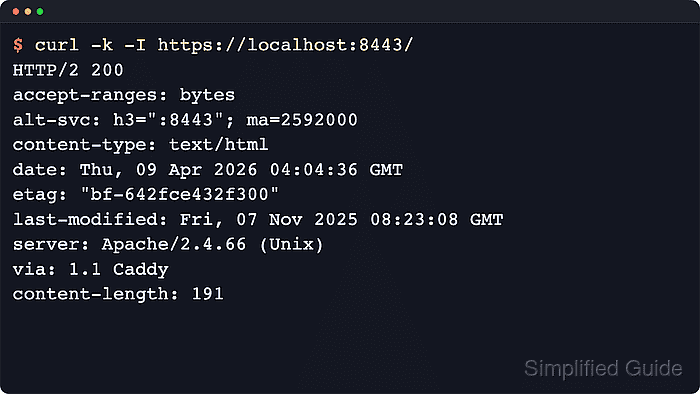
Current Apache HTTP Server documentation still covers browser-facing HTTP/2 through mod_http2, but not a browser-facing HTTP/3 module, so the supported pattern today is to terminate HTTP/3 on a frontend that speaks QUIC and reverse proxy the requests to Apache over regular HTTP or HTTPS. Caddy fits that frontend role because it serves HTTP/1.1, HTTP/2, and HTTP/3 by default and forwards requests to the local Apache origin.
The example keeps Apache on local port 80 and brings up Caddy on https://localhost:8443 with an internal certificate so the flow can be validated without first reworking the public site. After the local check works, move the same pattern to the real hostname and public TCP/UDP 443, and remember that some current curl packages still omit HTTP/3 support even when the site is configured correctly.
Related: How to improve Apache performance
Related: How to enable HTTP/2 in Apache
Related: How to configure Let's Encrypt SSL in Apache
Steps to enable HTTP/3 in Apache:
- Confirm that Apache is already serving the site locally on the origin port that the HTTP/3 frontend will proxy to.
$ curl -I http://127.0.0.1/
The example below proxies to http://127.0.0.1:80. Keep Apache bound to a local-only listener when the frontend and origin run on the same host.
- Open the Caddyfile for the frontend and add a site block that terminates TLS and reverse proxies to Apache.
$ sudo vi /etc/caddy/Caddyfile
{
    auto_https disable_redirects
}

https://localhost:8443 {
    tls internal
    reverse_proxy http://127.0.0.1:80
}
Caddy advertises HTTP/3 automatically for HTTPS sites, so no separate Alt-Svc header is required in this example. Replace localhost:8443 with the real hostname after the local validation pass, and remove tls internal when Caddy should obtain a public certificate.
- Validate the updated Caddyfile before reloading the frontend.
$ sudo caddy validate --config /etc/caddy/Caddyfile --adapter caddyfile
Valid configuration
Disabling automatic redirects in the global block avoids a port 80 conflict while Apache is still listening there. When moving this pattern to public 443, let the frontend own public 80 and 443, move Apache behind it on a local port such as 8080, and remove the auto_https disable_redirects override if automatic HTTP-to-HTTPS redirects are required.
- Reload Caddy so it starts serving HTTPS and advertising HTTP/3 for the test origin.
$ sudo systemctl reload caddy
Use sudo systemctl restart caddy if the service is not already running, or the equivalent service-management command on platforms that do not use systemd.
- Request the HTTPS endpoint over the normal TCP path and confirm the response advertises HTTP/3 with Alt-Svc.
$ curl -k -I https://localhost:8443/
HTTP/2 200
accept-ranges: bytes
alt-svc: h3=":8443"; ma=2592000
content-type: text/html
date: Sat, 06 Jun 2026 07:33:56 GMT
etag: "29b0-65390cc9fdaf1"
last-modified: Sat, 06 Jun 2026 07:33:53 GMT
server: Caddy
server: Apache/2.4.66 (Ubuntu)
vary: Accept-Encoding
content-length: 10672
The alt-svc header advertises HTTP/3 on the same HTTPS endpoint. The two server headers show that Caddy answered the browser-facing request while Apache still generated the origin response. On a real hostname over public 443, the same check should show alt-svc: h3=":443".
Tool: HTTP Header Checker
- Allow inbound UDP on the advertised port all the way to the frontend that terminates QUIC.
HTTP/3 discovery happens over HTTPS first, but the actual QUIC connection uses UDP. For a production rollout, open both TCP and UDP on 443 through local firewalls, cloud security groups, and load balancers.
- Check the Caddy service log for the HTTP/3 listener after the reload.
$ sudo journalctl -u caddy --since "5 minutes ago"
Jun 06 07:33:56 web01 caddy[1234]: {"level":"info","logger":"http","msg":"enabling HTTP/3 listener","addr":":8443"}
Jun 06 07:33:56 web01 caddy[1234]: {"level":"info","logger":"http.log","msg":"server running","name":"srv0","protocols":["h1","h2","h3"]}
For a production site on the standard HTTPS port, the listener address should be :443 instead of :8443.
- Verify from a client build that can actually negotiate HTTP/3.
$ curl --version
curl 8.18.0 (aarch64-unknown-linux-gnu) libcurl/8.18.0 OpenSSL/3.5.5
Release-Date: 2026-01-07, security patched: 8.18.0-1ubuntu2.1
Protocols: dict file ftp ftps gopher gophers http https imap imaps ipfs ipns ldap ldaps mqtt pop3 pop3s rtmp rtsp scp sftp smb smbs smtp smtps telnet tftp ws wss
Features: alt-svc AsynchDNS brotli GSS-API HSTS HTTP2 HTTPS-proxy IDN IPv6 Kerberos Largefile libz NTLM PSL SPNEGO SSL threadsafe TLS-SRP UnixSockets zstd
The example curl build above cannot run curl --http3-only because its feature list lacks HTTP3. Use a curl build whose feature list includes HTTP3, or a browser network inspector that shows the negotiated protocol, before treating a client-side HTTP/3 check as complete.

Mohd Shakir Zakaria is a cloud architect with deep roots in software development and open-source advocacy. Certified in AWS, Red Hat, VMware, ITIL, and Linux, he specializes in designing and managing robust cloud and on-premises infrastructures.


