Brotli compression reduces the size of HTML, CSS, JavaScript, JSON, XML, and SVG responses before Apache sends them to the client, which cuts bandwidth use and shortens transfer time on slower links.
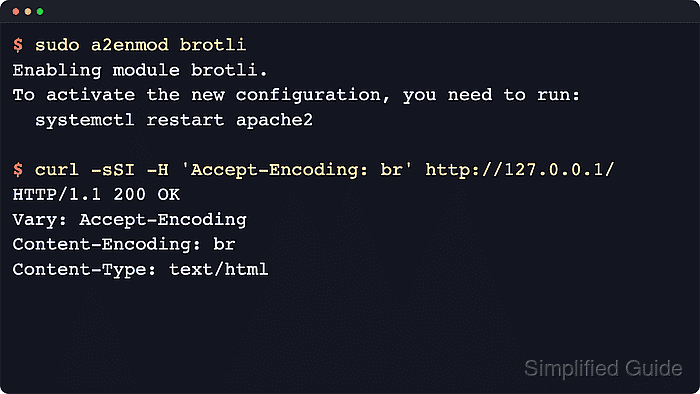
Apache handles Brotli through mod_brotli. When a client advertises Accept-Encoding: br, the BROTLI_COMPRESS output filter compresses the configured MIME types, then returns Content-Encoding: br and Vary: Accept-Encoding so caches keep compressed and uncompressed responses separate.
Current Debian and Ubuntu Apache packages already ship the mod_brotli module file and the brotli.load stub, so the job is usually enabling the packaged module and adding a conf-available rule set instead of building a third-party module. Compression still costs CPU and can contribute to BREACH-style side-channel exposure on HTTPS responses that reflect secrets, so keep the filter list focused on text responses that should be compressed.
Related: How to benchmark and tune Apache performance
Related: How to enable gzip compression in Apache
Related: Enable or disable Apache modules
Steps to enable Brotli compression in Apache:
- Enable the built-in brotli module.
$ sudo a2enmod brotli
Enabling module brotli.
To activate the new configuration, you need to run:
  service apache2 restart
Current Debian and Ubuntu packages provide mod_brotli.so with apache2-bin and the brotli.load stub with apache2. There is no separate libapache2-mod-brotli package on current releases.
The helper output still names the classic service apache2 command on current packages. On a systemd host, use systemctl in the apply step below.
- Create a Brotli rules file in the conf-available directory.
$ sudo tee /etc/apache2/conf-available/brotli.conf >/dev/null <<'EOF'
<IfModule mod_brotli.c>
    BrotliCompressionQuality 5
    BrotliAlterETag AddSuffix
    AddOutputFilterByType BROTLI_COMPRESS text/html text/plain text/css text/javascript
    AddOutputFilterByType BROTLI_COMPRESS application/javascript application/json application/xml text/xml
    AddOutputFilterByType BROTLI_COMPRESS application/xhtml+xml application/rss+xml application/atom+xml image/svg+xml
</IfModule>
EOF
Keep the filter list on text-based responses. Formats such as JPEG, PNG, WebP, AVIF, ZIP, or MP4 are already compressed and usually waste CPU when passed through Brotli again.
- Enable the Brotli configuration snippet.
$ sudo a2enconf brotli
Enabling conf brotli.
To activate the new configuration, you need to run:
  service apache2 reload
a2enconf creates the symlink under /etc/apache2/conf-enabled. It does not load a module that is not already enabled.
- Validate the Apache configuration syntax before applying the new rules.
$ sudo apache2ctl -t
Syntax OK
If Syntax OK is not returned, do not restart or reload Apache until the reported configuration error is fixed.
If AH00558 appears before Syntax OK on a fresh Debian or Ubuntu host, Apache is warning about a missing global ServerName. Fix that warning separately, but Syntax OK still means the Brotli configuration parsed successfully.
Related: How to test Apache configuration
- Restart Apache so the newly enabled module is loaded.
$ sudo systemctl restart apache2
Use a restart after a2enmod brotli. Later edits to only brotli.conf can usually be applied with sudo systemctl reload apache2.
- Verify that mod_brotli is loaded.
$ apache2ctl -M
Loaded Modules:
 core_module (static)
##### snipped #####
 brotli_module (shared)
##### snipped #####
- Confirm that a text response is served with Brotli compression.
$ curl -sSI -H 'Accept-Encoding: br' http://127.0.0.1/
HTTP/1.1 200 OK
Date: Sat, 06 Jun 2026 07:27:45 GMT
Server: Apache/2.4.66 (Ubuntu)
Last-Modified: Sat, 06 Jun 2026 07:27:45 GMT
ETag: W/"57ff-65390b6b34d88-br"
Accept-Ranges: bytes
Vary: Accept-Encoding
Content-Encoding: br
Content-Length: 75
Content-Type: text/html
If Content-Encoding: br is missing, test a text URL that matches the active virtual host. Add a neutral host header such as -H 'Host: www.example.net' when the site is selected by name. Binary assets and content types outside the AddOutputFilterByType list will not be compressed.
Tool: Gzip Compression Checker

Mohd Shakir Zakaria is a cloud architect with deep roots in software development and open-source advocacy. Certified in AWS, Red Hat, VMware, ITIL, and Linux, he specializes in designing and managing robust cloud and on-premises infrastructures.


