A Hive metastore is the catalog layer that tells Spark SQL where shared databases, tables, partitions, and storage formats live. Connecting Spark to that catalog lets jobs query warehouse tables that were created outside the current Spark session instead of relying only on temporary views or Spark-local metadata.
Spark reads Hive client settings from its configuration directory, most often through hive-site.xml, and the application must start its SparkSession with Hive support enabled. The metastore URI points Spark at the remote Thrift service, while core-site.xml and hdfs-site.xml may also be required when table locations use HDFS or Kerberos-secured storage.
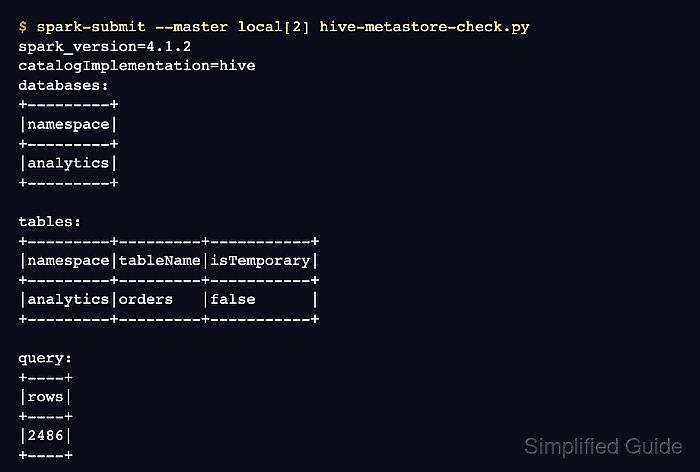
The smoke test should show catalogImplementation=hive, list an expected database or table, and query a known table. If metadata listing works but the query fails, Spark can reach the metastore but still lacks access to the table storage, required SerDes, or authentication layer.
Related: How to run SQL queries in Spark
Related: How to configure Spark defaults
Steps to connect Spark SQL to a Hive metastore:
- Collect the metastore and smoke-test values.
Metastore URI: thrift://hms.example.net:9083
Warehouse path: hdfs:///user/hive/warehouse
Metastore client version: 3.1.3
Known database: analytics
Known table: analytics.orders
Use a read-only table for the first check. The table query must be safe to run from the Spark environment where the check starts.
- Create a Spark configuration directory for the metastore check.
$ mkdir -p conf
- Save the Hive metastore client settings.
- conf/hive-site.xml
<configuration>
  <property>
    <name>hive.metastore.uris</name>
    <value>thrift://hms.example.net:9083</value>
  </property>
</configuration>
Use comma-separated Thrift URIs when the metastore service has multiple endpoints. Place core-site.xml, hdfs-site.xml, and security files in the same configuration directory when Spark must read table data from secured HDFS or another configured storage layer.
- Add Spark metastore defaults when the remote service needs a pinned client version.
- conf/spark-defaults.conf
spark.sql.warehouse.dir hdfs:///user/hive/warehouse
spark.ui.showConsoleProgress false

# Keep these only when the remote metastore is not compatible with Spark's bundled Hive 2.3.10 client.
spark.sql.hive.metastore.version 3.1.3
spark.sql.hive.metastore.jars path
spark.sql.hive.metastore.jars.path file:///opt/hive-metastore-client/*
Stage Hive metastore client JARs that match the remote service version before using spark.sql.hive.metastore.jars.path. Use Spark's bundled client only when it matches the metastore version boundary for the environment.
Related: How to add packages to a Spark job - Point the terminal session at the Spark configuration directory.
$ export SPARK_CONF_DIR=$PWD/conf
- Save the Spark SQL metastore check script.
- hive-metastore-check.py
from pyspark.sql import SparkSession

spark = (
    SparkSession.builder.appName("sg-hive-metastore-check")
    .enableHiveSupport()
    .getOrCreate()
)
spark.sparkContext.setLogLevel("ERROR")

database = "analytics"
table = "orders"

print(f"spark_version={spark.version}")
print("catalogImplementation=" + spark.conf.get("spark.sql.catalogImplementation"))

print("databases:")
spark.sql(f"SHOW DATABASES LIKE '{database}'").show(truncate=False)

print("tables:")
spark.sql(f"SHOW TABLES IN {database} LIKE '{table}'").show(truncate=False)

print("query:")
spark.sql(f"SELECT COUNT(*) AS rows FROM {database}.{table}").show(truncate=False)

spark.stop()
Change database and table to an existing metastore object that the Spark user is allowed to query.
- Run the metastore smoke test with Spark.
$ spark-submit --master local[2] hive-metastore-check.py
spark_version=4.1.2
catalogImplementation=hive
databases:
+---------+
|namespace|
+---------+
|analytics|
+---------+

tables:
+---------+---------+-----------+
|namespace|tableName|isTemporary|
+---------+---------+-----------+
|analytics|orders   |false      |
+---------+---------+-----------+

query:
+----+
|rows|
+----+
|2486|
+----+
Use the same SPARK_CONF_DIR for the real Spark job after the smoke test passes. In cluster mode, the driver and executors also need the same Hive, Hadoop, storage, and authentication configuration.
- Remove the temporary smoke-test script.
$ rm hive-metastore-check.py
Keep the Spark configuration directory only where jobs should continue using the Hive metastore.

Mohd Shakir Zakaria is a cloud architect with deep roots in software development and open-source advocacy. Certified in AWS, Red Hat, VMware, ITIL, and Linux, he specializes in designing and managing robust cloud and on-premises infrastructures.


