Spark dynamic allocation lets one application request executors while tasks are queued and release executors after the backlog clears. It fits shared clusters where a batch job needs more workers during a burst but should not keep them after the stage finishes.
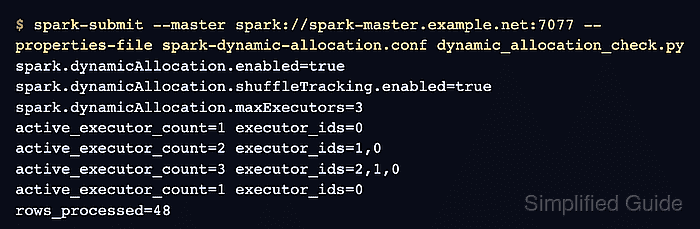
Dynamic allocation is an application setting, not a cluster-wide switch by itself. The submitted job must run on a coarse-grained cluster manager such as Spark standalone, YARN, or Kubernetes, and Spark must have a way to keep shuffle files usable after an executor leaves.
This configuration uses shuffle tracking because it does not require starting an external shuffle service. The smoke-test values use short timeouts so executor growth and removal are visible during a small run; raise the idle timeout and executor bounds before reusing the file for a production workload.
Related: How to submit an Apache Spark job
Related: How to configure Spark defaults
Related: How to check Spark application status
Steps to enable Spark dynamic allocation:
- Confirm the application will run on a supported cluster manager and use shuffle tracking for shuffle preservation.
Cluster manager: spark://spark-master.example.net:7077
Shuffle preservation: spark.dynamicAllocation.shuffleTracking.enabled
Verification surface: driver UI executor records
Dynamic allocation does not add or remove executors in local[…] mode. Validate it with a standalone, YARN, or Kubernetes application.
- Save the dynamic allocation properties for the test application.
- spark-dynamic-allocation.conf
spark.ui.showConsoleProgress false
spark.dynamicAllocation.enabled true
spark.dynamicAllocation.shuffleTracking.enabled true
spark.dynamicAllocation.minExecutors 0
spark.dynamicAllocation.initialExecutors 1
spark.dynamicAllocation.maxExecutors 3
spark.dynamicAllocation.schedulerBacklogTimeout 1s
spark.dynamicAllocation.sustainedSchedulerBacklogTimeout 1s
spark.dynamicAllocation.executorIdleTimeout 5s
spark.executor.cores 1
spark.executor.memory 512m
The 5s idle timeout is for a visible smoke test. Use a longer value, such as Spark's 60s default, before leaving dynamic allocation enabled for bursty production jobs.
- Save a temporary verification job that reports active executor counts while one action is running.
- dynamic_allocation_check.py
import json
import threading
import time
import urllib.request

from pyspark.sql import SparkSession


spark = SparkSession.builder.appName("sg-dynamic-allocation").getOrCreate()
sc = spark.sparkContext
sc.setLogLevel("ERROR")

conf_keys = [
    "spark.dynamicAllocation.enabled",
    "spark.dynamicAllocation.shuffleTracking.enabled",
    "spark.dynamicAllocation.minExecutors",
    "spark.dynamicAllocation.initialExecutors",
    "spark.dynamicAllocation.maxExecutors",
    "spark.executor.cores",
]

for key in conf_keys:
    print(f"{key}={sc.getConf().get(key, '<unset>')}")

app_id = sc.applicationId
print(f"application_id={app_id}")


def executor_ids():
    url = f"{sc.uiWebUrl}/api/v1/applications/{app_id}/executors"
    try:
        with urllib.request.urlopen(url, timeout=5) as response:
            rows = json.load(response)
    except Exception as exc:
        print(f"executor_api_poll=retry reason={type(exc).__name__}")
        return []
    return [row["id"] for row in rows if row["id"] != "driver" and row.get("isActive", True)]


def slow_task(value):
    time.sleep(3)
    return value


result = {}


def run_job():
    result["rows"] = sc.parallelize(range(48), 48).map(slow_task).count()


worker = threading.Thread(target=run_job)
worker.start()

samples = []
for _ in range(18):
    ids = executor_ids()
    samples.append(len(ids))
    print(f"active_executor_count={len(ids)} executor_ids={','.join(ids) if ids else 'none'}")
    if len(set(samples)) >= 2 and max(samples) >= 2:
        break
    time.sleep(1)

worker.join()

for _ in range(10):
    ids = executor_ids()
    samples.append(len(ids))
    print(f"active_executor_count={len(ids)} executor_ids={','.join(ids) if ids else 'none'}")
    if samples[-1] < max(samples):
        break
    time.sleep(2)

print("executor_count_samples=" + ",".join(str(value) for value in samples))
print(f"rows_processed={result['rows']}")

spark.stop()
The job creates enough pending tasks to make Spark request more executors, then waits long enough for the short idle timeout to remove some of them.
- Submit the verification job with the dynamic allocation properties file.
$ spark-submit \
  --master spark://spark-master.example.net:7077 \
  --name sg-dynamic-allocation \
  --properties-file spark-dynamic-allocation.conf \
  dynamic_allocation_check.py
##### snipped #####
spark.dynamicAllocation.enabled=true
spark.dynamicAllocation.shuffleTracking.enabled=true
spark.dynamicAllocation.minExecutors=0
spark.dynamicAllocation.initialExecutors=1
spark.dynamicAllocation.maxExecutors=3
spark.executor.cores=1
application_id=app-20260706212627-0000
--properties-file passes these settings to the submitted application. Move stable values into spark-defaults.conf only when every job launched by that client should inherit them.
Related: How to configure Spark defaults - Confirm that executor counts rise under backlog and fall after idle timeout.
active_executor_count=1 executor_ids=0
active_executor_count=2 executor_ids=1,0
active_executor_count=3 executor_ids=2,1,0
active_executor_count=1 executor_ids=0
executor_count_samples=1,1,2,3,3,3,3,1
rows_processed=48
The rise from one to three executors shows Spark requested more capacity for queued tasks. The later return to one executor shows idle executors were removed.
- Remove the temporary verification job after the real application is configured.
$ rm dynamic_allocation_check.py
Keep spark-dynamic-allocation.conf with the submitted workload, or copy the tuned settings into the client defaults after the smoke test passes.
Related: How to submit an Apache Spark job
Related: How to check Spark application status

Mohd Shakir Zakaria is a cloud architect with deep roots in software development and open-source advocacy. Certified in AWS, Red Hat, VMware, ITIL, and Linux, he specializes in designing and managing robust cloud and on-premises infrastructures.


