Spark jobs often need to enrich a fact-shaped DataFrame with lookup data before aggregation, validation, or writing. A DataFrame join matches rows from two inputs on a key column and produces one DataFrame that carries the fields needed by the next transformation.
In PySpark, DataFrame.join() takes the right-side DataFrame, a join key or expression, and an optional join type. Passing a shared column name such as customer_id performs an equi-join and keeps one copy of that key in the output, while an explicit column expression is better for differently named keys or self-joins.
The default join type is inner, which keeps only matched rows. A left join keeps every row from the left DataFrame and fills right-side columns with NULL where no match exists, so the output exposes lookup coverage before downstream steps rely on the joined columns.
Related: How to create a Spark DataFrame
Related: How to select and filter a Spark DataFrame
Related: How to configure a Spark broadcast join
Steps to join Spark DataFrames in PySpark:
- Create a PySpark join check script.
$ vi dataframe_join_check.py
- Import the Spark session and functions module.
from pyspark.sql import SparkSession, functions as F
- Build the Spark session.
spark = (
    SparkSession.builder
    .appName("sg-dataframe-join-check")
    .config("spark.sql.shuffle.partitions", "2")
    .config("spark.ui.showConsoleProgress", "false")
    .getOrCreate()
)
spark.sparkContext.setLogLevel("ERROR")
spark.sql.shuffle.partitions is reduced only to keep the local proof small. Production jobs should use a partition count that matches the data volume and cluster size.
- Create the left DataFrame.
orders = spark.createDataFrame(
    [
        ("ORD-1001", "C-101", 120.50),
        ("ORD-1002", "C-102", 75.00),
        ("ORD-1003", "C-999", 41.25),
        ("ORD-1004", "C-101", 63.40),
    ],
    ["order_id", "customer_id", "amount"],
)
- Create the lookup DataFrame.
customers = spark.createDataFrame(
    [
        ("C-101", "Asha Trading"),
        ("C-102", "Northwind Retail"),
        ("C-103", "Meridian Supply"),
    ],
    ["customer_id", "customer_name"],
)
- Join the DataFrames on the shared key.
joined = (
    orders
    .join(customers, on="customer_id", how="left")
    .select("order_id", "customer_id", "customer_name", "amount")
)
on=“customer_id” requires that column on both DataFrames and returns one output customer_id column. Use a column expression such as orders.customer_id == customers.customer_id when the key names differ, and alias DataFrames before self-joins to avoid ambiguous column references.
- Print the schema, joined rows, and count checks.
print("Joined schema:")
joined.printSchema()

print("Joined rows:")
joined.orderBy("order_id").show(truncate=False)

print(f"left_join_count = {joined.count()}")
print(f"inner_join_count = {orders.join(customers, on='customer_id', how='inner').count()}")
print(f"unmatched_customer_count = {joined.filter(F.col('customer_name').isNull()).count()}")

spark.stop()
- Run the script in local mode.
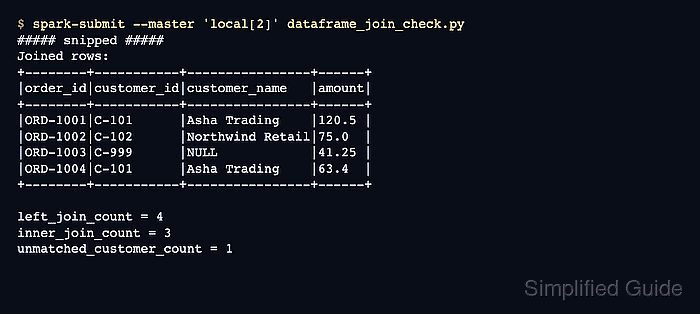
$ spark-submit --master 'local[2]' dataframe_join_check.py
##### snipped #####
Joined schema:
root
 |-- order_id: string (nullable = true)
 |-- customer_id: string (nullable = true)
 |-- customer_name: string (nullable = true)
 |-- amount: double (nullable = true)

Joined rows:
+--------+-----------+----------------+------+
|order_id|customer_id|customer_name   |amount|
+--------+-----------+----------------+------+
|ORD-1001|C-101      |Asha Trading    |120.5 |
|ORD-1002|C-102      |Northwind Retail|75.0  |
|ORD-1003|C-999      |NULL            |41.25 |
|ORD-1004|C-101      |Asha Trading    |63.4  |
+--------+-----------+----------------+------+

left_join_count = 4
inner_join_count = 3
unmatched_customer_count = 1
- Confirm the join proof values.
left_join_count stays at 4 because the left join keeps all four orders. inner_join_count drops to 3 because one order has no matching customer. unmatched_customer_count shows the single lookup miss that produced NULL.
- Remove the proof script when it is not part of the application code.
$ rm dataframe_join_check.py

Mohd Shakir Zakaria is a cloud architect with deep roots in software development and open-source advocacy. Certified in AWS, Red Hat, VMware, ITIL, and Linux, he specializes in designing and managing robust cloud and on-premises infrastructures.


