Vector search queries in Apache Cassandra let an application retrieve nearby embedding rows instead of matching exact text or IDs. A small CQL smoke test proves that the vector column, SAI index, sample embeddings, and ANN OF query all agree before application embeddings are wired into the table.
Cassandra stores embeddings in a fixed-width VECTOR<FLOAT,n> column and searches them through a Storage-Attached Index. The example uses a disposable guide_vector keyspace and a four-dimension embedding column so the query output stays readable while still exercising the same CQL path as higher-dimensional model output.
Use a lab keyspace first because Cassandra 5.0.8 prints an experimental warning for SAI ANN indexes on vector columns. The CQL path keeps consistency at the default cqlsh level, includes LIMIT on the ANN query, and uses COSINE so the sample does not depend on pre-normalized embeddings.
Steps to query vectors in Apache Cassandra with CQL:
- Confirm cqlsh reaches a Cassandra version that supports vector search.
$ cqlsh -e "SELECT release_version FROM system.local;"

 release_version
-----------------
           5.0.8

(1 rows)
Use the same host, port, credentials, and TLS options that the target administration session requires.
Related: How to connect to Apache Cassandra with cqlsh - Create a disposable keyspace for the vector search check.
$ cqlsh -e "CREATE KEYSPACE guide_vector WITH replication = {'class': 'SimpleStrategy', 'replication_factor': 1};"SimpleStrategy with replication factor 1 is for a one-node lab. Use the approved application keyspace and replication strategy for production data.
- Create a table with a fixed-width vector column.
$ cqlsh -e "CREATE TABLE guide_vector.article_embeddings (article_id text PRIMARY KEY, title text, embedding VECTOR<FLOAT, 4>);"
The query vector must use the same dimension count as the embedding column. A production embedding column usually has many more dimensions than this four-value sample.
- Create the SAI index on the vector column.
$ cqlsh -e "CREATE INDEX article_embeddings_ann_idx ON guide_vector.article_embeddings (embedding) USING 'sai' WITH OPTIONS = {'similarity_function': 'COSINE'};"Cassandra 5.0.8 warns that SAI ANN indexes on vector columns are experimental. Keep LIMIT in vector queries and avoid paging, high consistency levels, aggregation, GROUP BY, PER PARTITION LIMIT, and filters on unindexed columns.
- Check that the vector index is queryable.
$ cqlsh -e "SELECT index_name, column_name, is_queryable FROM system_views.sai_column_indexes WHERE keyspace_name = 'guide_vector' AND index_name = 'article_embeddings_ann_idx';"

 index_name                 | column_name | is_queryable
----------------------------+-------------+--------------
 article_embeddings_ann_idx |   embedding |         True

(1 rows)
is_queryable should be True before the ANN OF query is handed to an application or benchmark.
- Insert a sample row that should not be the nearest match.
$ cqlsh -e "INSERT INTO guide_vector.article_embeddings (article_id, title, embedding) VALUES ('install-cassandra', 'Install Cassandra', [0.90, 0.10, 0.05, 0.02]);" - Insert the row expected to rank closest to the query vector.
$ cqlsh -e "INSERT INTO guide_vector.article_embeddings (article_id, title, embedding) VALUES ('vector-search', 'Query vector search', [0.12, 0.88, 0.22, 0.18]);" - Insert another comparison row.
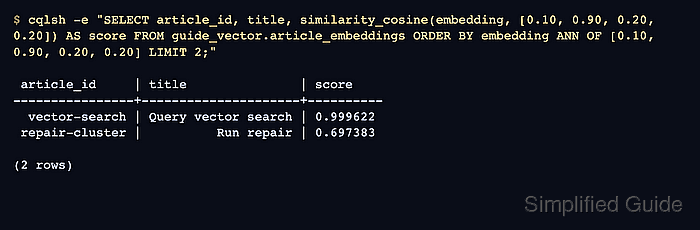
$ cqlsh -e "INSERT INTO guide_vector.article_embeddings (article_id, title, embedding) VALUES ('repair-cluster', 'Run repair', [0.20, 0.15, 0.92, 0.10]);" - Query nearest vectors with ANN OF and a similarity score.
$ cqlsh -e "SELECT article_id, title, similarity_cosine(embedding, [0.10, 0.90, 0.20, 0.20]) AS score FROM guide_vector.article_embeddings ORDER BY embedding ANN OF [0.10, 0.90, 0.20, 0.20] LIMIT 2;"

 article_id     | title               | score
----------------+---------------------+----------
  vector-search | Query vector search | 0.999622
 repair-cluster |          Run repair | 0.697383

(2 rows)
The nearest row appears first, and similarity_cosine prints the score used to explain the result. Use the similarity function that matches the index definition.
- Remove the disposable keyspace after the vector search check.
$ cqlsh -e "DROP KEYSPACE guide_vector;"
Run this cleanup only for the temporary keyspace created above. Dropping an application keyspace removes its schema and data from the cluster.

Mohd Shakir Zakaria is a cloud architect with deep roots in software development and open-source advocacy. Certified in AWS, Red Hat, VMware, ITIL, and Linux, he specializes in designing and managing robust cloud and on-premises infrastructures.


