An Apache Cassandra table may need a secondary lookup path after the primary-key design is already in use. A Storage-Attached Index gives Cassandra 5.x an indexed path for one non-primary-key column, and the index should be checked as queryable before application code depends on that filter.
SAI indexes are created with CREATE INDEX and USING 'sai'. The commands use a disposable keyspace named guide_sai and an orders table with customer_email as the indexed lookup column; replace those names with the target application keyspace, table, and column after confirming the data model.
Indexes add write work and index storage, so create one for a query the application actually needs instead of using it as a general replacement for primary-key design. Do not create an SAI index on the only partition-key column, because Cassandra already uses that key for primary reads and rejects the secondary index.
Steps to create an Apache Cassandra SAI index:
- Confirm cqlsh reaches a Cassandra version that supports SAI.
$ cqlsh -e "SELECT release_version FROM system.local"

 release_version
-----------------
           5.0.8

(1 rows)
Use the same host, port, credentials, and TLS options that the target administration session requires.
Related: How to connect to Apache Cassandra with cqlsh - Create a disposable keyspace for the SAI check.
$ cqlsh -e "CREATE KEYSPACE guide_sai WITH REPLICATION = {'class': 'SimpleStrategy', 'replication_factor': '1'}"SimpleStrategy with replication factor 1 is for a one-node lab. Use the approved application keyspace and replication strategy when creating an index for production data.
- Create a sample table with a non-primary-key lookup column.
$ cqlsh -e "CREATE TABLE guide_sai.orders (order_id int PRIMARY KEY, customer_email text, status text, total_cents int)"
customer_email is not part of the primary key, so the SAI index can provide the lookup path for queries that filter by that column.
- Insert a sample row into the table.
$ cqlsh -e "INSERT INTO guide_sai.orders (order_id, customer_email, status, total_cents) VALUES (1001, 'ada@example.net', 'paid', 4200)"
- Create the SAI index on the lookup column.
$ cqlsh -e "CREATE INDEX IF NOT EXISTS orders_customer_email_sai_idx ON guide_sai.orders (customer_email) USING 'sai' WITH OPTIONS = {'case_sensitive': 'false', 'normalize': 'true', 'ascii': 'true'}"Index names are unique inside a keyspace. The text options in this command make the email lookup case-insensitive and normalized; omit the WITH OPTIONS clause for numeric columns or exact case-sensitive text matching.
- Check the SAI index state.
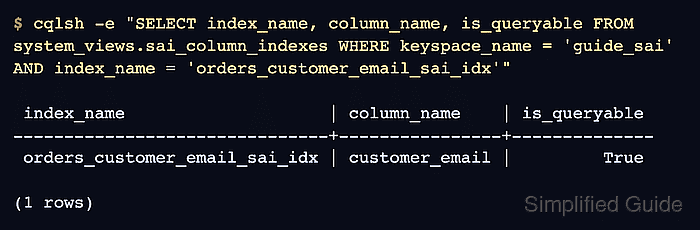
$ cqlsh -e "SELECT index_name, column_name, is_queryable FROM system_views.sai_column_indexes WHERE keyspace_name = 'guide_sai' AND index_name = 'orders_customer_email_sai_idx'"

 index_name                    | column_name    | is_queryable
-------------------------------+----------------+--------------
 orders_customer_email_sai_idx | customer_email |         True

(1 rows)
is_queryable should be True before the indexed query is handed to an application or migration job.
- Query the table through the indexed column.
$ cqlsh -e "SELECT order_id, customer_email, status, total_cents FROM guide_sai.orders WHERE customer_email = 'ada@example.net'"

 order_id | customer_email  | status | total_cents
----------+-----------------+--------+-------------
     1001 | ada@example.net |   paid |        4200

(1 rows)
The query filters on customer_email without ALLOW FILTERING, so Cassandra is using the indexed lookup path instead of a broad table filter.
- Verify the case-insensitive text option when it is part of the index definition.
$ cqlsh -e "SELECT order_id, customer_email FROM guide_sai.orders WHERE customer_email = 'ADA@EXAMPLE.NET'" order_id | customer_email ----------+----------------- 1001 | ada@example.net (1 rows) - Remove the disposable keyspace after the lab check.
$ cqlsh -e "DROP KEYSPACE guide_sai"
Run this cleanup only for the temporary keyspace created above. Dropping an application keyspace removes its schema and data from the cluster.

Mohd Shakir Zakaria is a cloud architect with deep roots in software development and open-source advocacy. Certified in AWS, Red Hat, VMware, ITIL, and Linux, he specializes in designing and managing robust cloud and on-premises infrastructures.


