Adding an Apache Cassandra node expands capacity only after the new server bootstraps into the same token ring as the existing cluster. The node must start with an empty Cassandra data directory, the same cluster name, compatible topology settings, and reachable seed addresses, or it can join the wrong ring, stall while streaming, or serve incomplete data.
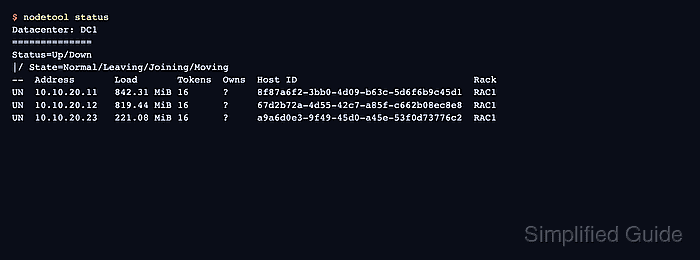
During bootstrap, Cassandra assigns token ranges to the joining node and streams the matching replica data from current owners. nodetool netstats shows streaming progress, and nodetool status should show the new node as UN once it is up and normal.
Normal same-datacenter capacity expansion differs from replacing a dead node or creating a new datacenter. Add one node at a time unless the cluster has a tested parallel-expansion process, and run cleanup on older nodes only after the new node is up and serving the cluster.
Steps to add a node to an Apache Cassandra cluster:
- Check the existing cluster from a current node.
$ nodetool status
Datacenter: DC1
==============
Status=Up/Down
|/ State=Normal/Leaving/Joining/Moving
--  Address       Load       Tokens  Owns  Host ID                               Rack
UN  10.10.20.11   842.31 MiB 16      ?     8f87a6f2-3bb0-4d09-b63c-5d6f6b9c45d1  RAC1
UN  10.10.20.12   819.44 MiB 16      ?     67d2b72a-4d55-42c7-a85f-c662b08ec8e8  RAC1
The existing nodes should be UN before a normal expansion. Fix down nodes, failed repairs, or topology mistakes before introducing another range movement.
- Install the same Cassandra release on the new server.
Use the same package family and major release as the existing nodes, and keep the service stopped until the new node configuration is ready.
- Stop Cassandra on the new server if the package started it automatically.
$ sudo systemctl stop cassandra
- Empty only the new server's Cassandra data directories.
$ sudo rm -rf /var/lib/cassandra/data/* /var/lib/cassandra/commitlog/* /var/lib/cassandra/hints/* /var/lib/cassandra/saved_caches/*
Run this only on the new node before it joins the cluster. Deleting these paths on an existing cluster member removes local Cassandra data.
- Open the new node's Cassandra configuration file.
$ sudo vi /etc/cassandra/cassandra.yaml
- Set the new node's cluster membership values.
cluster_name: 'prod-cassandra'
num_tokens: 16
listen_address: 10.10.20.23
rpc_address: 0.0.0.0
broadcast_rpc_address: 10.10.20.23
endpoint_snitch: GossipingPropertyFileSnitch

seed_provider:
  - class_name: org.apache.cassandra.locator.SimpleSeedProvider
    parameters:
      - seeds: "10.10.20.11,10.10.20.12"
Use existing seed nodes, not the new node itself, in seed_provider during bootstrap. Leave normal bootstrap behavior enabled; do not set auto_bootstrap: false for a capacity expansion.
- Open the rack and datacenter file when the cluster uses GossipingPropertyFileSnitch.
$ sudo vi /etc/cassandra/cassandra-rackdc.properties
- Set the new node's datacenter and rack.
dc=DC1
rack=RAC1
The values are case-sensitive and should match the intended placement for the new server, not just the closest existing node.
- Start Cassandra on the new node.
$ sudo systemctl start cassandra
- Check bootstrap completion on the new node.
$ nodetool netstats
Mode: NORMAL
Not sending any streams.
Read Repair Statistics:
Attempted: 0
Mismatch (Blocking): 0
Mismatch (Background): 0
##### snipped #####
Run the command again while the node is joining if it still shows active streams. A completed bootstrap should return to Mode: NORMAL with no active streams.
- Verify the new node appears as up and normal.
$ nodetool status
Datacenter: DC1
==============
Status=Up/Down
|/ State=Normal/Leaving/Joining/Moving
--  Address       Load       Tokens  Owns  Host ID                               Rack
UN  10.10.20.11   842.31 MiB 16      ?     8f87a6f2-3bb0-4d09-b63c-5d6f6b9c45d1  RAC1
UN  10.10.20.12   819.44 MiB 16      ?     67d2b72a-4d55-42c7-a85f-c662b08ec8e8  RAC1
UN  10.10.20.23   221.08 MiB 16      ?     a9a6d0e3-9f49-45d0-a45e-53f0d73776c2  RAC1
The load on the new node may remain lower at first. The important join signal is UN for the new address after bootstrap completes.
- Run a CQL smoke test against the new node.
$ cqlsh 10.10.20.23 -e "SELECT cluster_name FROM system.local;"

 cluster_name
--------------
 prod-cassandra

(1 rows)
Add the normal cqlsh authentication options when client authentication is enabled.
- Run cleanup on older nodes after the expansion is complete.
$ nodetool cleanup app_ks
Run cleanup only after the new node is up and working. If several nodes are being added, wait until the last node in that expansion batch has joined before cleaning old token-range data from existing nodes.

Mohd Shakir Zakaria is a cloud architect with deep roots in software development and open-source advocacy. Certified in AWS, Red Hat, VMware, ITIL, and Linux, he specializes in designing and managing robust cloud and on-premises infrastructures.


